Inspiring
April 27, 2026
Answered

Photoshop 27.5.0 - Rotate object missing from context bar

  • April 27, 2026
  • 6 replies
  • 121 views

Bonjour,

W10 Pro 64

Photoshop 27.5.0

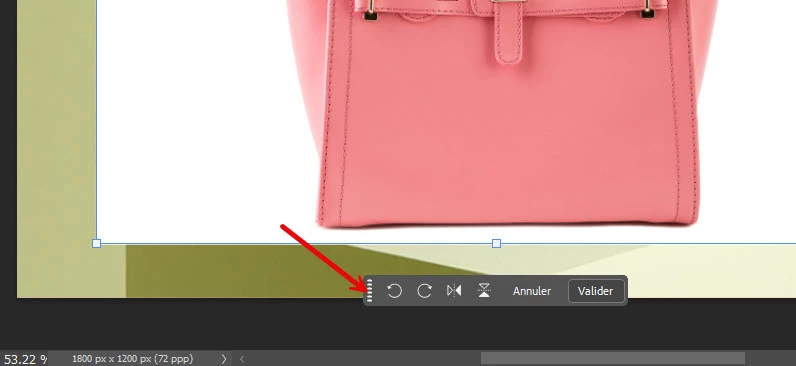
Dans l’exemple pour la rotation, je n’ai pas “Rotation” dans la Barre contextuelle, je n’ai que cela :
 

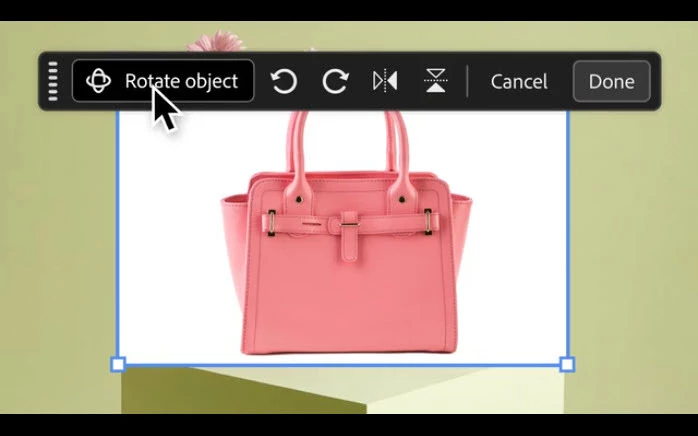
Exemple donné  :
 

Merci pour vos réponses.

 

    Correct answer davescm

    An update :
    Rotate object is in the very latest release which is 27.6.0 20260422.r.11 which has just been released today. 

    Dave

    6 replies

    Bdz
    Inspiring
    April 28, 2026

    Bonsoir.
    Elle est pourtant bien annoncée dans la fenêtre d’accueil de la version 25.5.0, avec même un fichier de test…
    En revanche j’ai lu que les versions Education n’y ont peut être pas accès pour le moment.

    Gelas3143Author
    Inspiring
    April 28, 2026

    @egghead_niz 

    Bonjour,

    Je viens de vérifier les mises à jour et la 27.6.0 est arrivée.

    Installée, la rotation marche super ! 

    Je n’ai pas testé avec mes fichiers, les yeux sont fatigués 😉

    Merci ​@davescm  d’avoir prévenu.

    Bonne continuation !


    davescm
    Community Expert
    davescmCommunity ExpertCorrect answer
    Community Expert
    April 28, 2026

    An update :
    Rotate object is in the very latest release which is 27.6.0 20260422.r.11 which has just been released today. 

    Dave

    egghead_niz
    Participant
    April 28, 2026

    Just opened Photoshop today (25.7.0, not beta 27.7.0) and a popup showed me new features. One of the first things listed was the object rotate feature, but it’s not actually in the release version.  I found it a bit confusing. Something must have gotten mixed up.

    egghead_niz
    Participant
    April 28, 2026

    EDIT: That was a number twister on my side. Release version is 27.5 not 25.7. :)

    davescm
    Community Expert
    Community Expert
    April 28, 2026

    @egghead_niz 27.6 has just been released, and includes the Rotate Object feature.
    Dave

    Gelas3143Author
    Inspiring
    April 27, 2026

    Bonjour à vous deux 

    Merci de vos réponses.

    J’ai fait ce sujet car le tutoriel était à l’ouverture de Photoshop mais je n’ai pas vu que c’était pour la version bêta.

    A 80 ans ça m’a échappé 😉

    Bonne continuation !

    Claire H.
    Community Manager
    Community Manager
    April 27, 2026

    @Gelas3143 Thanks for reaching out! Please don’t hesitate to reach out if you have any other questions. Happy editing! ^CH

    Claire H.
    Community Manager
    Community Manager
    April 27, 2026

    Hi ​@Gelas3143, As ​@davescm said, the "Rotate Object" feature is exclusive to the beta version (27.7.0) of Photoshop. It is not available in the current release version (27.5.0). If you’re missing the feature in Ps Beta, let us know, and we can troubleshoot the issue. Otherwise, be on the lookout for updates and release notes when they’re available in the general version of Photoshop. Thanks! ^CH

    davescm
    Community Expert
    Community Expert
    April 27, 2026

    Rotate Object is in the Beta version of Photoshop (currently v27.7.0), not yet the release version (v27.5).

    Dave