

Logoman2014
Participant
May 29, 2026
Question

Photoshop 27.6-7 Brush tool stop allowing pixels to poplate on screen when "attempting to draw" via using the Tool
  • May 29, 2026
  • 1 reply
  • 13 views

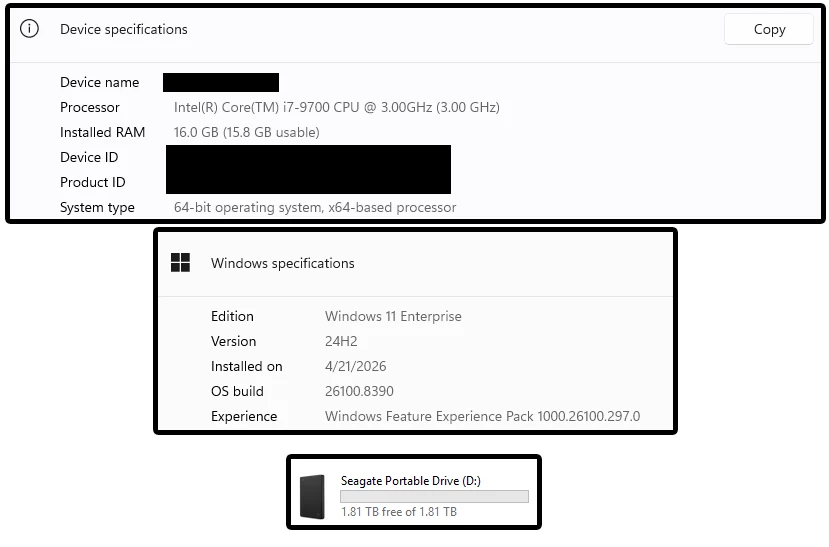
Default install when I first started using a file or created from scratch the Brush Tool would allow me to select it in the tool bar; however when using on an image of any kind it fails to output any pixels.  Suggestions?  Due know that the Seagate Portable Drive is for Scratch Disk tasks/use.

    1 reply

    Sameer K
    Community Manager
    Community Manager
    June 8, 2026

    Hey, @Logoman2014. Welcome to the Photoshop Community. I'll need more info to help you figure this out. 


    Could you please share more details, with steps to recreate this & video recordings of what you see?


    Thanks! 
    Sameer K

    (Type '@' and type my name to mention me when you reply)

    Logoman2014
    Participant
    June 12, 2026

    Hi Sameer,

    Well I was on furlough as to why I was out last week (also got PaintShop Pro as well/watching tutorials).  After I posted, probably 2 or 3 days later I was messing around my copy of a one-time purchase Corel Draw that I had gotten.  My management has been interested in me using that program for my workflow (maybe we can get it all done with Corel), since even if it’s one less monthly subscription, they love to be lean.  Getting after the products/services we provide is more of a priority than figuring out why default install doesn’t work; I assume it’s our older hardware that was supposed run Windows 10 and has been acting up ever since we all switched to Windows 11.  I thought I should do like another community manager mentioned and post like a good computer user.  Have a good one.