


Photoshop 27.x OpenVINO DLL conflict with third-party plugins when opening files via Recent
Summary:
Photoshop 27.2.0 (Windows 11) exhibits a plugin compatibility issue related to OpenVINO DLL load order that is dependent on document-open workflow.
Description:
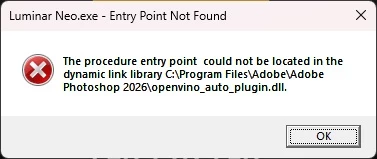
When using Photoshop 27.2.0 on Windows 11 (Intel Core Ultra 7, NVIDIA RTX 5060), invoking certain third-party plugins that depend on Intel OpenVINO (e.g., Luminar Neo) can fail with “Entry Point Not Found” errors if the document is opened via File → Open Recent or launched from Lightroom → Edit in Photoshop. The same plugin loads successfully when Photoshop opens a fresh document via File → Open.
Process Explorer shows that in failing cases, Photoshop initializes its ML/OpenVINO components during document rehydration, causing the plugin to resolve openvino_*.dll from the Photoshop application directory rather than its own runtime, resulting in an ABI mismatch. Clearing Photoshop’s Recent Files resets the behavior. This appears to be a timing-dependent DLL search-order conflict during plugin initialization.
Repro steps:
1. Launch Photoshop
2. Open a document via Open Recent or from Lightroom (edit in PS)
3. Invoke plugin → error
4. Clear Recents, open same file in PS via File → Open → plugin loads correctly
 AdChoices