

Photoshop Actions - Copying Steps to Another Action Reverts Step Order
Hi there,
I often use actions in my line of work and need to create them on a regular basis for different clients & purposes. As of recently, the behaviour of copying steps from one action to another has done something very weird.
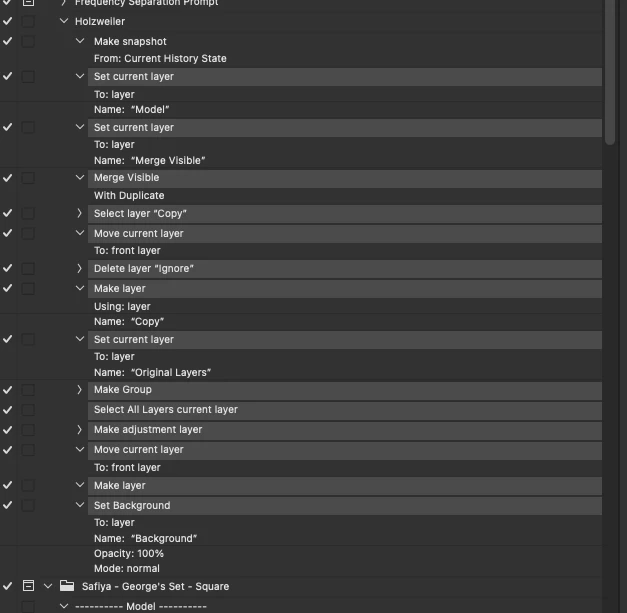
When I hold OPTION, to click & drag (copy) a range of steps from one action to the other, instead of copying it. It copies AND reverts their order. So the last step of the copied steps becomes the first, the first becomes the last.
Mac Software: Sonoma 14.0
Photoshop Version: 25.0.0
Here's screenshots to show the process below.
1.
The top Holzweiler action, is the 'target' for the paste.
The below Safiyaa - Model - Floor action & the selected steps are what I will hold OPTION/ALT to copy the steps from.
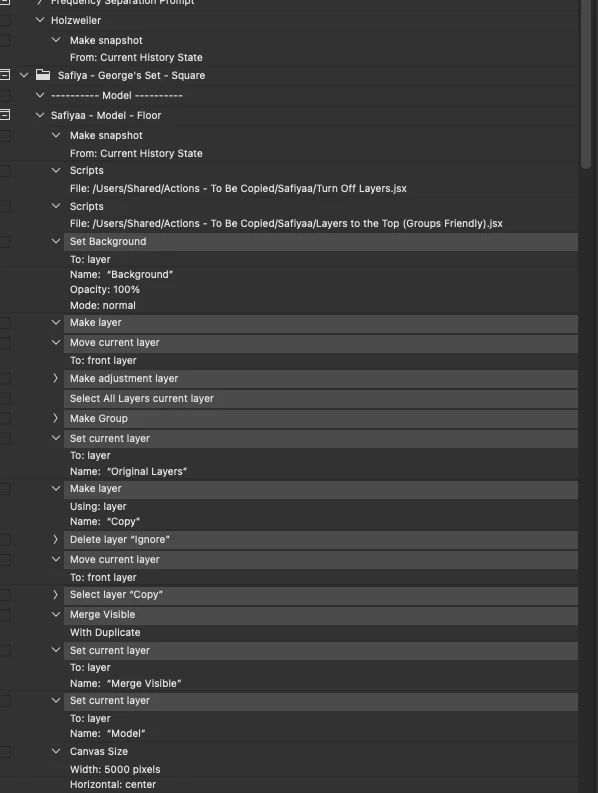
2.
In just one step, I've dragged the steps I wish to duplicate to the Holzweiler action. However as you can see, it's reverted the order of the steps. I can't imagine this is intended behaviour, its literally very backwards.
 AdChoices