dublove
Legend
November 23, 2025
Answered

Photoshop actions have never been ideal.

  • November 23, 2025
  • 2 replies
  • 177 views

What puzzled me all along was:
There's no option to “save to original directory” or “save to current directory.”

Recently discovered another bug in PS 2026:
For example, my image is: D:\bb\a1.jpg
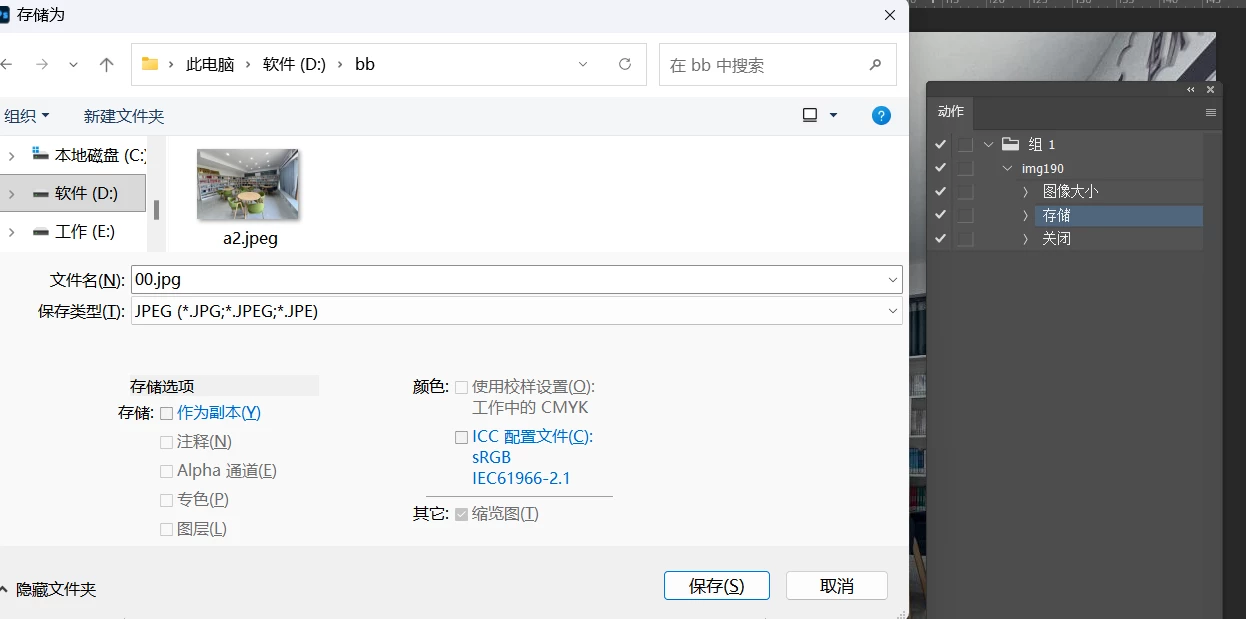
I recorded resizing it and saving to: D:\bb\00\
The first result was correct: D:\bb\00\a1.jpg.

But the second time, I opened D:\ee\a2.jpg
Then I double-clicked the “Save” action in the workflow, intending to change the save path to: D:\ee\00\a2.jpg

Instead, it directly saved as: D:\bb\00.jpg
Instead of: D:\ee\00\a2.jpg


Strange 00.jpg


Correct answer D Fosse

To change an action step you double-click that exact step, you don't double-click the action. That will just launch the whole action.


Actions are what they are. They record the exact steps you execute, to the letter. No more, no less. For more advanced operations you need to use scripts. There are several people here in the forum who can help you with that.


When you "Save" a file, not "Save As", it goes back to the source folder and overwrites the original. It will do that in actions too - as long as it's not prohibited by restricted file format specifications like jpeg. Then you need to include preliminary steps to make the file comply with the format specification first


But sometimes the smart thing is to keep it simple. I have a whole bunch of save actions, and like @creative explorer I just send them all to an "outbox" on my desktop. From there they can easily be bulk copied to wherever they're needed.

2 replies

D Fosse
Community Expert
D FosseCommunity ExpertCorrect answer
Community Expert
December 13, 2025

To change an action step you double-click that exact step, you don't double-click the action. That will just launch the whole action.


Actions are what they are. They record the exact steps you execute, to the letter. No more, no less. For more advanced operations you need to use scripts. There are several people here in the forum who can help you with that.


When you "Save" a file, not "Save As", it goes back to the source folder and overwrites the original. It will do that in actions too - as long as it's not prohibited by restricted file format specifications like jpeg. Then you need to include preliminary steps to make the file comply with the format specification first


But sometimes the smart thing is to keep it simple. I have a whole bunch of save actions, and like @creative explorer I just send them all to an "outbox" on my desktop. From there they can easily be bulk copied to wherever they're needed.

creative explorer
Community Expert
Community Expert
December 13, 2025

@dublove when I create an action with my students, I tell them to try and keep it simple as possible. For example of saving it into a drive - folder -  sub folder, I just save it to a folder on my desktop or just to the desktop. Try that out if that works

m