
Photoshop Animation: "Propagate Frame 1" & "Unify" functions grayed out
Hello everyone,
I hope I am not opening a duplicate thread here, but I searched the community forum and couldn't find a post to this problem, so here it goes:
I am currently learning to animate in PS and want to change a part of my drawing on multiple frames by editing the part on only one frame so I don't have to re-draw it on every single frame. So, I stumbled upon the "propagate frame 1" function. I don't even know whether it is the right tool for what I am planning to do but since the function is grayed out, I cannot even get to try (see screenshot).
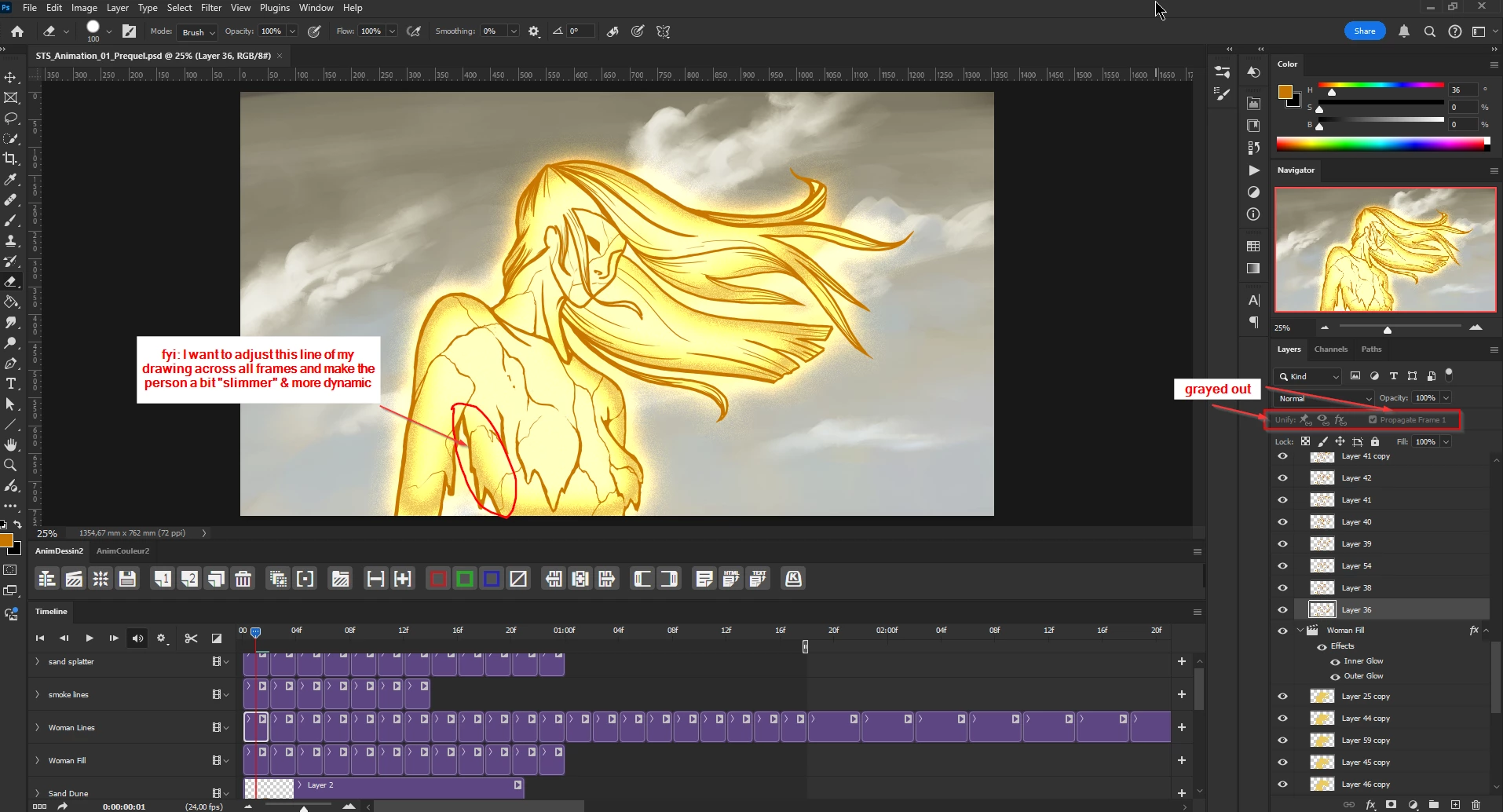
Does anyone know why it is grayed out?
Even if it would be the "wrong" tool for my endeavor, I would still be curious to know... The "unify" function is also grayed out, btw.
Thanks
PS: Btw for those who might currently be googling how to activate the propagate frame 1 widget in the first place (since I had to look that up as well): open the settings in the top right corner of the layers panel (four horizontal menu bars) -> animation options -> always show


 AdChoices