
Participant
March 17, 2022
Answered

Photoshop batch action to level image not working

  • March 17, 2022
  • 4 replies
  • 864 views

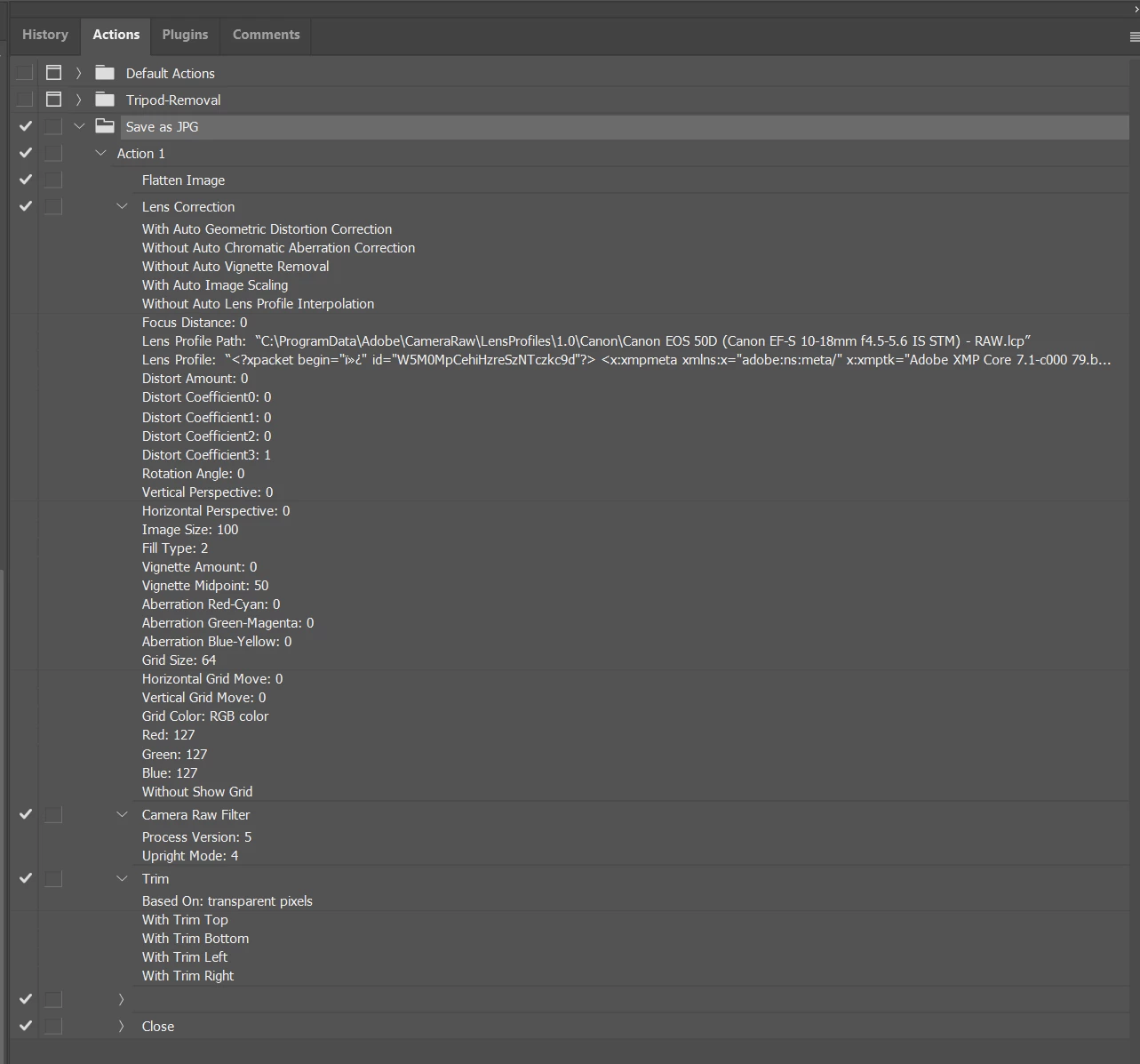
Im using photoshop 2022 (automate>batch) with an action that levels the image using Filter>Camera Raw Filter>Geometry>Vertical. It seems to work fine when recording the action, and I have also selected the option "Allow tool Recording". However, when I run the action as part of a batch it does not apply the level filter. The other actions in the set seem to work fine. What am I doing wrong here?
 

Correct answer Stephen Marsh

@Charles23501730y8qs 

I can't properly view the screenshot... Anyway, try this script to replace the recorded filter step. The script can be recorded as a step into the action:


/*
https://community.adobe.com/t5/photoshop/jsx-gt-camera-raw-filter-gt-transform-possible/m-p/11197302?page=1#M338216
JSX > Camera Raw Filter > Transform. Possible?

Camera Raw Filter - Transform Values:
1 = Auto, 2 = Full, 3 = Level, 4 = Vertical
*/
transformCRF(transValue = 4);

function transformCRF() {
    var actDesc = new ActionDescriptor();
    var transCode = charIDToTypeID("PerU");
    actDesc.putInteger(transCode, transValue);
    executeAction(stringIDToTypeID("Adobe Camera Raw Filter"), actDesc, DialogModes.NO);
}


https://prepression.blogspot.com/2017/11/downloading-and-installing-adobe-scripts.html

4 replies

amazing_meadow8759
Participant
February 7, 2025

Hey, I know this is an old thread, but I'm hoping you could help me out.

How do you go about automating geometry correction in Photoshop so that it doesn't just apply the same correction to each image, but calculates "correct" geometry correction for each image individually?


Thanks so much

Stephen Marsh
Community Expert
Community Expert
February 7, 2025
quote

Hey, I know this is an old thread, but I'm hoping you could help me out.

How do you go about automating geometry correction in Photoshop so that it doesn't just apply the same correction to each image, but calculates "correct" geometry correction for each image individually?


Thanks so much


By @amazing_meadow8759


By using a scripted step in the action rather than a standard action recorded step. My answer that was marked as a correct answer is one such example, however, there are other, more complex scripts that can be used.

Participant
June 24, 2023

Thank you so much for this however I have another follow up question that is really important to me I am remote based thus use a combination of tools to be efficient and agile I rely heavily on my mobile phones to work so can I get some clarity on whether the answer will be relevant for the phone 

Regards ⌛🌎

Bojan Živković11378569
Community Expert
Community Expert
March 18, 2022

What is happening when you run action on individual file? From my testing step recorded in action simply does not work. I am testing using 22.5.6 Release.

Stephen Marsh
Community Expert
Stephen MarshCommunity ExpertCorrect answer
Community Expert
March 18, 2022

@Charles23501730y8qs 

I can't properly view the screenshot... Anyway, try this script to replace the recorded filter step. The script can be recorded as a step into the action:


/*
https://community.adobe.com/t5/photoshop/jsx-gt-camera-raw-filter-gt-transform-possible/m-p/11197302?page=1#M338216
JSX > Camera Raw Filter > Transform. Possible?

Camera Raw Filter - Transform Values:
1 = Auto, 2 = Full, 3 = Level, 4 = Vertical
*/
transformCRF(transValue = 4);

function transformCRF() {
    var actDesc = new ActionDescriptor();
    var transCode = charIDToTypeID("PerU");
    actDesc.putInteger(transCode, transValue);
    executeAction(stringIDToTypeID("Adobe Camera Raw Filter"), actDesc, DialogModes.NO);
}


https://prepression.blogspot.com/2017/11/downloading-and-installing-adobe-scripts.html

Participant
March 18, 2022

Thanks Stephen that script worked when added as a step.

Stephen Marsh
Community Expert
Community Expert
March 19, 2022

You're welcome!