Participant
May 25, 2025
Answered

Photoshop brush panel view

  • May 25, 2025
  • 3 replies
  • 308 views

Hey,

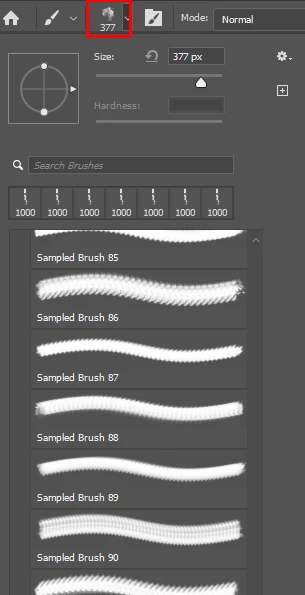
Is there a way I can change the photoshop brush panel to show a "stamp" of the brush rather than a continuous flow?

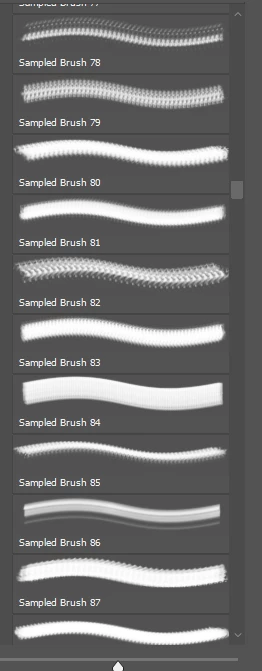
As shown in the screenshot my brush panel shows the brush as it would look if you were painting a continous line with the brush which makes it hard to visualy find the a brush I want to use. It would be much easier if the view port for the brush just showed it as a stamp like how it is shown at the top of the brush panel once it has been selected.

Is there anyway to do this?

Thanks in advance for any answers 🙂


Correct answer Conor SB

I probaly should have clicked a few more buttons before posting this.... I found how to change it lol.

Not sure how to delete threads but no need for answers anymore. 😛

3 replies

Glenn 8675309
Legend
May 26, 2025

I bought some silly windows plug  in that lets me see thumbnails of all ABR files.   About $10- some of the best money I've ever spent. 

There are free abr viewers but I just like the plugin I bought. 

Trevor.Dennis
Community Expert
Community Expert
May 26, 2025

Hi Conor.  It makes sense to have all of the options turned on unless you are really short on screen space.  


I think there are more than 700 presets in the Kyle Megapack, and you need to know what tool each prest is going to change you to.  (Ctrl/Cmd clicking on a preset forces it to keep the current tool)


You absolutely need the Search Bar.  You can rename the .abr files in File Explorer so they at least start with meaningful names making them appear grouped together if you have a lot of them.


There are two other options I can think of for arranging presets.


BrushBox

https://derrickbarth.gumroad.com/l/brushbox


Brusherator

https://kritskiy.gumroad.com/l/brusherator


I used BrushBox for a while, but that was years ago.  


Conor SBAuthorCorrect answer
Participant
May 25, 2025

I probaly should have clicked a few more buttons before posting this.... I found how to change it lol.

Not sure how to delete threads but no need for answers anymore. 😛