


Participant
November 19, 2021
Answered

photoshop brush settings color dynamics greyed out

  • November 19, 2021
  • 3 replies
  • 6003 views

In Photoshop 2022, in brush settings, several options are greyed out (cannot access): color dynamics, dual brush, noise and wet edges. How do I resolve it? I already had to add a file manually to get shape dynamics.

Thanks in advance

Christine
This topic is closed to new replies. Start a new post to keep the conversation going.
Correct answer J453

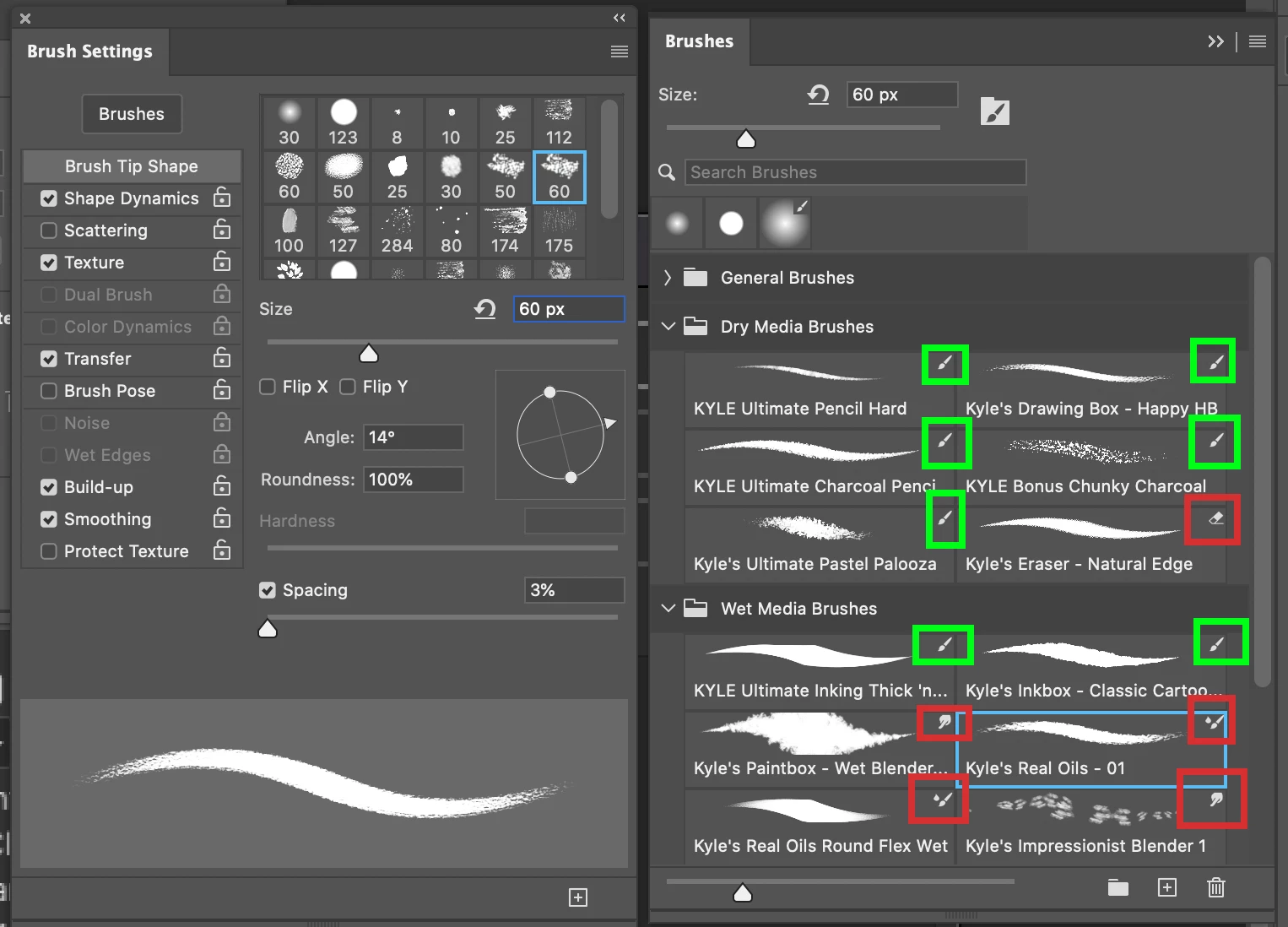
Depending on the brush preset you have selected, these options aren't available:

Regular paint brushes (green) will have these options. Brushes for eraser, smudge, history brush, etc (red) won't have these options.

3 replies

J453Correct answer
Legend
November 20, 2021

Depending on the brush preset you have selected, these options aren't available:

Regular paint brushes (green) will have these options. Brushes for eraser, smudge, history brush, etc (red) won't have these options.

Participant
September 28, 2022

what if it's a brush that i've created?

Chris 486
Community Expert
Community Expert
November 19, 2021

Hi Sebastien154A!


Have you tried using "reset tool" to see if that fixes your issue?