Participant
August 21, 2025
Answered

photoshop camera raw filter seems not working

  • August 21, 2025
  • 3 replies
  • 368 views

Hi,

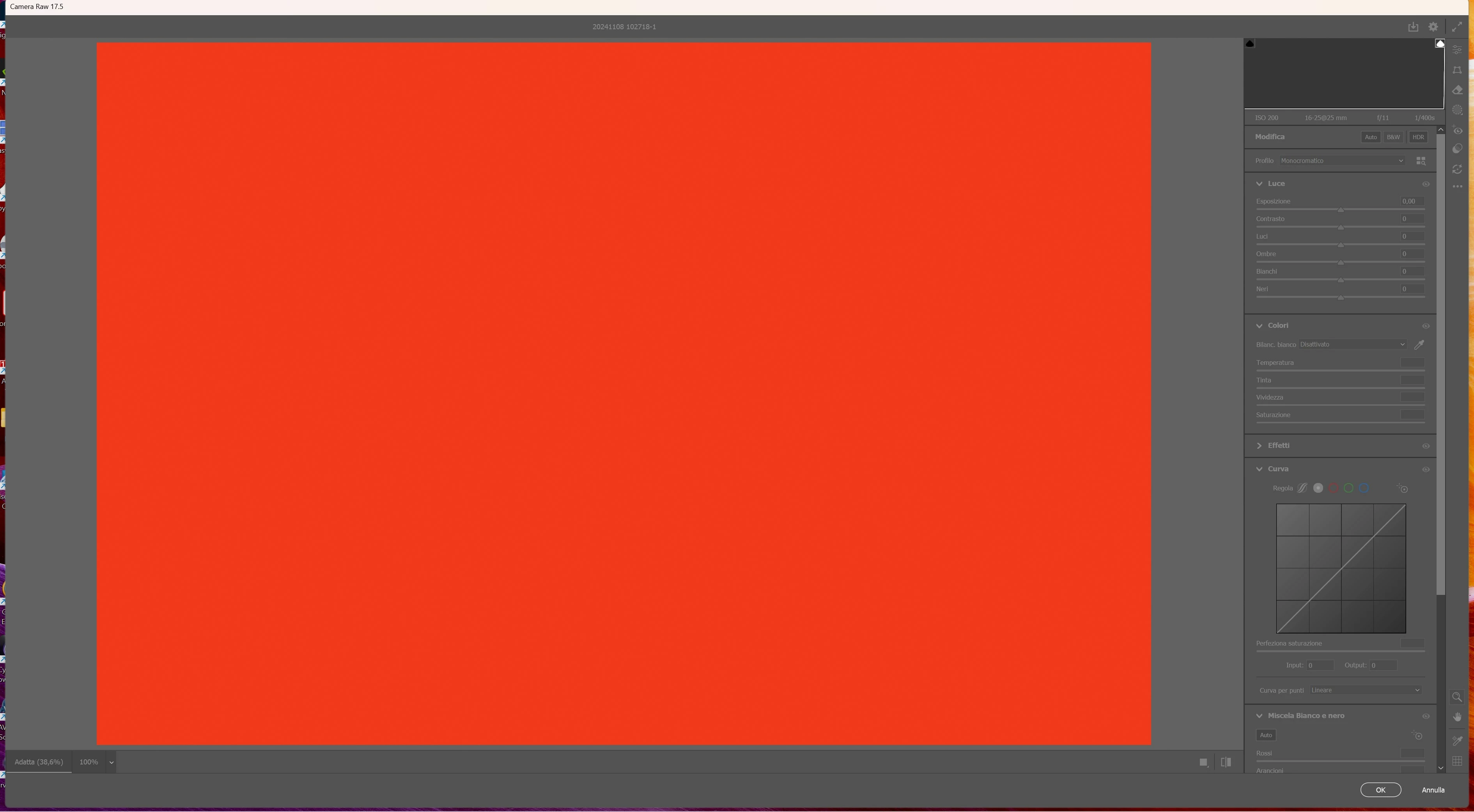
when I open a RAW file in photoshop, I apply a b&w layer and then a camera raw filter, I obtain a completely red image.

I tried to open the same RAW file in photoshop, applying the camera raw filter only (thus without the b&n layer) and everything seems to be working fine.

The problem seems to be related to the b&w layer.

All my apps are updated to the last version, working on a windows 11 system.

Is there any way to fix the problem?

Many thanks for your support....


ps. the image shows my screen with the above described problem
Correct answer AxelMatt
quote


# devices: 2
Device 0
Name: NVIDIA GeForce GTX 1050

...
Vendor name: NVIDIA
Driver date: 2024-11-06 000000.000000-000
Driver age: 9 months
Driver version: 32.0.15.6614


...........................


Device 1
Name: Intel(R) UHD Graphics 630
Preferred: FALSE
Power Envelope: UNKNOWN
Attachment: UNKNOWN
# attached displays: 0
GPU accessible RAM: 17,229 MB
VRAM: 128 MB
Dedicated System RAM: 0 MB
Shared System RAM: 17,101 MB
API version: 12.1 (12.1)
Device version: 12.0 (12.0)
Vendor name: INTEL
Model: INTEL_UHD_GRAPHICS_630
Driver date: 2020-07-08 000000.000000-000
Driver age: 61 months
Driver version: 27.20.100.8477
Supports UMA: SUPPORTED
D3D-ID: 16027
End platform native
{806 ms}


By @antonio aitala


I see in your System Info two issues.


First your NVidia GTX 1050 matches the requirements but it is absolute minimum in performance. You should think about an upgrade to a powerful card. The driver for the graphic card is also outdated. Goto NVidia's website and search for the recent version for your card. Make sure the you're installing the Studio version of the recent driver and not the Game Ready version.


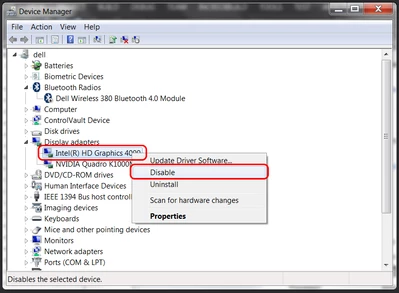
The second point is that you have buildin a CPU with an internal graphic card. The internal GPU can sometimes caused several issues. Open the Windows Device Manager, right-click the card's name and choose Disable.  


3 replies

Participant
August 24, 2025

Many thanks for your great support!!!


Well, my graphic card is integrated in my laptop, an ASUS VivoBookPro.

Upgrading to a better system is an option on the table but, as you can imagine, it is not something can be done easily.

However, I have followed both your suggestions:

a) I installed the "studio" version of the new updated drivers directly from NVIDIA web site

b) I tried to disable the "internal" GPU but, unfortunately, it seems it cannot be done: I have two monitors and, if I disable it, the main external monitor gets blank. In have studied the problem a bit and it seems the internal architecture of my system "sees" the two monitors to be directly operated by the internal CPU graphic card: the NVDIA GTX 1050 card "helps" it elaborating most of the data but it cannot "see" the external monitor and the "internal" one directly. 


Anyway, up to now I never had big issues with the graphic card and the systems performances when using Camera Raw and Photoshop are not so bad after all.

At the same time I have realized that "the red" screen I thought was a sort of issue, seems to be something standard due to the fact that I was asking to operate a Camera Raw filter on a "empty" layer....I mistake a mine, not a software problem.


Therefore, I would say that the problem has been solved and, at the same time, with your help I have discovered two issues in my system. Many thanks again for your help.


Have a great sunday!!


Antonio Aitala

Participant
August 22, 2025

Many thanks for your replay.


Here you are my system's info (they are in my language... hope this is not a problem):


Adobe Photoshop Versione: 26.10.0 20250811.r.7 595d3a6 x64 (final, Release)
Numero di avvii: 166
Sistema operativo: Windows 11 64 bit
Versione: 11 o versione successiva 10.0.26100.4946
Architettura di sistema: Famiglia CPU Intel:6, Modello:14, Stepping:10, AVX2, HyperThreading
Conteggio processore fisico: 6
Conteggio processore logico: 12
Velocità processore: 2208 MHz
Memoria incorporata: 32619 MB
Memoria disponibile: 20910 MB
Memoria disponibile per Photoshop: 25071 MB
Memoria usata da Photoshop: 70 %
Gestione arresti anomali: Adobe
DCX Version: 9.11.0
SAM SDK Version: 14.3.1
ACP.local Status:
- SDK Version: 5.8.1
- Core Sync Status: Reachable and compatible
- Core Sync Running: 7.7.0.5
- Min Core Sync Required: 4.3.66.28
Versione SDK Live Edit Client: v5.3.2
Adobe Firefly: utilizzate qualsiasi funzione di IA generativa per visualizzare la versione più recente.
OpenColorIO versione: 2.4.2
Versione libreria C2PA: adobe_c2pa/0.14.2 c2pa-rs/0.43.0
Versione NGL: 1.42.0.5
Lavagna: disattivato.
Creazione documento lavagna: disattivato.
Renderer D3D12Warp: disattivato.
Gestione precisa dei colori per la visualizzazione HDR: disattivato.
Livelli alias: disattivato.
Highbeam: ^ 0 ®Wintab Digitizer Services
Spec Version 1.4
Impl Version 1.39
Num Devices 1
Dimensioni porzioni immagine: 1024 K
Livelli cache immagine: 4
Anteprima font: Grande
Versione HarfBuzz: 8.4.0
TextEngine: ATE 7.9.0 (d611361)
======= GPU
API nativa stabile: vero
API OpenCL stabile: vero
GPUDeny: 0
GPUForce: 0
useGPU: 1
useOpenCL: 1
isGPUCapable: 1
isGPUAllowed: 1
GPUName: NVIDIA GeForce GTX 1050
GPUVendor: NVIDIA
NVIDIA GeForce GTX 1050 UNKNOWN, NVIDIA
Intel(R) UHD Graphics 630 INTEL_UHD_GRAPHICS_630, INTEL
IsNativeGPUCapable: 1
IsOpenCLGPUCapable: 1
HasSufficientRAM: 1
GPU accessible RAM: 4,007 MB
Required GPU accessible RAM: 1,500 MB
UseGraphicsProcessorChecked: 1
UseOpenCLChecked: 1
Windows remote desktop: 0
Windows available feature level: 12.1
Windows required feature level: 12.0
Windows has required feature level: 1
Monitor: 1
Visualizzate limiti: (0, 0) -> (3840, 2160)
Ridimensionamento di visualizzazione: 1,5
Monitor principale
Tipo di visualizzazione: SDR
Profilo visualizzazione: Samsung Generic PnP-2
Monitor: 2
Visualizzate limiti: (3840, 7) -> (5760, 1087)
Ridimensionamento di visualizzazione: 1
Tipo di visualizzazione: SDR
Profilo visualizzazione: Samsung LU28R55
------- Sniffer output
[0 ms]
Launch GPUSnifferThread

[0 ms]
Start RunAllAPIs

[0 ms]
C:\Program Files\Adobe\Adobe Photoshop 2025\sniffer.exe -baseTimeMS=657211 -comment=Photoshop Version: Adobe Photoshop 26.10.0 20250811.r.7 595d3a6 x64

[1 ms]
Start GetSnifferResult

[1695 ms]
Start sniffer 2025-08-22 17:04:53
# Photoshop Version: Adobe Photoshop 26.10.0 20250811.r.7 595d3a6 x64
C:\Program Files\Adobe\Adobe Photoshop 2025\sniffer.exe -baseTimeMS=657211 -comment=Photoshop Version: Adobe Photoshop 26.10.0 20250811.r.7 595d3a6 x64

{423 ms}
Start platform native
# displays: 2
Display 0
Display: \\.\DISPLAY2
Main: TRUE
Built in: FALSE
Stereo: FALSE
Bounds: (0, 0) -> (3,840, 2,160)
Dimensions: (3,840 2,160)
Display scale: 1.5
Physical size: (0 0)
Pixel size: (0 0)
Dynamic range: (0 1)
Attached Device: (DeviceID name=NVIDIA GeForce GTX 1050 index=0)

Display 1
Display: \\.\DISPLAY1
Main: FALSE
Built in: FALSE
Stereo: FALSE
Bounds: (3,840, 7) -> (5,760, 1,087)
Dimensions: (1,920 1,080)
Display scale: 1
Physical size: (0 0)
Pixel size: (0 0)
Dynamic range: (0 1)
Attached Device: (DeviceID name=NVIDIA GeForce GTX 1050 index=0)

# devices: 2
Device 0
Name: NVIDIA GeForce GTX 1050
Preferred: TRUE
Power Envelope: UNKNOWN
Attachment: UNKNOWN
# attached displays: 2
\\.\DISPLAY2
\\.\DISPLAY1
GPU accessible RAM: 4,007 MB
VRAM: 4,007 MB
Dedicated System RAM: 0 MB
Shared System RAM: 17,101 MB
API version: 12.1 (12.1)
Device version: 12.0 (12.0)
Vendor name: NVIDIA
Driver date: 2024-11-06 000000.000000-000
Driver age: 9 months
Driver version: 32.0.15.6614
Supports UMA: UNSUPPORTED
D3D-ID: 7309

Device 1
Name: Intel(R) UHD Graphics 630
Preferred: FALSE
Power Envelope: UNKNOWN
Attachment: UNKNOWN
# attached displays: 0
GPU accessible RAM: 17,229 MB
VRAM: 128 MB
Dedicated System RAM: 0 MB
Shared System RAM: 17,101 MB
API version: 12.1 (12.1)
Device version: 12.0 (12.0)
Vendor name: INTEL
Model: INTEL_UHD_GRAPHICS_630
Driver date: 2020-07-08 000000.000000-000
Driver age: 61 months
Driver version: 27.20.100.8477
Supports UMA: SUPPORTED
D3D-ID: 16027
End platform native
{806 ms}

{806 ms}
Start platform OpenCL
# displays: 0

# devices: 2
Device 0
Name: NVIDIA GeForce GTX 1050
Preferred: TRUE
Power Envelope: DISCRETE
Attachment: UNKNOWN
# attached displays: 0
GPU accessible RAM: 4,294 MB
VRAM: 4,294 MB
Dedicated System RAM: 0 MB
Shared System RAM: 0 MB
API version: 3.0 (OpenCL 3.0 CUDA)
Device version: 3.0 (OpenCL 3.0 CUDA)
Vendor name: NVIDIA
Driver date: UNKNOWN
Driver age: UNKNOWN
Driver version: UNKNOWN
Bandwidth: 96 GB / s
Compute score: 745.054
Device name string: NVIDIA GeForce GTX 1050
Device vendor string: NVIDIA Corporation
Platform name string: NVIDIA CUDA
Platform vendor string: NVIDIA Corporation

Device 1
Name: Intel(R) UHD Graphics 630
Preferred: FALSE
Power Envelope: INTEGRATED
Attachment: UNKNOWN
# attached displays: 0
GPU accessible RAM: 13,681 MB
VRAM: 13,681 MB
Dedicated System RAM: 0 MB
Shared System RAM: 0 MB
API version: 2.1 (OpenCL 2.1 )
Device version: 2.1 (OpenCL 2.1 NEO )
Vendor name: INTEL
Model: INTEL_UHD_GRAPHICS_630
Driver date: UNKNOWN
Driver age: UNKNOWN
Driver version: UNKNOWN
Bandwidth: 24 GB / s
Compute score: 177.818
Device name string: Intel(R) UHD Graphics 630
Device vendor string: Intel(R) Corporation
Platform name string: Intel(R) OpenCL HD Graphics
Platform vendor string: Intel(R) Corporation
End platform OpenCL
{1632 ms}

Exit code kExitNormal
End sniffer 2025-08-22 17:04:54
[kStatusNormal, kExitNormal]

[1695 ms]
Finish RunAllAPIs

[1699 ms]
Finish GetSnifferResult

------- Sniffer output
======= GPU
Tipo di licenza: Iscrizione
Numero di serie: 96040712950678544110
GUIDBucket:
Composite Core GPU (comp_core_gpu): off
Composite Core Threads (MultithreadedCompositing): on
Composite Core UI (CompositingDocumentTabUI): off
Composite Core Feature Prefs (CompCoreFeaturePrefs): off

Cartella applicazione: C:\Program Files\Adobe\Adobe Photoshop 2025\
Percorso file temporanei: C:\Users\Antonio\AppData\Local\Temp\
La memoria virtuale di Photoshop dispone di I/O asincrono attivato
Volumi di memoria virtuale:
D:\, 931,5 GB, 464,7 GB disponibili
C:\, 475,8 GB, 152,5 GB disponibili
Cartella Plugin richiesti: C:\Program Files\Adobe\Adobe Photoshop 2025\Required\Plug-ins\
Cartella Plugin primari: C:\Program Files\Adobe\Adobe Photoshop 2025\Plug-ins\

Componenti installati:
ACE.dll ACE 2025/04/27-19:09:42 79.458e2f3 79.458e2f3
act_tracing.dll Adobe Common Toolkit 1.0.68
AdobeLinguistic.dll Adobe Linguistic Library 792708d
AdobeOwl.dll Adobe Owl 5.5.0
AdobePDFL.dll PDFL 2025/04/29-08:14:41 79.7bc3f9c 79.7bc3f9c
AdobePIP.dll Adobe Product Improvement Program 8.2.0.16
AdobeSVGAGM.dll AdobeSVGAGM 79.e3adea7 79.e3adea7
AdobeXMP.dll Adobe XMP Core 2025/03/06-19:12:03 79.9690a87 79.9690a87
AdobeXMPFiles.dll Adobe XMP Files 2025/03/06-19:12:03 79.9690a87 79.9690a87
AdobeXMPScript.dll Adobe XMP Script 2025/03/06-19:12:03 79.9690a87 79.9690a87
AGM.dll AGM 2025/04/27-19:09:42 79.458e2f3 79.458e2f3
AID.dll AID DLL 1.0.0.58
AIDE.dll AIDE 2025/04/09-06:36:00 79.1939c22 79.1939c22
aifm.dll AIFM 1.0 23.68434
AILib.dll Adobe Illustrator 2024 29.0.0
aiport.dll AIPort 1.0 23.68434
ARE.dll ARE 2025/04/27-19:09:42 79.458e2f3 79.458e2f3
AXE8SharedExpat.dll AXE8SharedExpat 2025/03/06-19:12:03 79.4abff3a 79.4abff3a
AXEDOMCore.dll AXEDOMCore 2025/03/06-19:12:03 79.4abff3a 79.4abff3a
BIB.dll BIB 2025/04/27-19:09:42 79.458e2f3 79.458e2f3
BIBUtils.dll BIBUtils 2025/04/27-19:09:42 79.458e2f3 79.458e2f3
CoolType.dll CoolType 2025/04/27-19:09:42 79.458e2f3 79.458e2f3
CRClient.dll Adobe Crash Reporter Client DLL 26.5.0.202506270759_7140322
DirectML.dll DirectML Redistributable Library 1.13.1+240111-2204.1.dml-1.13.9b0890f
dnssd.dll Bonjour 3,0,0,2
dvaaccelerate.dll Adobe DVA 2025 25.2.0
dvaadameve.dll Adobe DVA 2025 25.2.0
dvaappsupport.dll Adobe DVA 2025 25.2.0
dvaaudiodevice.dll Adobe DVA 2025 25.2.0
dvaaudiotoolkit.dll Adobe DVA 2025 25.2.0
dvacore.dll Adobe DVA 2025 25.2.0
dvacrashhandler.dll Adobe DVA 2025 25.2.0
dvaevefactory.dll Adobe DVA 2025 25.2.0
dvamarshal.dll Adobe DVA 2025 25.2.0
dvamediatypes.dll Adobe DVA 2025 25.2.0
dvametadata.dll Adobe DVA 2025 25.2.0
dvametadataapi.dll Adobe DVA 2025 25.2.0
dvametadataUI.dll Adobe DVA 2025 25.2.0
dvanet.dll Adobe DVA 2025 25.2.0
dvaplayer.dll Adobe DVA 2025 25.2.0
dvascripting.dll Adobe DVA 2025 25.2.0
dvastorage.dll Adobe DVA 2025 25.2.0
dvatemporalxmp.dll Adobe DVA 2025 25.2.0
dvatransport.dll Adobe DVA 2025 25.2.0
dvaui.dll Adobe DVA 2025 25.2.0
dvauxphost.dll Adobe DVA 2025 25.2.0
dvauxpui.dll Adobe DVA 2025 25.2.0
dvavulcansupport.dll Adobe DVA 2025 25.2.0
dvaworkspace.dll Adobe DVA 2025 25.2.0
dynamic-torqnative.dll Unified Extensibility Platform uxp-9.0.1-uxp
dynamiclink.dll Adobe DVA 2025 25.2.0
ExtendScript.dll ExtendScript 2022/08/18-12:50:45 82.4 82.4
filterport.dll FilterPort 1.1 O
icucnv74.dll International Components for Unicode Build 14.0.1.04ee3a5
icuin74.dll International Components for Unicode Build 14.0.1.04ee3a5
icuuc74.dll International Components for Unicode Build 14.0.1.04ee3a5
ippcc.dll ippCC. Intel(R) Integrated Performance Primitives. Color Conversion. 2021.6 (r0xbffe3c5b)
ippcck0.dll ippCC. Intel(R) Integrated Performance Primitives. Color Conversion. 2021.6 (r0xbffe3c5b)
ippccl9.dll ippCC. Intel(R) Integrated Performance Primitives. Color Conversion. 2021.6 (r0xbffe3c5b)
ippccy8.dll ippCC. Intel(R) Integrated Performance Primitives. Color Conversion. 2021.6 (r0xbffe3c5b)
ippcore.dll core. Intel(R) Integrated Performance Primitives. Core Library. 2021.6 (r0xbffe3c5b)
ippcv.dll ippCV. Intel(R) Integrated Performance Primitives. Computer Vision. 2021.6 (r0xbffe3c5b)
ippcvk0.dll ippCV. Intel(R) Integrated Performance Primitives. Computer Vision. 2021.6 (r0xbffe3c5b)
ippcvl9.dll ippCV. Intel(R) Integrated Performance Primitives. Computer Vision. 2021.6 (r0xbffe3c5b)
ippcvy8.dll ippCV. Intel(R) Integrated Performance Primitives. Computer Vision. 2021.6 (r0xbffe3c5b)
ippi.dll ippIP. Intel(R) Integrated Performance Primitives. Image Processing. 2021.6 (r0xbffe3c5b)
ippik0.dll ippIP. Intel(R) Integrated Performance Primitives. Image Processing. 2021.6 (r0xbffe3c5b)
ippil9.dll ippIP. Intel(R) Integrated Performance Primitives. Image Processing. 2021.6 (r0xbffe3c5b)
ippiy8.dll ippIP. Intel(R) Integrated Performance Primitives. Image Processing. 2021.6 (r0xbffe3c5b)
ipps.dll ippSP. Intel(R) Integrated Performance Primitives. Signal Processing. 2021.6 (r0xbffe3c5b)
ippsk0.dll ippSP. Intel(R) Integrated Performance Primitives. Signal Processing. 2021.6 (r0xbffe3c5b)
ippsl9.dll ippSP. Intel(R) Integrated Performance Primitives. Signal Processing. 2021.6 (r0xbffe3c5b)
ippsy8.dll ippSP. Intel(R) Integrated Performance Primitives. Signal Processing. 2021.6 (r0xbffe3c5b)
ippvm.dll ippVM. Intel(R) Integrated Performance Primitives. Vector Math. 2021.6 (r0xbffe3c5b)
ippvmk0.dll ippVM. Intel(R) Integrated Performance Primitives. Vector Math. 2021.6 (r0xbffe3c5b)
ippvml9.dll ippVM. Intel(R) Integrated Performance Primitives. Vector Math. 2021.6 (r0xbffe3c5b)
ippvmy8.dll ippVM. Intel(R) Integrated Performance Primitives. Vector Math. 2021.6 (r0xbffe3c5b)
JP2KLib.dll JP2KLib 2025/03/06-19:12:03 79.6311509 79.6311509
libcrypto-3-x64.dll The OpenSSL Toolkit 3.0.14
libifcoremd.dll Intel(r) Visual Fortran Compiler 10.0 (Update A)
libiomp5md.dll Intel(R) OpenMP* Runtime Library 5.0
libmmd.dll Intel(R) C/C++/Fortran Compiler Mainline
libssl-3-x64.dll The OpenSSL Toolkit 3.0.14
LogSession.dll LogSession 8.2.0.16
mediacoreif.dll Adobe DVA 2025 25.2.0
Microsoft.AI.MachineLearning.dll Microsoft® Windows® Operating System 1.17.20240223.4.8f5c79c
mkl_avx2.2.dll Intel(R) oneAPI Math Kernel Library 2022.1
mkl_avx512.2.dll Intel(R) oneAPI Math Kernel Library 2022.1
mkl_core.2.dll Intel(R) oneAPI Math Kernel Library 2022.1
mkl_def.2.dll Intel(R) oneAPI Math Kernel Library 2022.1
mkl_mc3.2.dll Intel(R) oneAPI Math Kernel Library 2022.1
mkl_sequential.2.dll Intel(R) oneAPI Math Kernel Library 2022.1
mkl_vml_avx2.2.dll Intel(R) oneAPI Math Kernel Library 2022.1
mkl_vml_avx512.2.dll Intel(R) oneAPI Math Kernel Library 2022.1
mkl_vml_def.2.dll Intel(R) oneAPI Math Kernel Library 2022.1
mkl_vml_mc3.2.dll Intel(R) oneAPI Math Kernel Library 2022.1
MPS.dll MPS 2025/03/11-13:46:07 79.a22178b 79.a22178b
onnxruntime.dll Microsoft® Windows® Operating System 1.17.20240223.4.8f5c79c
opencv_world4110.dll OpenCV library 4.11.0
pdfport.dll PDFPort 2020/11/19-11:34:27 79.625377 79.625377
Plugin.dll Adobe Photoshop 2025 26.10
PlugPlugExternalObject.dll Adobe(R) CEP PlugPlugExternalObject Standard Dll (64 bit) 12.0.0
PlugPlugOwl.dll Adobe(R) CSXS PlugPlugOwl Standard Dll (64 bit) 12.0.0.14
PSCloud.dll 1.0.0.1
PSRes.dll Adobe Photoshop 2025 26.10
PSViews.dll Adobe Photoshop 2025 26.10
ScCore.dll ScCore 2022/08/18-12:50:45 82.4 82.4
SVGRE.dll SVGRE 79.9f41d70 79.9f41d70
svml_dispmd.dll Intel(R) C/C++/Fortran Compiler Mainline
VulcanControl.dll Vulcan Application Control Library 7.2.0.34
VulcanMessage5.dll Vulcan Message Library 7.2.0.34
WinRTSupport.dll Adobe Photoshop Windows RT Support 1.0.1.0
Piattaforma di estensibilità unificata uxp-9.0.1-uxp
UPIC 2.6.0


Plugin richiesti:

Affresco 26.10 - dal file “Filter Gallery.8bf”
Analog Efex Pro 3 NO VERSION - dal file “NikCollection.8bf”
Applica texture 26.10 - dal file “Filter Gallery.8bf”
Asimmetria 26.10 - dal file “statistics.8ba”
BackgroundFilter 5.0.5 - dal file “Background.8bf”
Bagliore diffuso 26.10 - dal file “Filter Gallery.8bf”
Bassorilievo 26.10 - dal file “Filter Gallery.8bf”
Bordi brillanti 26.10 - dal file “Filter Gallery.8bf”
Camera Raw 17.5 - dal file “Camera Raw.8bi”
Carta da lettere 26.10 - dal file “Filter Gallery.8bf”
Cineon 26.10 - dal file “Cineon.8bi”
Color Efex Pro 5 NO VERSION - dal file “NikCollection.8bf”
Colore mezzetinte 26.10 - dal file “Standard MultiPlugin.8bf”
Colori NTSC 26.10 - dal file “NTSC Colors.8bf”
Conté Crayon 26.10 - dal file “Filter Gallery.8bf”
Contorni accentuati 26.10 - dal file “Filter Gallery.8bf”
Contorni con inchiostro 26.10 - dal file “Filter Gallery.8bf”
Contorni poster 26.10 - dal file “Filter Gallery.8bf”
Contorni strappati 26.10 - dal file “Filter Gallery.8bf”
Coordinate polari 26.10 - dal file “Standard MultiPlugin.8bf”
Core misurazione 26.10 - dal file “MeasurementCore.8me”
Correzione obiettivo 26.10 - dal file “Lens Correction.8bf”
Cristallizza 26.10 - dal file “Standard MultiPlugin.8bf”
Curtosi 26.10 - dal file “statistics.8ba”
Deforma 26.10 - dal file “Standard MultiPlugin.8bf”
Deviazione standard 26.10 - dal file “statistics.8ba”
Dfine 2 5.0.5 - dal file “Dfine2.8bf”
Dicom 26.10 - dal file “Dicom.8bi”
Distorsione curvilinea 26.10 - dal file “Standard MultiPlugin.8bf”
Effetto acquerello 26.10 - dal file “Filter Gallery.8bf”
Effetto carboncino 26.10 - dal file “Filter Gallery.8bf”
Effetto carta bagnata 26.10 - dal file “Filter Gallery.8bf”
Effetto cromatura 26.10 - dal file “Filter Gallery.8bf”
Effetto fotocopia 26.10 - dal file “Filter Gallery.8bf”
Effetto increspatura 26.10 - dal file “Standard MultiPlugin.8bf”
Effetto incrinatura 26.10 - dal file “Filter Gallery.8bf”
Effetto intonaco 26.10 - dal file “Filter Gallery.8bf”
Effetto onda 26.10 - dal file “Standard MultiPlugin.8bf”
Effetto pennellate 26.10 - dal file “Filter Gallery.8bf”
Effetto punti 26.10 - dal file “Standard MultiPlugin.8bf”
Effetto retinatura 26.10 - dal file “Filter Gallery.8bf”
Effetto ritaglio 26.10 - dal file “Filter Gallery.8bf”
Effetto sfera 26.10 - dal file “Standard MultiPlugin.8bf”
Effetto sfumino 26.10 - dal file “Filter Gallery.8bf”
Effetto spatola 26.10 - dal file “Filter Gallery.8bf”
Effetto spirale 26.10 - dal file “Standard MultiPlugin.8bf”
Effetto spugna 26.10 - dal file “Filter Gallery.8bf”
Effetto vento 26.10 - dal file “Standard MultiPlugin.8bf”
Entropia 26.10 - dal file “statistics.8ba”
Esporta tavole di consultazione colore 26.10 - dal file “Export3DLUT.8be”
Estrusione 26.10 - dal file “Standard MultiPlugin.8bf”
Fibre 26.10 - dal file “Standard MultiPlugin.8bf”
Filtro Camera Raw 17.5 - dal file “Camera Raw.8bi”
Filtro Pacchetto immagini 26.10 - dal file “ChannelPort.8bf”
Filtro ritaglia e raddrizza foto 26.10 - dal file “Standard MultiPlugin.8bf”
FineStructuresFilter 5.0.5 - dal file “FineStructures.8bf”
Fluidifica 26.10 - dal file “Liquify.8bf”
Formato file bitmap 26.10 - dal file “Standard MultiPlugin.8bf”
Formato IFF 26.10 - dal file “Standard MultiPlugin.8bf”
Formato Targa 26.10 - dal file “Standard MultiPlugin.8bf”
Fuoco prospettico 26.10 - dal file “VanishingPoint.8bf”
Galleria filtri 26.10 - dal file “Filter Gallery.8bf”
Gessetto e carboncino 26.10 - dal file “Filter Gallery.8bf”
Grana pellicola 26.10 - dal file “Filter Gallery.8bf”
Grandangolo adattato 26.10 - dal file “Adaptive Wide Angle.8bf”
Granulosità 26.10 - dal file “Filter Gallery.8bf”
Halide Bottlenecks 26.10 - dal file “HalideBottlenecks.8bx”
HDR Efex Pro 2 5.0.5 - dal file “HDR Efex Pro 2.8bf”
HDRMergeUI 26.10 - dal file “HDRMergeUI.8bf”
HotPixelsFilter 5.0.5 - dal file “HotPixels.8bf”
HSB/HSL 26.10 - dal file “Standard MultiPlugin.8bf”
Increspatura oceano 26.10 - dal file “Filter Gallery.8bf”
Intermedio 26.10 - dal file “statistics.8ba”
Intervallo 26.10 - dal file “statistics.8ba”
Involucro di plastica 26.10 - dal file “Filter Gallery.8bf”
JPEG 2000 26.10 - dal file “JPEG2000.8bi”
Luce al neon 26.10 - dal file “Filter Gallery.8bf”
Massimo 26.10 - dal file “statistics.8ba”
Matita colorata 26.10 - dal file “Filter Gallery.8bf”
Matlab Operation 26.10 - dal file “ChannelPort.8bf”
Media 26.10 - dal file “Average.8bf”
Media aritmetica 26.10 - dal file “statistics.8ba”
Merge to HDR Efex Pro 2 5.0.5 - dal file “HDR Efex Pro 2.8bf”
Mezzatinta 26.10 - dal file “Standard MultiPlugin.8bf”
Minimo 26.10 - dal file “statistics.8ba”
Muovi 26.10 - dal file “Standard MultiPlugin.8bf”
Nik Collection Service NO VERSION - dal file “NikCollection.8bf”
Nik Selective Tool 2 5.0.5 - dal file “SelectivePalette.8li”
Nuvole 26.10 - dal file “Clouds.8bf”
Nuvole in differenza 26.10 - dal file “Clouds.8bf”
Ombra tratteggiata 26.10 - dal file “Filter Gallery.8bf”
OpenEXR 26.10 - dal file “Standard MultiPlugin.8bf”
Parametric Filter NO VERSION - dal file “MaterialFilter.8bf”
Pastelli su superficie ruvida 26.10 - dal file “Filter Gallery.8bf”
Patchwork 26.10 - dal file “Filter Gallery.8bf”
Pattern mezzetinte 26.10 - dal file “Filter Gallery.8bf”
PCX 26.10 - dal file “PCX.8bi”
Penna grafica 26.10 - dal file “Filter Gallery.8bf”
Pennello a secco 26.10 - dal file “Filter Gallery.8bf”
Perspective Efex 5.0.5.61 - dal file “PhotoshopPlugin-filterPerspectiveEfex64.8bf”
Perspective Efex automation 5.0.5.61 - dal file “PhotoshopPlugin-automationPerspectiveEfex64.8li”
Pixar 26.10 - dal file “Pixar.8bi”
Portable Bit Map 26.10 - dal file “PBM.8bi”
Porzioni 26.10 - dal file “Standard MultiPlugin.8bf”
Porzioni mosaico 26.10 - dal file “Filter Gallery.8bf”
Radiance 26.10 - dal file “Radiance.8bi”
Rendering griglia di consultazione colore 26.10 - dal file “Export3DLUT.8be”
Riflesso obiettivo 26.10 - dal file “Standard MultiPlugin.8bf”
Ritaglia e raddrizza foto 26.10 - dal file “CropPhotosAuto.8li”
Routine FastCore 26.10 - dal file “FastCore.8bx”
Routine MMXCore 26.10 - dal file “MMXCore.8bx”
Salva per Web 26.10 - dal file “Save for Web.8be”
Sfocatura con obiettivo 26.10 - dal file “Lens Blur.8bf”
Sfocatura migliore 26.10 - dal file “Standard MultiPlugin.8bf”
Sfocatura radiale 26.10 - dal file “Standard MultiPlugin.8bf”
ShadowsFilter 5.0.5 - dal file “Shadows.8bf”
Sharpener Pro 3: (1) RAW Presharpener 5.0.5 - dal file “SHP3RPS.8bf”
Sharpener Pro 3: (2) Output Sharpener 5.0.5 - dal file “SHP3OS.8bf”
Silver Efex Pro 3 NO VERSION - dal file “NikCollection.8bf”
SkinFilter 5.0.5 - dal file “Skin.8bf”
SkyFilter 5.0.5 - dal file “Sky.8bf”
Solarizza 26.10 - dal file “Solarize.8bf”
Sommatoria 26.10 - dal file “statistics.8ba”
SP Substance Suite NO VERSION - dal file “MaterialSuite.8li”
Spruzzo 26.10 - dal file “Filter Gallery.8bf”
StrongNoiseFilter 5.0.5 - dal file “StrongNoise.8bf”
Substance 3D Viewer NO VERSION - dal file “Substance3DViewerForPs.8bi”
Sumi-e 26.10 - dal file “Filter Gallery.8bf”
Supporto multiprocessore 26.10 - dal file “MultiProcessor Support.8bx”
Supporto WIA 26.10 - dal file “WIASupport.8li”
SupportoScripting 26.10 - dal file “ScriptingSupport.8li”
Timbro 26.10 - dal file “Filter Gallery.8bf”
Togli interlacciato 26.10 - dal file “Standard MultiPlugin.8bf”
Tracciati per Illustrator 26.10 - dal file “Standard MultiPlugin.8bf”
Tratti a spruzzo 26.10 - dal file “Filter Gallery.8bf”
Tratti ad angolo 26.10 - dal file “Filter Gallery.8bf”
Tratti scuri 26.10 - dal file “Filter Gallery.8bf”
Varianza 26.10 - dal file “statistics.8ba”
Vernice di fondo 26.10 - dal file “Filter Gallery.8bf”
Vetro 26.10 - dal file “Filter Gallery.8bf”
Vetro colorato 26.10 - dal file “Filter Gallery.8bf”
Viveza 3 NO VERSION - dal file “NikCollection.8bf”
Wireless Bitmap 26.10 - dal file “WBMP.8bi”
Zig zag 26.10 - dal file “Standard MultiPlugin.8bf”

Plugin opzionali e di terze parti: NESSUNO


Plugin duplicati e disattivati: NESSUNO


Plugin non caricati: NESSUNO

Piattaforma di estensibilità unificata - Estensioni:

Home Screen (Caricato) 9.4.1.1 - dal file "C:\Program Files\Common Files\Adobe/UXP/Extensions\com.adobe.ccx.start-9.4.1\"
CmdN: 1.26.27
FMS: 1.10.9
UAM: 1.3.1
UAB: 2.18.0-17
UAB4: 5.38.0
AXT: 1.0.5
Caricata in: 330 ms - Impatto tempo di avvio: 0 ms
ccx-timeline (Preparato) 3.1.12.0 - dal file "Cartella richiesta"
CCX Commenting UXP Webview (Caricato) 30.19.0.0 - dal file "Cartella richiesta"
Caricata in: 6269 ms - Impatto tempo di avvio: 0 ms
CCX Sharesheet UXP (Preparato) 30.29.3.0 - dal file "Cartella richiesta"
Share Panel (Caricato) 1.0.22.0 - dal file "Cartella richiesta"
Caricata in: 332 ms - Impatto tempo di avvio: 0 ms
In app notifications (Caricato) 2.0.25.0 - dal file "Cartella richiesta"
Caricata in: 337 ms - Impatto tempo di avvio: 0 ms
Content Credentials (Caricato) 0.51.4.0 - dal file "Cartella richiesta"
Caricata in: 5052 ms - Impatto tempo di avvio: 0 ms
CC Libraries Panel (Preparato) 4.11.89.0 - dal file "C:\Program Files\Common Files\Adobe/CEP/Extensions\CC_LIBRARIES_PANEL_EXTENSION_4_11_89\"
CAPTURE: 2.0.41 STOCK: 4.2.7
Neural Filters (Preparato) 1.15.0.102 - dal file "Cartella richiesta"
Filtro parametrico (Preparato) 1.0.0.0 - dal file "Cartella richiesta"
Photoshop Adjustments Panel (Caricato) 2.3.7.0 - dal file "Cartella richiesta"
Caricata in: 6272 ms - Impatto tempo di avvio: 0 ms
Photoshop UXP Export-As (Preparato) 5.12.1.0 - dal file "Cartella richiesta"
Photoshop In App Messaging (Caricato) 4.8.6.0 - dal file "Cartella richiesta"
Caricata in: 6276 ms - Impatto tempo di avvio: 0 ms
Information Alert (Preparato) 0.5.0.0 - dal file "Cartella richiesta"
Photoshop Selection Feedback (Preparato) 0.5.0.0 - dal file "Cartella richiesta"
Plugins Panel (Preparato) 1.6.9.0 - dal file "Cartella richiesta"
Substance 3D Viewer Plugin for Photoshop (Preparato) 1.0.0.0 - dal file "C:\Program Files\Common Files\Adobe/UXP/Extensions\com.adobe.substance-3d.viewer.ps\"
IC popup message (Caricato) 1.0.0.0
Caricata in: 5054 ms - Impatto tempo di avvio: 0 ms
Multilayer Protection (Caricato) 1.0.0.0
Caricata in: 5055 ms - Impatto tempo di avvio: 0 ms
Discover Panel (Caricato) 2507.128.0.9 - dal file "Cartella richiesta"
Caricata in: 6282 ms - Impatto tempo di avvio: 0 ms
Tempo di scansione: 0 ms - voci: 48

Estensioni:

Librerie 1.0.0 - dal file “C:\Program Files\Common Files\Adobe\CEP\extensions\CC_LIBRARIES_PANEL_EXTENSION_4_11_89\index.html”
com.adobe.stock.panel.licensing-embedded 4.0.35 - dal file “C:\Program Files\Common Files\Adobe\CEP\extensions\CC_LIBRARIES_PANEL_EXTENSION_4_11_89\extensions\stock-panel-licensing\index.html”
com.adobe.capture.extension 2.0.41 - dal file “C:\Program Files\Common Files\Adobe\CEP\extensions\CC_LIBRARIES_PANEL_EXTENSION_4_11_89\extensions\capture\capture.html”
Esporta come 4.8.16 - dal file “C:\Program Files\Adobe\Adobe Photoshop 2025\Required\CEP\extensions\com.adobe.photoshop.crema\index.html”
com.adobe.cclibraries.manager 1.0.0 - dal file “C:\Program Files\Common Files\Adobe\CEP\extensions\CC_LIBRARIES_PANEL_EXTENSION_4_11_89\manager.html”

Periferiche TWAIN installate: NESSUNA


as far as I can understand, my system is compatible and the versions I am running are all updated to the latest version:

a) Photoshop: 26.10

b) Bridge: 15.1.1

c) Camera Raw 17.5


I would like to describe herein after the exact procedure I am following to get to the problem:

a) open a RAW file in Camera Raw

b) open the same file in Photoshop as a smart object or a standard one (it doesn't change)

c) in Photoshop I apply a b&w layer

d) in Photoshop I apply a Gradient Map layer

e) in Photoshop I apply a Camera Raw filter and I get the problem


If it helps, I have noted that merging the layers I have not the problem any more... this is the procedure:

a) open a RAW file in Camera Raw

b) open the same file in Photoshop as a smart object or a standard one (it doesn't change)

c) in Photoshop I apply a b&w layer

d) in Photoshop I apply a Gradient Map layer

e) IN PHOTOSHOP I MERGE ALL THE LAYERS

f) in Photoshop I apply a Camera Raw filter and everything works fine


I also tried to reset the Camera Raw preferences with no results.

Please, let me know if you see anything wrong in my above procedure...

Many thanks again for your great help...


Antonio


AxelMatt
Community Expert
AxelMattCommunity ExpertCorrect answer
Community Expert
August 22, 2025
quote


# devices: 2
Device 0
Name: NVIDIA GeForce GTX 1050

...
Vendor name: NVIDIA
Driver date: 2024-11-06 000000.000000-000
Driver age: 9 months
Driver version: 32.0.15.6614


...........................


Device 1
Name: Intel(R) UHD Graphics 630
Preferred: FALSE
Power Envelope: UNKNOWN
Attachment: UNKNOWN
# attached displays: 0
GPU accessible RAM: 17,229 MB
VRAM: 128 MB
Dedicated System RAM: 0 MB
Shared System RAM: 17,101 MB
API version: 12.1 (12.1)
Device version: 12.0 (12.0)
Vendor name: INTEL
Model: INTEL_UHD_GRAPHICS_630
Driver date: 2020-07-08 000000.000000-000
Driver age: 61 months
Driver version: 27.20.100.8477
Supports UMA: SUPPORTED
D3D-ID: 16027
End platform native
{806 ms}


By @antonio aitala


I see in your System Info two issues.


First your NVidia GTX 1050 matches the requirements but it is absolute minimum in performance. You should think about an upgrade to a powerful card. The driver for the graphic card is also outdated. Goto NVidia's website and search for the recent version for your card. Make sure the you're installing the Studio version of the recent driver and not the Game Ready version.


The second point is that you have buildin a CPU with an internal graphic card. The internal GPU can sometimes caused several issues. Open the Windows Device Manager, right-click the card's name and choose Disable.  


My System: Intel i7-8700K - 64GB RAM - NVidia Geforce RTX 3060 - Windows 11 Pro 25H2 -- LR-Classic 15 - Photoshop 27 - Nik Collection 8 - PureRAW 6 - Topaz Photo AI
AxelMatt
Community Expert
Community Expert
August 21, 2025


Try to reset the Camera Raw preferences first.


Is your system up-to-date? Do you have installed all recent updates and patches for the operating system and the device drivers, especially the graphic driver. If you have a NVidia graphic card installed, make sure that you are using the recent Studio version of the driver, not the Game Ready version.


Maybe you can post your Photoshop system info. In Photoshop goto Help > System Info and hit the copy button. Then paste the entire informations into this thread


My System: Intel i7-8700K - 64GB RAM - NVidia Geforce RTX 3060 - Windows 11 Pro 25H2 -- LR-Classic 15 - Photoshop 27 - Nik Collection 8 - PureRAW 6 - Topaz Photo AI