
robboxxx
Participant
November 13, 2020
Answered

Photoshop/Camera Raw issue

  • November 13, 2020
  • 1 reply
  • 480 views

Hi All

I have a serious issue with Camera Raw. When I open a Raw file in Photoshop it opens in Camera Raw, wich is fine.

When I use the "global" settings like Exposure, Highlights, shadow etc. everything works fine. When I use the "local" settings (brush) Exposure, Highlights, shadow etc. nothing happens. It started yesterday while working on a series of photo's, before that eveything worked fine.


I deleted the Photoshop prefs and even de-installed and installed trough creative cloud photoshop.


Anybody?


regards,

Rob

The Netherlands
This topic has been closed for replies.
Correct answer

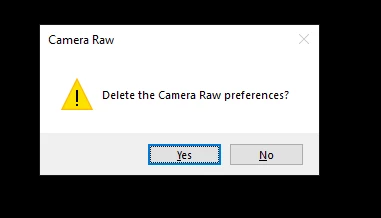
In Photoshop hold down the ctrl/cmd key and go to Edit > Preferences and click on Camera Raw and you should see this option

You need to keep the ctrl/cmd key held down while selecting Edit > Preferences and clicking on Camera Raw


1 reply

November 13, 2020

Hi

Try resetting the camera raw preferences

Reset Camera Raw preferences

  • Hold down the Command key and select Photoshop > Preferences > Camera Raw (macOS) or hold down the Ctrl key and select Edit > Preferences > Camera Raw (Windows).

  • Click Yes in the dialog that asks "Delete the Camera Raw Preferences?"

robboxxx
robboxxxAuthor
Participant
November 13, 2020

Thanks for your response. I can't find what you discribe.

Is thise what I am looking for?: 

Correct answer
November 13, 2020

In Photoshop hold down the ctrl/cmd key and go to Edit > Preferences and click on Camera Raw and you should see this option

You need to keep the ctrl/cmd key held down while selecting Edit > Preferences and clicking on Camera Raw