


Participating Frequently
January 18, 2018
Answered

Photoshop: Cannot Pan/Scroll with WACOM pen in Open/Save/Place file dialogue windows.

  • January 18, 2018
  • 7 replies
  • 4823 views

Cannot Pan/Scroll with Wacom pen in Open/Save/Place type file dialogue windows in mmany if not all of Adobe apps (where every other non-Adobe app I know of does, Apple and other 3rd parties), obviously this pertains to when you've mapped a Wacom pen button to pan/scroll to use in that manner (Wacom settings screen attached).

What should happen is being able to interact similar to touch omnidirectional swiping which includes vertical mouse-like scrolling when pressing the button and making contact with the pen, as would be expected and Wacom designed it to do.

What instead happens: Adobe apps interpret this as a Quick Look request on click of whatever file is targeted by cursor at the time. This defers from every system norm elsewhere on macOS, 1st and 3rd party. Never witnessed this in a non-Adobe app. Adobe apps are essentially ignoring the pan/scroll input from Wacom pens, but strangely only in those types of windows, which are standard and common macOS type views otherwise and not unique to Adobe, so the behavior expected is pretty well established.
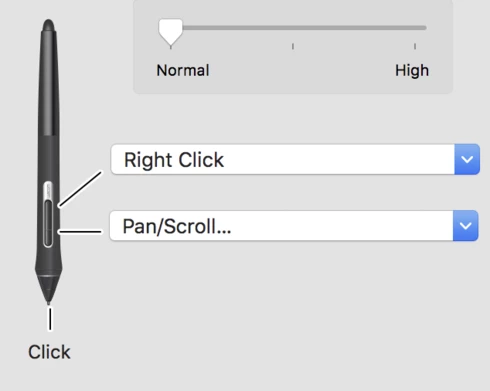


Note: This is not unique to Photoshop. This is an Adobe Suite - wide issue. Illustrator, InDesign reflect same unexpected behavior, and I would assume others if it's a shared thing across the CC suite of apps. That said, in all other app interactivity other than in these window types, the pan/scroll input is respected and behavior is consistent with expectation.

...This issue has plagued Adobe products for a long time and is not newly occurring.

Correct answer Lynn Caldwell

I fixed it!  I'm using Apple OS Catalina 10.15.7.  Open the Wacom tablet Preferences window.  There is a small window at the top with different application icons, click on Photoshop.  In the Pen menu, on the lower button select Navigation, then click Scroll.  It works!

7 replies

Known Participant
August 16, 2025

I’m having the same issue in every Adobe app for years. Every other app interprets pan/zoom/scroll correctly.

The ‘solution’ mentioned here isn’t a solution at all, as it only allows scrolling, not panning and zooming.

Also, zooming with CMD held is confusing—you have to move the pen left and right instead of up and down.

Lynn CaldwellCorrect answer
Participant
September 23, 2021

I fixed it!  I'm using Apple OS Catalina 10.15.7.  Open the Wacom tablet Preferences window.  There is a small window at the top with different application icons, click on Photoshop.  In the Pen menu, on the lower button select Navigation, then click Scroll.  It works!

Inspiring
October 17, 2022

that's fine.  but only problem is that we loose the pan functionality.

Inspiring
July 14, 2020
Hello, on macOS Cataéina 10.15.5 and PS 21.2.0 use PAN (in french Wacom driver is Déffilement) And no problème to scroll in dialogue boxes Finder and PS Menus !


Wacom Driver : 6.3.40-2


Yves Crausaz, Suisse, retraité actif dans le monde de la photo et des arts graphiques.
Jools808080
Known Participant
July 15, 2020
I am using Mojave 10.14.6 and PS 21.2 and the problem is still present.  
Unfortunately, upgrading to Catalina is not an option, because it destroys my iMac (I recently  "downgraded" to Mojave because the iMac wouldn't shut down anymore.)
Inspiring
July 14, 2020
Any official update on this? it's very annoying that I have to drop the pen and use mouse wheel to scroll layers/brushes panel.
Inspiring
March 2, 2020
uncheck "use windows ink" into tablet mapping settings...
Jools808080
Known Participant
March 2, 2020
this is a MAC problem.
Jools808080
Known Participant
February 12, 2020
After searching for the solution on this fro so long it is quite disheartening that all i can find on the topic is a 2 year old thread that was never answered. This has been bugging me for so long, and I can't believe it still hasnt been addressed. 
Participating Frequently
April 20, 2018
Nothing on this, in 3 months? C'mon, this has given me trouble for years...