Known Participant
June 16, 2015
Answered

Photoshop cc 2015 crashes on startup

  • June 16, 2015
  • 35 replies
  • 78997 views

I updated my Photoshop and LR this morning, LR is fine but PS is crashing on startup, saying 'The last time you opened Photoshop CC, it unexpectedly quit while reopening windows. Do you want to try to reopen its windows again?' I have already trawled the forums, and tried a few suggestions (deleting the temp file in the autorecover file, Signing out of creative Cloud) but now at a total loss. Running a 2013 Retina MacBook.

Any thoughts would be much appreciated.
This topic has been closed for replies.
Correct answer vdrielc

I've done a little investigating myself, since Adobe isn't really coming to the party on fixing this.

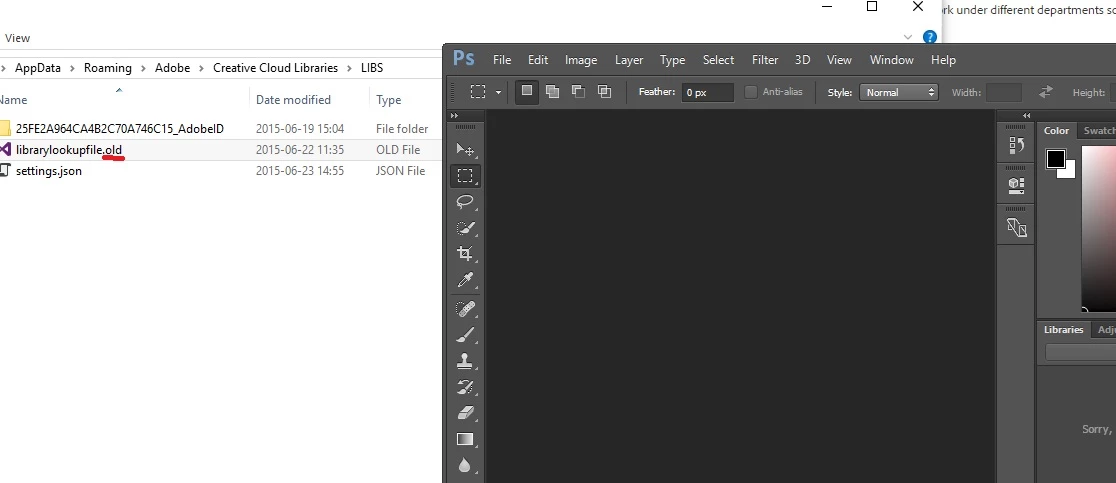
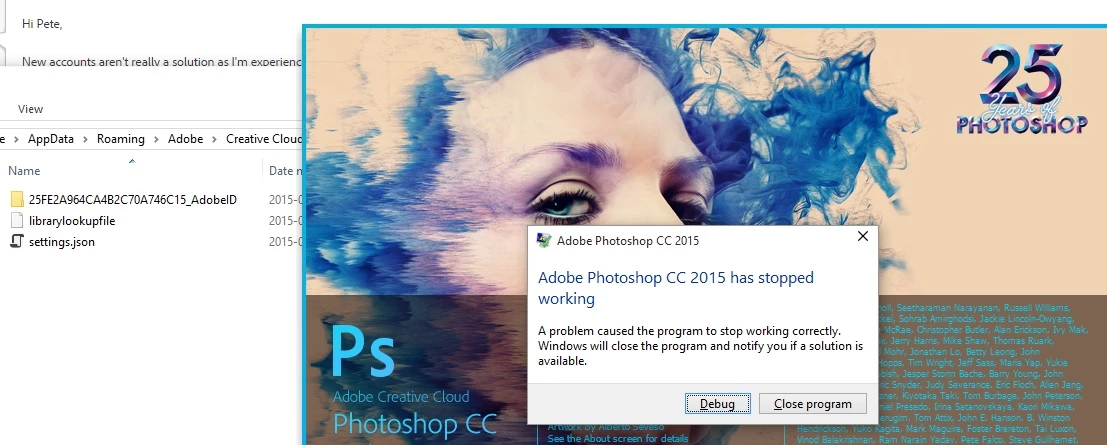
So, in C:\Users\%USERNAME%\AppData\Roaming\Adobe\Creative Cloud Libraries\LIBS is a file called librarylookupfile

This is the file that appears to be responsible for my crash at least (and looking at the dump data, everyone is having the same issue). Renaming this file (or just deleting it) resolves the issue for me.

I'm not sure what the significance of this file is, it just appears to contain a reference to Fonts that I have used. I'm also not sure if it is truly corrupt or if there is an issue with the latest version of Photoshop when loading a valid version of this file.

Either way, try renaming that and see if it works for you.

Thanks.

35 replies

Participant
November 18, 2015

I encountered this Error on Startup after the Windows 10 Upgrade in my Sony Vaio Laptop. I posted this problem on YouTube hoping that Adobe would notice it and fix the problem thru Updates. Unfortunately, it is still ongoing. I purchased an Adobe Photoshop Elements 14 and Premiere Elements 14 Bundle on 10/19/2015 for my HP Pavilion Elite Desktop because I thought this was better than Windows Movie Maker but I was unable to use the Premiere Elements 14 because it has stopped working. I tried to find a solution to the problem but didn't find any this morning so I did the only option I have which was uninstalling it. I tried to re-install but it failed. It kept on telling me that a Restart was pending. I followed the suggestion and clicked Quit and restarted my computer but it did not do anything. I went to the Control Panel and see if it installed but it wasn't there. Before trying to re-download it, I optimized my computer to start download fresh but after it was still the same issue after the download extraction. I don't know what else to do. I was thinking of getting a refund but you can't even get hold of the Customer Service. This is awful. 

Participant
November 4, 2015

I have the same problem but I know it's to do with the extension I am developing, it only crashes when I load up my extension (which I have working at home on Adobe Photoshop 2015 but it's probably an earlier build).

Does anyone know what PlugPlugOwl.dll does?

Faulting application name: Photoshop.exe, version: 16.0.0.88, time stamp: 0x55681d39

Faulting module name: PlugPlugOwl.dll, version: 6.0.0.96, time stamp: 0x55550137

Exception code: 0xc0000005

Fault offset: 0x00000000002d0030

Faulting process ID: 0x2b1c

Faulting application start time: 0x01d116bbbb7bbdf1

Faulting application path: C:\Program Files\Adobe\Adobe Photoshop CC 2015\Photoshop.exe

Faulting module path: C:\Program Files\Adobe\Adobe Photoshop CC 2015\PlugPlugOwl.dll

Report ID: 5a33c6ff-74cd-4cd7-b767-cfa7b8abc10d

Faulting package full name:

Faulting package-relative application ID:

Participant
November 2, 2015

I am having the same problem with my Photoshop, I tried every possible solution but it is keep doing the same.

Can someone please advise when can we expect to get this resolved?

Many Thanks!

CreativeThumbUS.com

Participant
October 14, 2015

hello, i just barely upgraded to windows 10 and phtotoshop 2015 started crashing, it was ok with windows 7, and i tried to look for the library file but i dont have it in my folder wher else can i look??

TiffGouge
Participant
August 23, 2015

I ended up hitting Ctrl+Shift+Alt as soon as i tried to open photoshop - this bypassed the load error and i was able to open it!!

Dierk
Participating Frequently
August 19, 2015

I went through all solutions offered, nothing worked. Photoshop crashes with teh following event log:

Faulting application name: Photoshop.exe, version: 16.0.1.168, time stamp: 0x55af6140

Faulting module name: dvamarshal.dll, version: 8.0.0.0, time stamp: 0x53567edc

Exception code: 0xc0000005

Fault offset: 0x0000000000005779

Faulting process ID: 0x1794

Faulting application start time: 0x01d0da62ead04f7e

Faulting application path: C:\Program Files\Adobe\Adobe Photoshop CC 2015\Photoshop.exe

Faulting module path: C:\Program Files\Adobe\Adobe Photoshop CC 2015\dvamarshal.dll

Report ID: 8cedec87-a35c-4a5f-a121-05db79ce61db

Faulting package full name:

Faulting package-relative application ID:

Curiously I get the same faulting module with Audition [also crashiong upon start-up]:

Faulting application name: Adobe Audition CC.exe, version: 8.0.0.192, time stamp: 0x5564f024

Faulting module name: dvamarshal.dll, version: 8.0.0.192, time stamp: 0x5564d319

Exception code: 0xc0000005

Fault offset: 0x0000000000005826

Faulting process ID: 0x2d20

Faulting application start time: 0x01d0da6396fe6bb7

Faulting application path: C:\Program Files\Adobe\Adobe Audition CC 2015\Adobe Audition CC.exe

Faulting module path: C:\Program Files\Adobe\Adobe Audition CC 2015\dvamarshal.dll

Report ID: 4bf5abfb-8d19-45d6-bcac-f731bc461830

Faulting package full name:

Faulting package-relative application ID:

I checked for the library file, the plug-ins, and the graphics card driver. After Premiere Pro's infamous 'can't find video module' error I installed it last week to no avail. But I do now have the crashing issues of Audition and Photoshop; AI, ID, Acrobat, DW, and Bridge work.

Windows 10 [upgrade from a running Windows 7 system], 8 GB RAM, ample HD/SSD space, i7-2600K processor, AMD Radeon HD 6800.

Wallace Moraes
Participant
August 8, 2015

None of this works for me. I have Windows 10 and a Geforce 635m and photoshop remains useless.

b3llair
Participant
July 31, 2015

Experiencing the same issue, right after installing Photoshop CC 2015

Never had problem before with Photoshop CC 2014

Problem Event Name:APPCRASH
  Application Name:Photoshop.exe
  Application Version:16.0.0.88
  Application Timestamp:55681d39
  Fault Module Name:MSVCR120.dll
  Fault Module Version:12.0.21005.1
  Fault Module Timestamp:524f83ff
  Exception Code:c000001d
  Exception Offset:0000000000096cd5
  OS Version:6.1.7600.2.0.0.256.1
  Locale ID:1033
  Additional Information 1:096a
  Additional Information 2:096a2e6fc4d77a7a966ff48506139a6c
  Additional Information 3:016d
  Additional Information 4:016dfb7218e8ce18ad1c15d79aa0a2ae

Read our privacy statement online:

  http://go.microsoft.com/fwlink/?linkid=104288&clcid=0x0409

If the online privacy statement is not available, please read our privacy statement offline:

  C:\Windows\system32\en-US\erofflps.txt

Any1 could solve this problem, or having the same issue as me?

Participant
July 26, 2015

This worked awesome - getting rid of librarylookupfile (just renamed it) made it work instantly.  Thanks!

Participant
July 24, 2015

I've been having similar problems. Tried all the fixes mentioned in this thread to no avail. I finally managed to start PS CC 2015 after updating Windows 7. However, a few days later I got the same error message that Adobe Photoshop CC has stopped working. Out of desperation I did a system restore and surprisingly, PS started up. However, a few days later, it randomly stopped at startup again.

Very frustrated. I can't even get back to reinstall CC 2014.

Has anyone at Adobe found a solution yet? I'm losing patience.

Thanks.

Participant
August 22, 2015

Think I found my culprit. Software for UGEE brand graphics tablet seems to cause PS crashes. Since removing the software, no crashes (yet).