Known Participant
June 16, 2015
Answered

Photoshop cc 2015 crashes on startup

  • June 16, 2015
  • 35 replies
  • 78997 views

I updated my Photoshop and LR this morning, LR is fine but PS is crashing on startup, saying 'The last time you opened Photoshop CC, it unexpectedly quit while reopening windows. Do you want to try to reopen its windows again?' I have already trawled the forums, and tried a few suggestions (deleting the temp file in the autorecover file, Signing out of creative Cloud) but now at a total loss. Running a 2013 Retina MacBook.

Any thoughts would be much appreciated.
This topic has been closed for replies.
Correct answer vdrielc

I've done a little investigating myself, since Adobe isn't really coming to the party on fixing this.

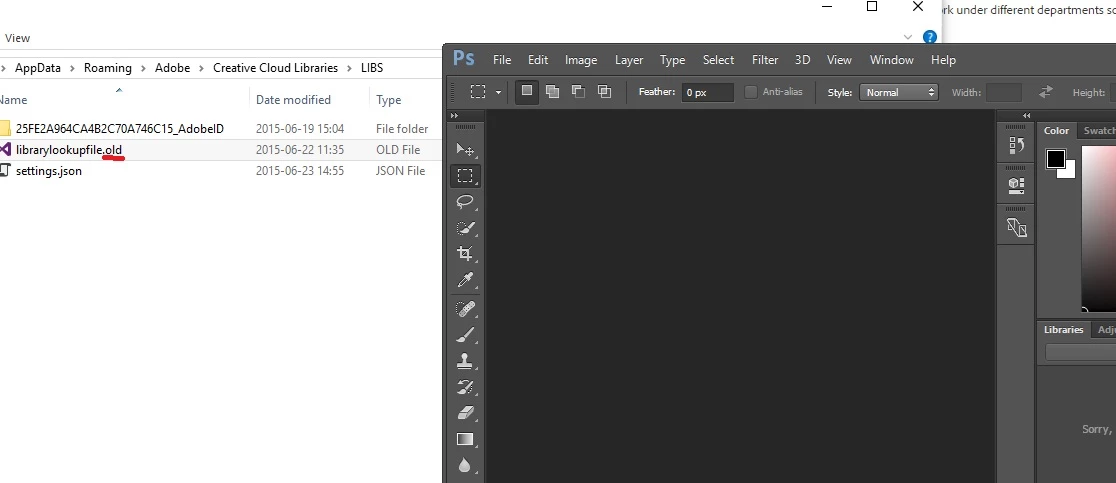
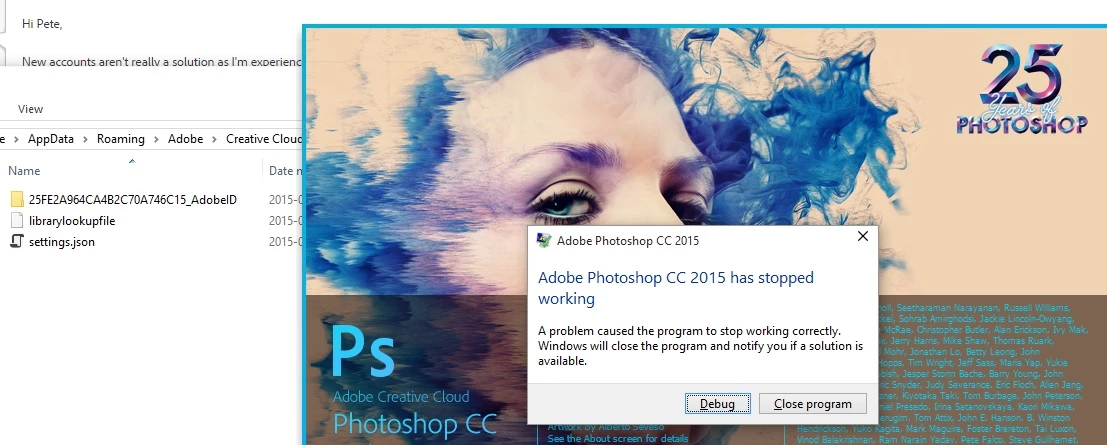
So, in C:\Users\%USERNAME%\AppData\Roaming\Adobe\Creative Cloud Libraries\LIBS is a file called librarylookupfile

This is the file that appears to be responsible for my crash at least (and looking at the dump data, everyone is having the same issue). Renaming this file (or just deleting it) resolves the issue for me.

I'm not sure what the significance of this file is, it just appears to contain a reference to Fonts that I have used. I'm also not sure if it is truly corrupt or if there is an issue with the latest version of Photoshop when loading a valid version of this file.

Either way, try renaming that and see if it works for you.

Thanks.

35 replies

Known Participant
July 23, 2015

To Adobe:

We've seen issues such as this over and over again with corrupt preferences files, and other files PS and other Adobe apps use.  Why doesn't Adobe run a validation check on these resource files and repair them automatically and notify the user if settings are lost?  It's simple code to write, and would save users countless hours of frustration.  Validation checks should be a standard part of the code.  We pay good money to subscribe to these products, we should have a better level of confidence that they won't crash.

Participant
July 23, 2015

Thank you, thank you, thank you!

I have been trying to figure this out all day, night, and into the next day again.

I have been doing so many other pointless "remedies" trying to figure out why Photoshop CC kept crashing - and it was that one file.

I deleted the file and Photoshop CC created it again as it launched - I guess that file was corrupt.

ADDITIONAL INFORMATION: I had just switched from an Nvidia Graphics Card to an AMD Graphics Card - I wonder if that had something to do with it. Who knows.

BUT THANK YOU.

Participant
July 20, 2015

Just wanted to say a big thanks for the fix!

Neither PS or AI would open for me in the last week and it's being doing my head in, all other CC programs were fine. I'd nearly given up hope then I found this thread, deleted the file and bingo! Works perfectly again.

Hopefully Adobe fixes this properly, I was told to politely go away when I asked due to using Windows 10.

Thanks!

Participant
July 19, 2015

Worked! Thanks!!

Participant
July 15, 2015

thank you!!!

that worked for me.

lets hope tomorrow it will stay fixed...:-)

Participant
July 9, 2015

Thanks it now opens and works

Participant
July 8, 2015

It works for me...tnks

Participant
July 6, 2015

worked for thanks for help vdrielc

!!!

worked for indesign issue as well

Participant
July 6, 2015

@

Known Participant
July 4, 2015

Here's the event log entry from my crash.  It happened after about an hour of use though, not at startup.

Log Name:      Application

Source:        Application Error

Date:          7/3/2015 7:20:13 PM

Event ID:      1000

Task Category: (100)

Level:         Error

Keywords:      Classic

User:          N/A

Computer:      Port1

Description:

Faulting application name: Photoshop.exe, version: 16.0.0.88, time stamp: 0x55681d39

Faulting module name: Photoshop.exe, version: 16.0.0.88, time stamp: 0x55681d39

Exception code: 0xc0000005

Fault offset: 0x0000000003ab8ec1

Faulting process id: 0xf68

Faulting application start time: 0x01d0b5f64ebb125d

Faulting application path: C:\Program Files\Adobe\Adobe Photoshop CC 2015\Photoshop.exe

Faulting module path: C:\Program Files\Adobe\Adobe Photoshop CC 2015\Photoshop.exe

Report Id: 33678344-21f3-11e5-8276-346895ed2968

Faulting package full name:

Faulting package-relative application ID:

Event Xml:

<Event xmlns="http://schemas.microsoft.com/win/2004/08/events/event">

  <System>

    <Provider Name="Application Error" />

    <EventID Qualifiers="0">1000</EventID>

    <Level>2</Level>

    <Task>100</Task>

    <Keywords>0x80000000000000</Keywords>

    <TimeCreated SystemTime="2015-07-04T02:20:13.000000000Z" />

    <EventRecordID>20918</EventRecordID>

    <Channel>Application</Channel>

    <Computer>Port1</Computer>

    <Security />

  </System>

  <EventData>

    <Data>Photoshop.exe</Data>

    <Data>16.0.0.88</Data>

    <Data>55681d39</Data>

    <Data>Photoshop.exe</Data>

    <Data>16.0.0.88</Data>

    <Data>55681d39</Data>

    <Data>c0000005</Data>

    <Data>0000000003ab8ec1</Data>

    <Data>f68</Data>

    <Data>01d0b5f64ebb125d</Data>

    <Data>C:\Program Files\Adobe\Adobe Photoshop CC 2015\Photoshop.exe</Data>

    <Data>C:\Program Files\Adobe\Adobe Photoshop CC 2015\Photoshop.exe</Data>

    <Data>33678344-21f3-11e5-8276-346895ed2968</Data>

    <Data>

    </Data>

    <Data>

    </Data>

  </EventData>

</Event>

Participating Frequently
July 4, 2015

‌My guess off the top of my head would be a memory crash. I had that kind of thing happen a few years ago, several layers open and then crash. Ps takes lose of memory.