



guidos50720937
Inspiring
October 20, 2017
Répondu

Photoshop CC 2018 IGNORES TABLET PROPERTIES

I just updated Photoshop to the latest update ( 19.0 20170929.r.165 2017/09/29: 1138933  x64)
and it completely ignores the tablet properties such as:

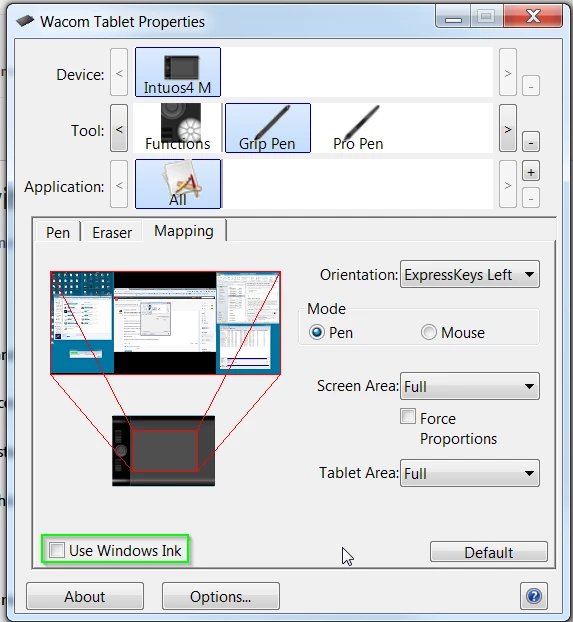
a) Pen Pressure (the pen no longer have pen pressure, no matter if windows ink is turned on or of)
b) Screen Lock (the tablet should lock on Monitor 1 while using Photoshop, and it doesn't)

Every other software i'm using such as Clip studio Paint, zBrush and so on are working fine.

While photoshop completely ignores them.

The previous version used to work fine, but it's been overwritten by the new one without even asking.

The software, no matter the new features, has got worse with every update in terms of performance,
stability, and usability.

Introducing the standard windows Alt key behaviour was already driving me nuts.

i still have not tried the windows ink workaround
i hope this gets fixed TODAY because as it is, PS is useless to me, and i'll be moving to
any alternative available.
    Ce sujet a été fermé aux réponses.
    Meilleure réponse par guidos50720937

    Update, the previous Win Ink workaround fix pen pressure and the screen lock

    Trevor.Dennis  ha scritto

    hansb90361119 wrote:

    If you check the "use windows ink" for wacom intous 5 (most likly all of the models) you are getting a REALLY annoying lag with zoom and pen size adjuster etc. If you turn it off, it works perfect, but the downside is the pen pressure opacity don't work.

    You've turned off Windows Ink, so without supplying an alternative, pen pressure is not going to work.  You have to enable WinTab.

    If Windows Ink is disabled

    1. Create a file that contains instructions to revert to the WinTab functionality.

    2. Create a text file in a text editor such as Notepad.

    Type in the following lines:

    # Use WinTab

    UseSystemStylus 0

    3. Save the file as a plain text file named PSUserConfig.txt

    4. Put (copy) the file into the Photoshop settings folder: C:\Users\[User Name]\AppData\Roaming\Adobe\Adobe Photoshop CC 2015\Adobe Photoshop CC 2015 Settings\

    5. Restart Photoshop and check the pen pressure and overall performance.

    34 commentaires

    Participant
    October 23, 2017

    The new Adobe Illustrator 2018 also ignores the tablet's preferences. Sad to have to delete and reset all of the preferences for all of my programs just to get things to work properly. But sometimes you just gotta do what you gotta do.

    Participant
    October 21, 2017

    Hi,

    I have the same issue here. Photoshop 19.0 Release is completely ignoring my Wacom intuos pro properties.

    On the new lightroom version it works perfectly but not on photoshop.

    I'm using a macbook pro on MacOs Sierra version 10.12.6.

    Can someone help ?

    Akash Sharma
    Legend
    October 23, 2017

    Hi hadhouud,

    Could you please take a look at this article Menus, shortcuts, Lasso tool, or Photoshop stop working when using a Wacom tablet | Mac OS and let us know if that helps?

    ~Akash

    Participant
    October 23, 2017

    Hi, after different manipulations I was able to resolve the issue yesterday night.

    I had to delete all my preferences of my Wacom tablet and finally I was able to assign specific keys to Photoshop that was recognized by the application.

    I don't know why it happens as I only updated Photoshop and Lightroom before having the issue.

    Anyway, if someone is having the same issue he should delete all the preferences of the Wacom or restore a configuration backup and it should resolve the problem.

    Akash Sharma
    Legend
    October 20, 2017

    Hi guidos,

    Thanks for reporting this issue.

    Could you confirm if the workaround mentioned by TrevorDennis has been working fine for you?

    We are investigating this issue and will get back with more updates.

    Thanks,

    Akash

    guidos50720937
    Inspiring
    October 23, 2017

    Yes, it did, but the issue with windows ink is getting pretty boring since it comes back with every major Update

    You should start considering the possibility of choosing the this option in the control panel (At Least)

    BTW, the wacom drivers work PERFECTLY FINE with any other software, windows ink or not.

    guidos50720937
    guidos50720937AuteurRéponse
    Inspiring
    October 20, 2017

    Update, the previous Win Ink workaround fix pen pressure and the screen lock

    Trevor.Dennis  ha scritto

    hansb90361119 wrote:

    If you check the "use windows ink" for wacom intous 5 (most likly all of the models) you are getting a REALLY annoying lag with zoom and pen size adjuster etc. If you turn it off, it works perfect, but the downside is the pen pressure opacity don't work.

    You've turned off Windows Ink, so without supplying an alternative, pen pressure is not going to work.  You have to enable WinTab.

    If Windows Ink is disabled

    1. Create a file that contains instructions to revert to the WinTab functionality.

    2. Create a text file in a text editor such as Notepad.

    Type in the following lines:

    # Use WinTab

    UseSystemStylus 0

    3. Save the file as a plain text file named PSUserConfig.txt

    4. Put (copy) the file into the Photoshop settings folder: C:\Users\[User Name]\AppData\Roaming\Adobe\Adobe Photoshop CC 2015\Adobe Photoshop CC 2015 Settings\

    5. Restart Photoshop and check the pen pressure and overall performance.

    JaniYlinen
    Participant
    October 24, 2017

    This solution helped me. I have used this solution for very long time.

    What is strange is that as far as i can member i didnt add this file to photoshop 2018 settings folder but the file was already there but with wrong extension. For some really strange reason the file was named as PSUserConfig.txt.txt