Participant
October 19, 2017
Answered

Photoshop CC 2018 - line spacing tool failoure

  • October 19, 2017
  • 65 replies
  • 48761 views

Since the Update of Photoshop CC 2017 to Photoshop CC 2018, the line spacing tool is not working anymore.

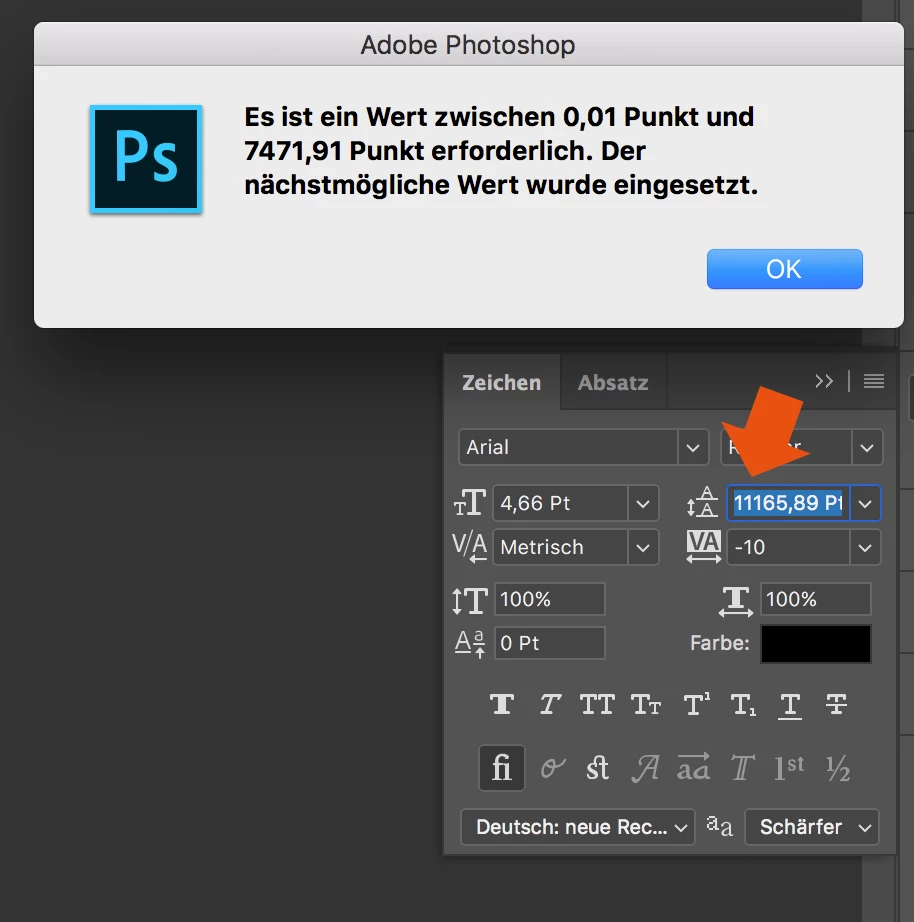
When I try to enter a number, it randomly changes it to another one. Also if I try to change the number via draging over the tool-symbol it first works and then jumps to a number over 8000...

How to fix this? Thank you in advance!
This topic has been closed for replies.
Correct answer davescm

Hi

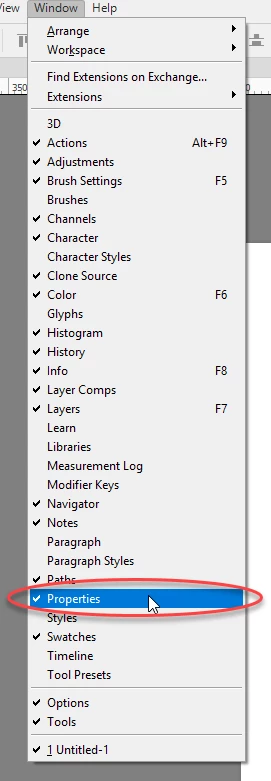
Yes it only affects text that has been transformed. The workaround appears to be type the value into properties and the correct value will appear in the character panel

I am not sure what they call the properties panel in German but I have circled it in the menu which may help you find it. It is the same panel used for Live Shape properties

Dave

65 replies

PECourtejoie
Community Expert
Community Expert
April 3, 2018

Hello, which version of Photoshop are you running?

Only the latest version fixes that issue..

PECourtejoie
Community Expert
Community Expert
January 26, 2018
brandonl8911795
Inspiring
January 25, 2018

Thank heavens, it's finally fixed. The long nightmare is over.

Carola_BHG
Inspiring
January 25, 2018

And… It's fixed!! Finally! Thank you!

brandonl8911795
Inspiring
December 20, 2017

Hmmm...already have WindowsInk disabled in the registry and yet the issue persists since the last update. Maybe next year, hey Adobe?

(Nothing but love, but...sometimes it's hard to believe how expensive this software is.)

rvryoungn
Participant
December 20, 2017

If no one has mentioned this already, I just discovered for myself at least that turning off Windows Ink fixes all these scrubby slider issues! I use a Wacom Intuos Pro pen tablet and have ran into several issues with Windows Ink so maybe give that a shot until the bugs are really fixed-- good luck!

Participant
December 20, 2017

Wow. We're really not going to get a working update this year, are we? 

I guess at this point, rolling back to 2017 as we head into 2019 is the only option.

C'mon Adobe! You've had plenty of time to work this issue out.

Participant
December 15, 2017

Yes this is happening in the USA version.. and it is making me upset and embarrassed with clients. I had to make layers for each line and that is a pain. In bigger amounts of text it will not be good.

I try to go smaller or bigger and it just moves quickly larger and larger even just enter. and the properties does not work so well either. The text I just created also. Please does Adobe know about this??

brandonl8911795
Inspiring
December 15, 2017

Yes, they do. The crazy text thing is fixed in the new update, but now you don't have live previews of what you did. You have to hit Enter or Shift+Enter as Gunter suggests.

Participating Frequently
December 14, 2017

Software Engineering failure

Director funny but not focus debug app problem

developer team attempting release product line of the year

no beta tester released

not fix app

this is a big bug showtime

Günter Heißenbüttel
Inspiring
December 14, 2017

Nice! … and now in words, that we all can understand, please!

Günter Heißenbüttel
Inspiring
December 14, 2017

Pressing shift+enter instead of enter helps a lot in this situation: The input field keeps its focus — at least.