Participant
October 19, 2017
Answered

Photoshop CC 2018 - line spacing tool failoure

  • October 19, 2017
  • 65 replies
  • 48763 views

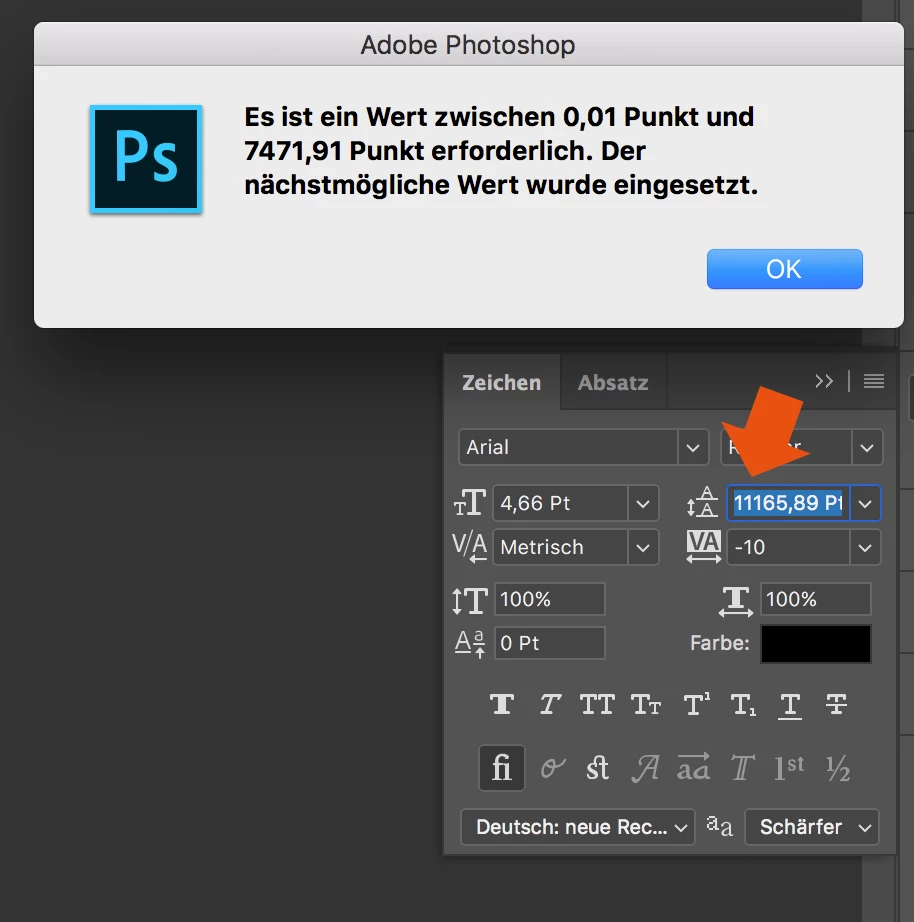
Since the Update of Photoshop CC 2017 to Photoshop CC 2018, the line spacing tool is not working anymore.

When I try to enter a number, it randomly changes it to another one. Also if I try to change the number via draging over the tool-symbol it first works and then jumps to a number over 8000...

How to fix this? Thank you in advance!
This topic has been closed for replies.
Correct answer davescm

Hi

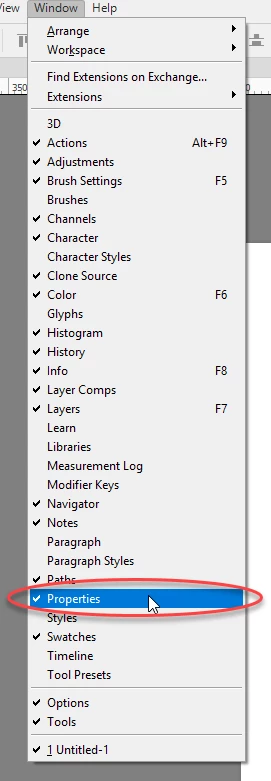
Yes it only affects text that has been transformed. The workaround appears to be type the value into properties and the correct value will appear in the character panel

I am not sure what they call the properties panel in German but I have circled it in the menu which may help you find it. It is the same panel used for Live Shape properties

Dave

65 replies

Participant
December 13, 2017

Nope -nada - dosen't work - you can't type the number you want either.

Seriously the people that test Photoshop really blow - i've met them when I attended a training session and while they went over so many great techniques for using Photoshop, after class I asked all of them hundreds of questions regarding bugs i've noticed and they all seemed oblivious as though they don't actually use Photoshop, lol - wth? I've used it for 2D - motion graphics, built commercials with it, texturing for 3D Maya, used it for burning 2dimensional imagery into 3dimensional crystal, print / desktop design, fine art - painting, etc., for galleries, photo / light correcting, film animation strips, and sooooooo much more and every lesson you can imagine Photoshop to be used for, plus I taught it for 10 years and I swear if I was testing this Program before it came out it wouldn't have these friggin stupid bugs. The problem is they have no automated program or person to run each task that this program can be used for so they pay these buttheads good money to showcase the product and their terrible at communicating to the programmers of what infrastructure they broke. Plain & simple - if a program is not ready then DON'T release it to the public, duh!  

brandonl8911795
Inspiring
December 13, 2017

Sigh...

I was having that same problem until I updated, but now it won't show what it's doing until you pick a number and hit Enter. Leading has worked just fine for the last couple decades, but now...not so much.

Adobe, please stop breaking stuff that works. Please.

(Like last update, you couldn't flood fill the foreground color anymore. What the heck???)

Participant
December 13, 2017

New version is absolutely slowed our team down from every angle. So sad to back to 2017.

Participating Frequently
December 10, 2017

big bug!

more dev

more bad

more slow

Photoshop very very stable version

on Windows is CS5.1

on macOS is CS6

danielm7342214
Participant
December 10, 2017

So frustrating. How is this not fixed already?

Participating Frequently
December 6, 2017

Still experiencing the lack of live updating of text as well, when using error keys to adjust. This does make working with text in Photoshop so much harder.

MacBook Pro, latest updates on Adobe CC and Mac OS High Sierra. (I'll be sure to take my time upgrading in the future)

Participant
December 2, 2017

Okay - I am a very very patient guy. But this bug is absolutely killing my workflow. When will you get this fixed Adobe? Really.

Known Participant
December 2, 2017

Not sure we're capturing Adobe's attention. Sadly, am imagining it would take a massive influx of complaints to stir them to action.

gener7
Community Expert
Community Expert
December 2, 2017

You can use CC 2017 in the meantime.

TMTI user 1
Known Participant
November 24, 2017

It seems the November fix for this issue is to break the live update for font sizing and leading, so that highlighted text now no longer updates as you change the font size or leading using the cursor keys. Adobe, do you not test fixes before release? Please test fixes with actual Photoshop users before going live!

davescm
Community Expert
Community Expert
November 24, 2017
TMTI user 1
Known Participant
November 24, 2017

Thanks for posting that, Good to know they are aware of the issue

I do question as to whether the leading issue is more important than the live update function we've lost. Hope they get the fix out ASAP

gone-anon
Participant
November 21, 2017

Appears to be fixed (my version Photoshop 19.0 20171103.r.190 2017/11/03: 1143799  x64)

Inspiring
November 16, 2017

I think they fixed it. I updated my CC this morning and the problem is gone. For me at least.

Participant
November 16, 2017

mine was just F'd, i cant use the text size tool in the properties panel at all it does nothing. I have like 20 project due by 3:30 I had to just reinstall 2017

Participant
November 16, 2017

Discovered this issue with leading in the character panel after upgrading to Mac OS High Sierra and Photoshop CC 2018 on my office machine; it's incredibly frustrating. Using the up or down arrows, or the backspace key, jumps to giant, seemingly pre-determined numbers (seems to approximately double the previous leading value, and only ever increases - the down arrow pushes the number further up, not back). When I try to type the value in that I want, it will take the first number I press (1-9) and double it, so I can only type in the following leading values:

• 1 = 2.01

• 2 = 4.02

• 3 = 3.06

• 4 = 8.04

• 5 = 10.05

• 6 = 12.06

• 7 = 14.08

• 8 = 16.09

• 9 = 18.1

This applies when using the number keys on the keyboard or keypad.