Participant
October 19, 2017
Answered

Photoshop CC 2018 - line spacing tool failoure

  • October 19, 2017
  • 65 replies
  • 48763 views

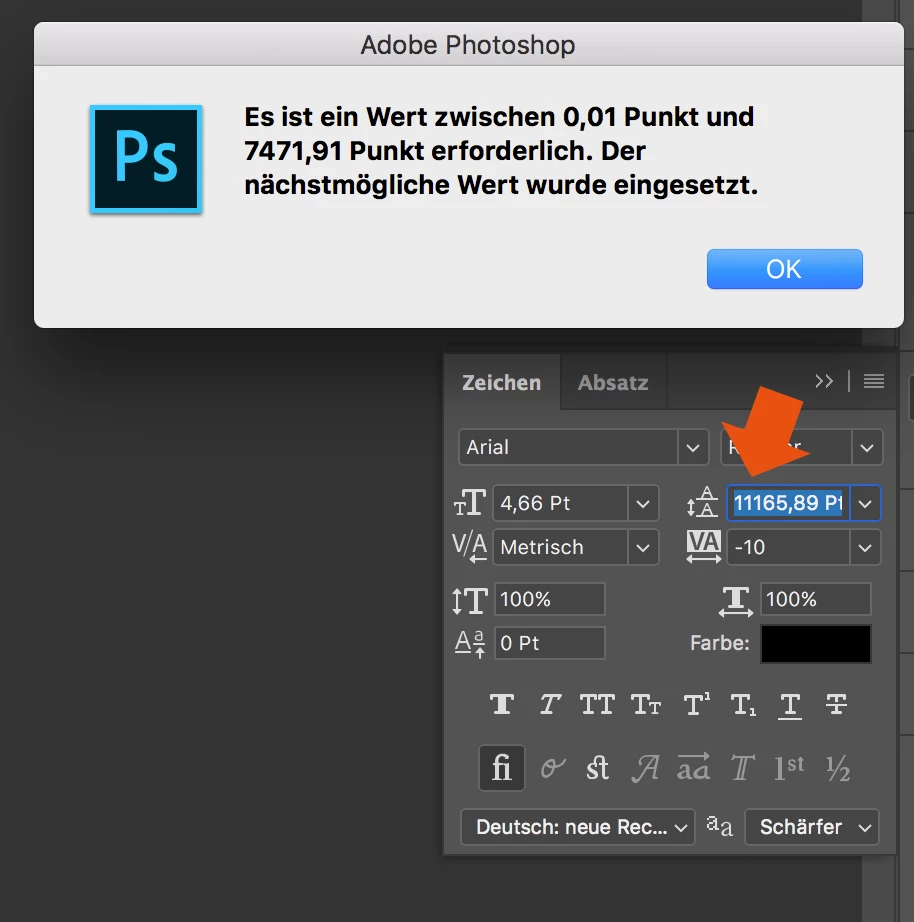
Since the Update of Photoshop CC 2017 to Photoshop CC 2018, the line spacing tool is not working anymore.

When I try to enter a number, it randomly changes it to another one. Also if I try to change the number via draging over the tool-symbol it first works and then jumps to a number over 8000...

How to fix this? Thank you in advance!
This topic has been closed for replies.
Correct answer davescm

Hi

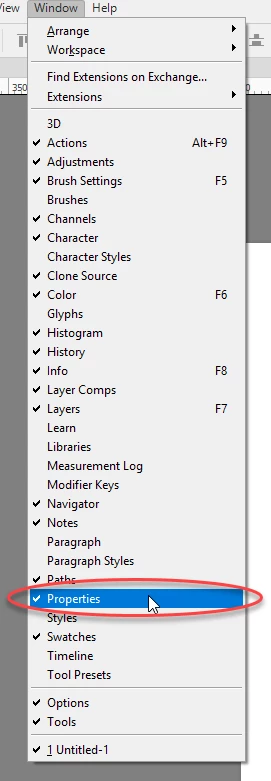
Yes it only affects text that has been transformed. The workaround appears to be type the value into properties and the correct value will appear in the character panel

I am not sure what they call the properties panel in German but I have circled it in the menu which may help you find it. It is the same panel used for Live Shape properties

Dave

65 replies

NAFFCO_ads
Participant
November 15, 2017

After update, the "Leading" issue is resolved. It's not going nuts no more. Thanks for that.

But "Font size", ""Tracking" and "Leading" are not showing real-time results, until you press enter or switch to other settings of the text.

Known Participant
November 15, 2017

Yes, this is maddening!

Real-time updating of text parameters is kaput.

Participant
November 15, 2017

As someone who puts in double digit hours in Photoshop each day, this makes me want to pull my hair out. I might just downgrade back to 2017 for the time being.  Thanks Adobe!

Participant
November 14, 2017

Ok.. this is bizarre.. but I'm now having a separate issue with the text tool.

My text is so small you can't read it, regardless of what size or font you select. It also doesn't matter if it's in a paragraph text box or not. I've shut down Photoshop, opened new files - exactly the same.

When I go to transform what I've written I get "Could not transform because the initial bounding rectangle is empty."

Any ideas guys?! Currently can't use Photoshop at all because of this!

EDIT: I've fixed the issue. For anyone else experiencing it, I deleted "Adobe Photoshop CC 2018 Prefs.psp" from the settings folder.

gener7
Community Expert
Community Expert
November 14, 2017

An update to  CC 2018 is out. Check your CC Desktop Manager and see if it helps. Use Check for Updates in the side menu if it doesn't show up.

Carola_BHG
Inspiring
November 14, 2017

gener7  escribió

An update to  CC 2018 is out. Check your CC Desktop Manager and see if it helps. Use Check for Updates in the side menu if it doesn't show up.

Is there a way to check the changes log? Can't find it anywhere. Thanks.

Known Participant
November 14, 2017

was talking about the leading issue. the text live update problem is still there. but I'm going to investigate because my colleague whom has the same windows 10 and creative cloud version don't have the problem. he can change the text size, while it is selected, in real time. :/

Known Participant
November 14, 2017

just in case I had the issue on windows seven since the 2018 rollout and just updated to windows 10 and no more problem with it.

Francesco-2020
Participant
November 14, 2017

2017-11-14 Photoshop update

I think the problem is fixed. No more leading problem

Participant
November 14, 2017

I've just installed the Photoshop update from this morning, and I believe the problem has been resolved.

dhalman
Participant
November 14, 2017

The problem has been resolved, but the leading does not update in real time like it used to. You have to commit the new leading amount before seeing what it looks like. Which isn't great.

Günter Heißenbüttel
Inspiring
November 14, 2017

Yes, changing the values for leading or font size by using the arrow keys doesn‘t evoke a real time update any more.

bellevue scott
Inspiring
November 13, 2017

Me too. I thought I was going crazy. With all due respect Adobe, this update is a total pile of dog doo. I'm being as polite as I can, but the entire 2018 update with its myriad of work stoppage bugs is just not fit for release. I hope you're listening. So far bugs that have greatly affected my work are 1) This text bug 2) Healing brush lag 3) colors inconsistent between 2017 and 2018 (ADOBE??!!! You messed up the most basic and essential thing - color accuracy).

At least you fixed the issue of "image turns black when spanning two monitors in a dual monitor setup", I mean, it took 10 months!!!!!! Seriously. You are not doing well.

davescm
Community Expert
Community Expert
November 13, 2017

@bellvue scott

What issues are you seeing with color accuracy between versions? I am seeing no problems here. If you are hitting issues, then it will be worth starting a new thread.

Dave

Participant
November 13, 2017

Big shame for adobe

Participant
November 13, 2017

Same thing here!

This is a serious bug... 80% of my work is with the type tool.

Only work around is creating separate layers for each line of text

You can use the auto spacing but it never looks good if you have different font sizes...

ADOBE PLEASE FIX!

Participant
November 11, 2017

How can Adobe roll out this product without being aware of this bug. This has come and gone in throughout various rollouts. This is supposed to be the industry professionals tool and it makes adjusting type a nightmare.


Honestly adobe....get it together. How is this not fixed yet?


Workaround solutions? Lol.