Participant
October 19, 2017
Answered

Photoshop CC 2018 - line spacing tool failoure

  • October 19, 2017
  • 65 replies
  • 48763 views

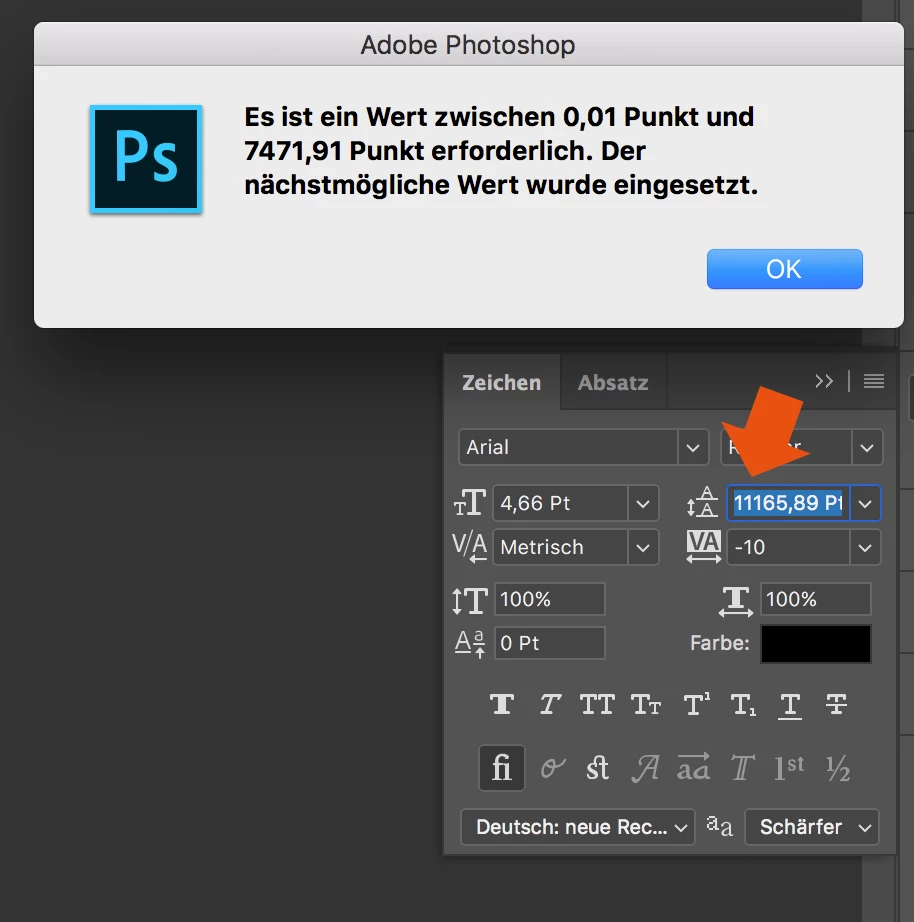
Since the Update of Photoshop CC 2017 to Photoshop CC 2018, the line spacing tool is not working anymore.

When I try to enter a number, it randomly changes it to another one. Also if I try to change the number via draging over the tool-symbol it first works and then jumps to a number over 8000...

How to fix this? Thank you in advance!
This topic has been closed for replies.
Correct answer davescm

Hi

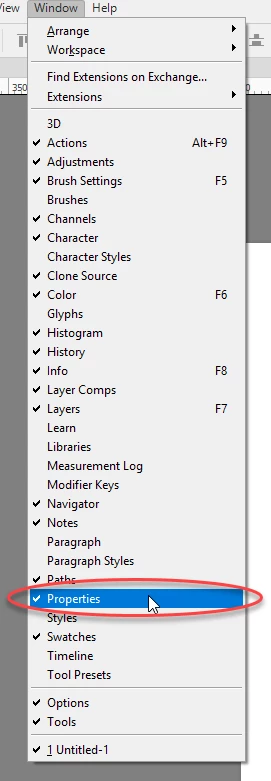
Yes it only affects text that has been transformed. The workaround appears to be type the value into properties and the correct value will appear in the character panel

I am not sure what they call the properties panel in German but I have circled it in the menu which may help you find it. It is the same panel used for Live Shape properties

Dave

65 replies

Participant
November 10, 2017

Stupidest and annoying bug.

Participant
November 8, 2017

It's really sad that this bug renders photoshop useless for 2 weeks now!  Fix it Adobe

Participating Frequently
November 7, 2017

The text tool is very unstable. Beside this line spacing bug, i often have a total freeze of Photoshop when i do cmd+S and enter a text area without to wait the end of the saving... can't escape anymore from the text area and have to restart Photoshop (mac os 10.13 on macbook pro Touchbar). Im hating Photoshop...

Carola_BHG
Inspiring
November 8, 2017

kyulkyul  escribió

The text tool is very unstable. Beside this line spacing bug, i often have a total freeze of Photoshop when i do cmd+S and enter a text area without to wait the end of the saving... can't escape anymore from the text area and have to restart Photoshop (mac os 10.13 on macbook pro Touchbar). Im hating Photoshop...

This happens a lot to me too, as well!

Picons
Participating Frequently
November 7, 2017

WTF Adobe!!! More than 2 weeks and you still didn't fix this issue. I'm working in software dev too and we fix such bugs in hours, not weeks. I'm going to cancel my subscription, this is nuts!

davescm
Community Expert
Community Expert
November 7, 2017

On this forum we are volunteer Photoshop users - not Adobe (unless you see the red staff badge).

Dave

lucasselbach
Inspiring
November 7, 2017

Right, Dave.

Any way for having an answer from some Adobe Specialist / Employee / Staff / Team / Developer / worker????

That would be awesome (otherwise should fill a bug report)

cheers!

Lucas

lucasselbach
Inspiring
November 7, 2017

Same problem here in Brazilian version 19.0

Can't do it in Character window nor in the Properties window (same bug)

Can Adobe work in this fix? SOON?

Thanks

davescm
Community Expert
Community Expert
November 7, 2017

I posted this earlier in the thread but as we are now on page three, and for the benefit of anyone joining now :

Adobe have picked this up, in the meantime there is a workaround :

a. Enter the leading value in the Properties panel.

b. When you hit enter the value in the properties panel box will change to something different (that is a bug) but will now show correctly in the Character panel

c. The value applied to the text will be the same as you entered and now shown in the character panel

Note : The workaround does not work backwards - you must enter in the properties box.

Dave

michaelt76180164
Participant
November 6, 2017

Same problem here.

The leading setting is bugged in both the Character panel and Properties panel.

Participant
November 6, 2017

same thing here, the update really sucks

kunalex
Participating Frequently
November 6, 2017

Best fix?

Open Adobe Creative Cloud/ Apps / Right to Open is a down facing arrow - click it / Other Versions / Install CC 2015 / grab coffee mug, wait for update.

Good luck.

lucasselbach
Inspiring
November 7, 2017

I can't believe it.

20 days without Adobe's correction.

Waiting until tomorrow and then going to downgrade....

Thanks for the hint

Lucas

Participant
November 6, 2017

Having the same issue. Its a rather interesting one and cumbersome to correct. since I made 16 artboards from the very first "transformed" text frame - now have to go in manually and adjust. Not ideal. and also this might explain why my styles werent applying properly. I think there needs to be a Redefine Scaling 100% - similar to the InDesign one where it sometimes will missinterpret the formatting but can be restored to 100%. or something.

lovropodobnikov
Participant
November 6, 2017

I have the same issue with leading behavior. When I want to increase a number go from 10pt to 14457,89 pt.
Pls Adobe fix this awful bug ASAP, the monthly subscription is not that cheap! :((((

Participant
November 6, 2017

Adding another "ME TOO". Just updated to 19.0 today and the problem appeared.