Participant
October 19, 2017
Answered

Photoshop CC 2018 - line spacing tool failoure

  • October 19, 2017
  • 65 replies
  • 48763 views

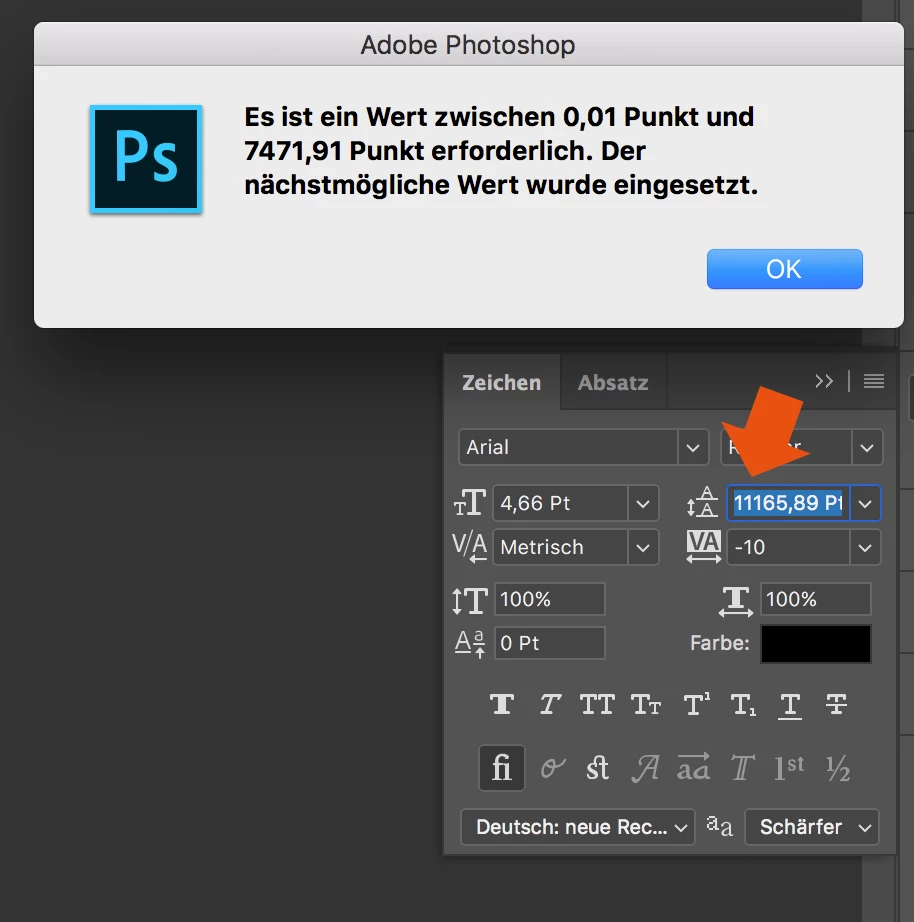
Since the Update of Photoshop CC 2017 to Photoshop CC 2018, the line spacing tool is not working anymore.

When I try to enter a number, it randomly changes it to another one. Also if I try to change the number via draging over the tool-symbol it first works and then jumps to a number over 8000...

How to fix this? Thank you in advance!
This topic has been closed for replies.
Correct answer davescm

Hi

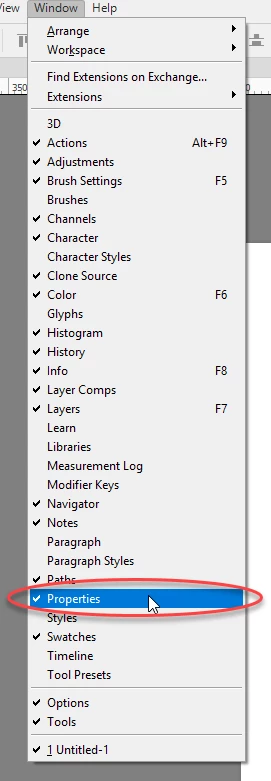
Yes it only affects text that has been transformed. The workaround appears to be type the value into properties and the correct value will appear in the character panel

I am not sure what they call the properties panel in German but I have circled it in the menu which may help you find it. It is the same panel used for Live Shape properties

Dave

65 replies

liamc66241891
Participant
November 5, 2017

Come on Adobe - you're better than this....

Participant
November 4, 2017

me too T T

Participant
November 3, 2017

It's been a few weeks with this now and it's getting super annoying. I get completely random numbers

davescm
Community Expert
Community Expert
November 3, 2017

Hi

Yes it is annoying , have you tried the workaround posted earlier in this thread ?

a. Enter the leading value in the Properties panel.

b. When you hit enter the value in the properties panel box will change to something different (that is a bug) but will now show correctly in the Character panel

c. The value applied to the text will be the same as you entered and now shown in the character panel

Note : The workaround does not work backwards - you must enter in the properties box.

Dave

Inspiring
November 3, 2017

Start testing BEFORE you release!

Inspiring
November 3, 2017

same issue!!! WTF Adobe

Participant
November 2, 2017

I have a make-shift solution until Adobe patches this issue... to decrease or increase leading 2 points or pixels:

- Mac:

Option + Down Arrow or Up Arrow

- PC

Alt + Down Arrow or Up Arrow

Participating Frequently
November 2, 2017

Hi, Same problem here with the text tool panel, very annoying and im paying for the whole suite every month....

Participant
November 1, 2017

The best workaround is to use CC 2017 instead.

Participant
November 1, 2017

THANK GOD IM NOT THE ONLY ONE. I thought my MAC screw up! I struggle my way through..ive dont have choice but to use auto...and auto may not be the best option!

Participating Frequently
October 31, 2017

Hello, same issues Here, I'm on PC on win7.

it happen on document blocks text created before the 2018 version...

My way to fix it is to copy the "old text" in microsoft-word or other pad-txt, and re-past it in a new bloc text.

When i create a new text block i don't have this issues and i can set it...

But it still bored... Hope u will fix very soon guys...

Thx
Thomas