Participant
October 19, 2017
Answered

Photoshop CC 2018 - line spacing tool failoure

  • October 19, 2017
  • 65 replies
  • 48761 views

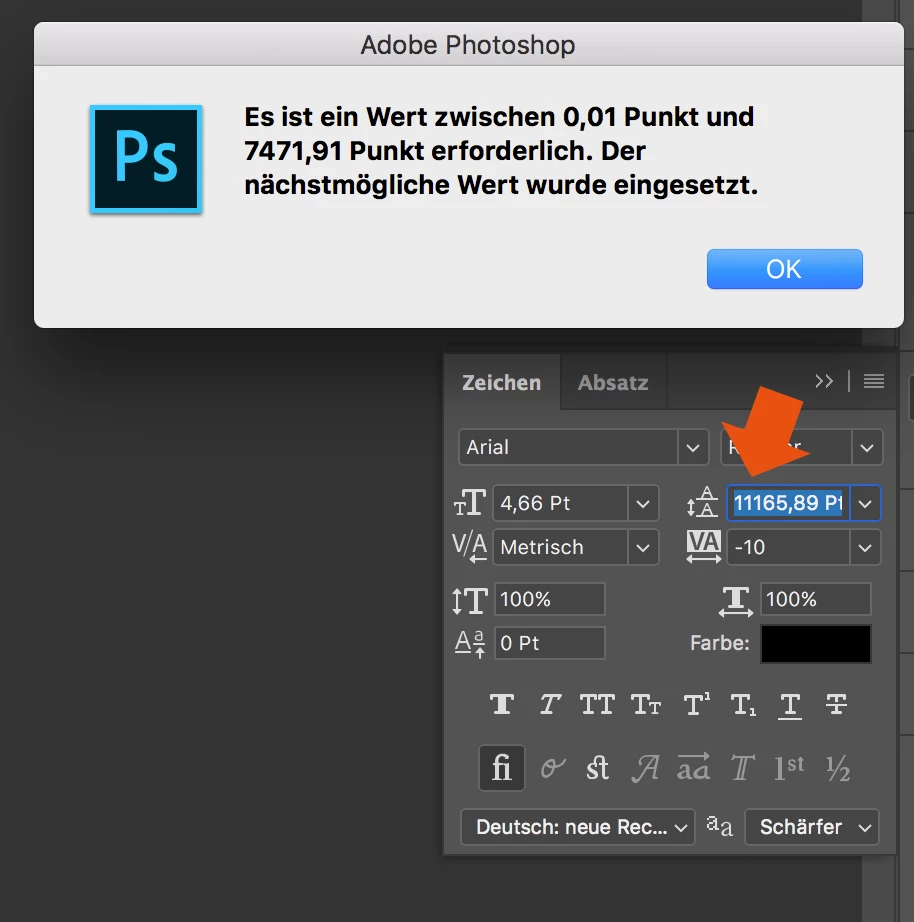
Since the Update of Photoshop CC 2017 to Photoshop CC 2018, the line spacing tool is not working anymore.

When I try to enter a number, it randomly changes it to another one. Also if I try to change the number via draging over the tool-symbol it first works and then jumps to a number over 8000...

How to fix this? Thank you in advance!
This topic has been closed for replies.
Correct answer davescm

Hi

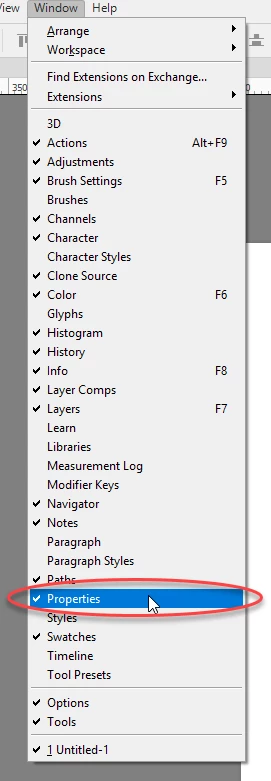
Yes it only affects text that has been transformed. The workaround appears to be type the value into properties and the correct value will appear in the character panel

I am not sure what they call the properties panel in German but I have circled it in the menu which may help you find it. It is the same panel used for Live Shape properties

Dave

65 replies

rudinsky.18556065
Participant
October 31, 2017

HELLO, i am user from Slovakia and have same problem. This is BUG - and if I use program for this kind of money and my workflow is related to effectiveness and clients, there is no way that I have to go to four settings, when I need to reload my lining space. Are you people crazy? ADOBE - this bug needs to be fixed ASAP.
Or - just go and use another tools such as sketch, invision app and other.
-
regards,
matt

Anne.lee
Participant
October 31, 2017

There is exactly same problem to me! And I agree with the opinion that is transformed/resized problem.(It might be transformed between point and pixel.)

When I see the photoshop text panel, the value number of text line is wrong. but, When I export a artboard that I worked to Zeplin(I'm using zeplin tool), The number of value is right. So.. I just put the value in the properties panel while doubting.... I want to be fixed by adobe team as soon as possible.

Participant
October 28, 2017

This is horrible!! I just got the newest photoshop on a new Mac. Can't even do Leading. Is there a way to contact someone at Adobe over this issue? So frustrating. Can't work with the Paragraph tool not working. How can the newest version of Photoshop be so messed up?!

davescm
Community Expert
Community Expert
October 28, 2017

Adobe are already aware - you can join the thread below if you wish to add comments

https://feedback.photoshop.com/photoshop_family/topics/character-leading-in-photoshop-cc-2 018-broken

In the meantime have you tried the workaround given earlier in this thread ?

a. Enter the leading value in the Properties panel.

b. When you hit enter the value in the properties panel box will change to something different (that is a bug) but will now show correctly in the Character panel

c. The value applied to the text will be the same as you entered and now shown in the character panel

Note : The workaround does not work backwards - you must enter in the properties box

Dave

Participant
October 27, 2017

This is a nightmare! A ton of "fires" and "emergencies" this week and this is slowing things down horrifically! Ugh... Awful! What a week to upgrade. Total mess.  

Known Participant
October 27, 2017

Missnick, I feel your pain. Take a deep breath and try to enjoy the weekend.

SNAPWarriors
Participant
October 27, 2017

Want to make sure I jump on this bandwagon. I work for a 501c3 and we are constantly developing and pushing out new designs and engagements...this problem in Photoshop has slowed our productivity and is simply unacceptable.

Eugene Reisch
Inspiring
October 27, 2017

Adding a 'ME TOO!' to this thread

Really annoying bug - using the Properties panel does work, but even then when I type in a new leading value, while it DOES work on the affected text, the textfield in the Properties box actually displays the wrong value, ie, I type '20' for leading (that's line spacing, y'all!), the Character panel 'leading' shows 20, but the Properties panel, where I just typed it, shows 13???)

Anyhoo, PLEASE FIX THIS... we've come to expect so much more from Adobe. This is a pretty silly bug.

scamper4
Participant
October 26, 2017

BTW, this must relate to another long-standing problem I've had, where copying text from one PSD to another often resulted in target text that was 2x larger (or 2x smaller) than it should be. Turns out, I bet, that the source text was "previously transformed," which is an attribute that Photoshop seems to pay way too much attention to.

Participant
October 26, 2017

Thanks for the work for the work arounds! This has been a HUGE headache. Thought I was going crazy at first. I hope the fix come soon, this is killing my workflow.

Ozona
Participating Frequently
October 26, 2017

Does anyone know if there is an official way to report bugs? Writing in the forum was the only way I saw to do it, but it seems that everyone in here are Photoshop users rather than Adobe personnel.

davescm
Community Expert
Community Expert
October 26, 2017

Hi

you can raise issues and ideas (for feature requests)  here:

Photoshop Family Customer Community

Note : For this issue it is already raised, but you can join the conversation :

https://feedback.photoshop.com/photoshop_family/topics/character-leading-in-photoshop-cc-2018-broken

Dave

Participant
October 26, 2017

I've tried all the mentioned workarounds with no luck.  Going to have to use an old version of CS5 on an old mac to continue working on my projects.  Unbelievable!

Inspiring
October 26, 2017

I've actually had this problem with more than just text that has been transformed. I've had it occur with completely new virgin text Please, Adobe, fix this problem. It's ridiculous.