
Known Participant
February 5, 2018
Answered

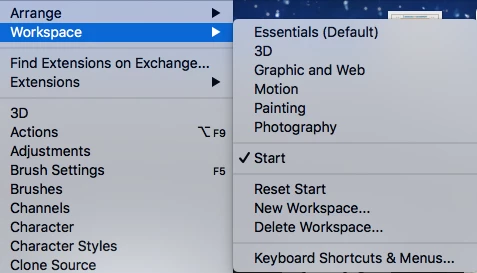
Photoshop CC 2018 macbook pro 3D workspace not showing

  • February 5, 2018
  • 1 reply
  • 1154 views

Hi all,

Attached is a snapshot of my imac at work. I have a MacBook pro at home, which runs the 3D component without issue but the 3D workspace does not show up under "workspaces." Any idea why? I did not upgrade to high sierra but did not think that would make a difference. I ran updates over the weekend hoping that would resolve it but it did not.
    This topic has been closed for replies.
    Correct answer gener7

    Photoshop > Preferences > Workspaces and the bottom click on "Restore Default Workspaces". Restart Photoshop and let me know if that worked.

    1 reply

    gener7
    Community Expert
    gener7Community ExpertCorrect answer
    Community Expert
    February 5, 2018

    Photoshop > Preferences > Workspaces and the bottom click on "Restore Default Workspaces". Restart Photoshop and let me know if that worked.

    Stefano Cavazzoni
    Participant
    February 6, 2018

    Same problem, still not work after your suggest. Any other idea?

    gener7
    Community Expert
    Community Expert
    February 6, 2018

    Two things I  can suggest:

    Reset Preferences:

    The other would be to reinstall Photoshop.