March 7, 2019
Question

Photoshop CC 2019 causes BSODs on Windows 10 randomly and unpredictably

  • March 7, 2019
  • 4 replies
  • 13264 views

Whenever I'm using Adobe Photoshop CC 2019 (version 20.0.3), it will freeze unexpectedly. When Photoshop freezes, the system will slowly get unusable as other applications running in the background stop responding. The system will then no longer respond to my keyboard. Eventually, the system crashes and gives a Blue Screen of Death (BSOD).

The unexpected freezing can happen anytime. I've noticed that it happens when I opened a .svg file, accessing the "Performance" under "Preferences", closing an unsaved file and when making the "Rulers" visible. I'm not sure what other things will trigger such a crash, though I'm certain that it is not limited to what I've listed above.

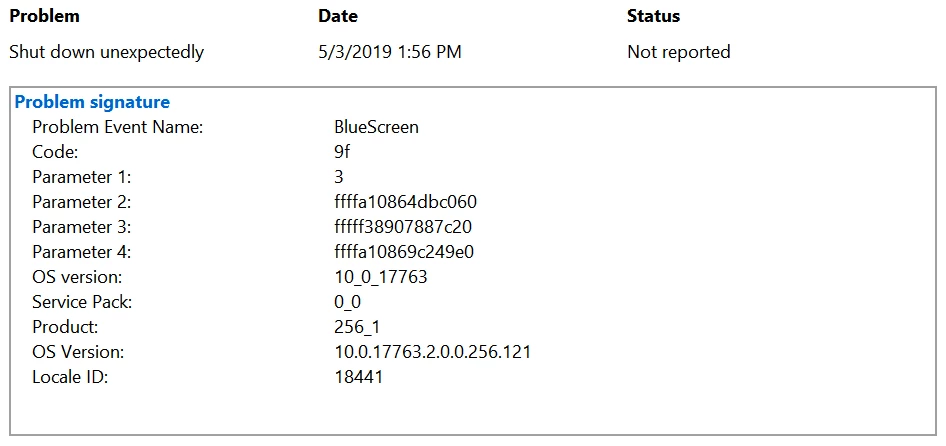
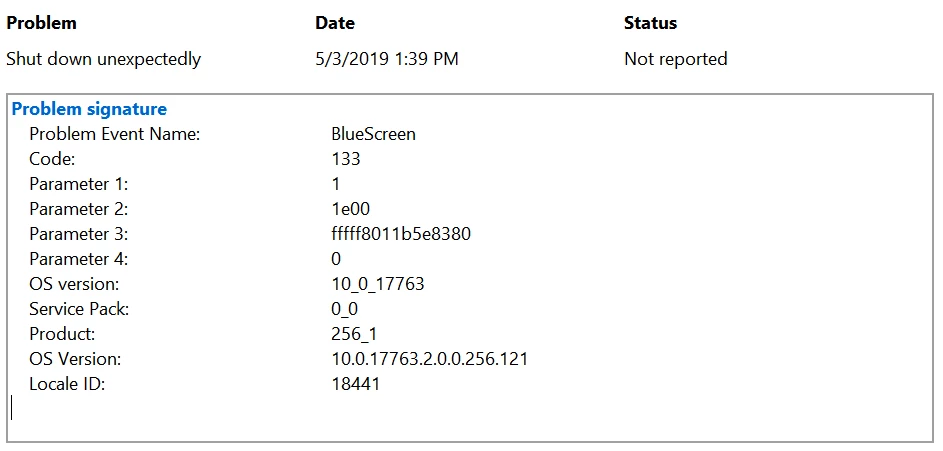
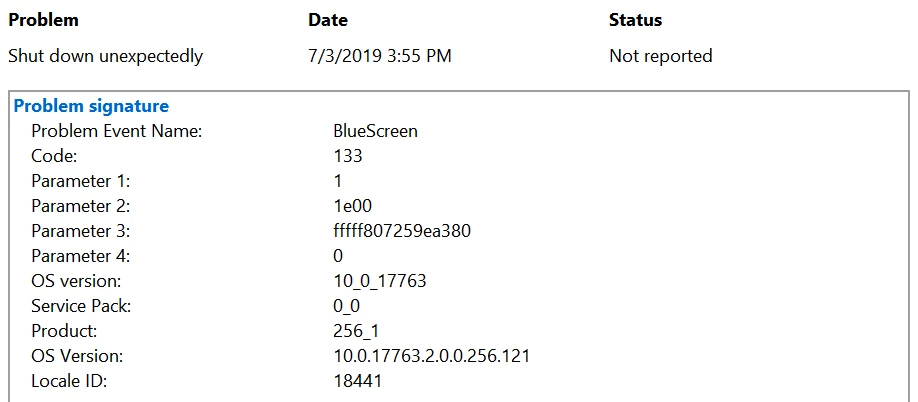
So far the BSODs caused by Photoshop all give a stop code of 0x00000133 (DPC_WATCHDOG_VIOLATION​) and 0x0000009F (DRIVER_POWER_STATE_FAILURE) (though the DRIVER_POWER_STATE_FAILURE might be caused by me plugging in power while Photoshop was unresponsive and causing that mayhem, resulting in the system unable to respond quickly).

Here are the images of the details available in the reliability history on those BSODs caused when the system stopped working when Photoshop was active:
Such a problem didn't happen previous months ago (one to three months ago before this problem showed up), despite user preferences being changed to better suit me; it only happened recently, and even with default user preferences. The first time such a problem came up was when I opened a .svg file to edit it.

I tried uninstalling and reinstalling the latest version of Photoshop (without keeping user preferences) but it still caused those BSODs. Maybe it's because of the changes to the new versions?

I'm using a computer that meets the system requirements specified by Adobe for Photoshop. Here's are my specs:

  • Processor: Intel Core i5-8250U @ 1.60 GHz (turbo boosts up to 3.40 GHz though it only reaches 3.38 GHz)
  • Memory: 8 GB of RAM
  • System type: 64-bit operating system, x64-based processor
  • Operating system: Windows 10, Education Edition (1809), OS Build 17763.316
  • Computer Model: Swift SF314-52G
  • Integrated Graphics: Intel UHD 620
  • Dedicated Graphics: NVIDIA GeForce MX150 (this is the graphics processor used for Photoshop)

I believe these are the specs that are within the scope of those problems. If you'd like to see other specs that you believe are part of the problem, feel free to reply.

Thanks a lot,

Brandon.

This topic has been closed for replies.

4 replies

aDifferentRealm
Participant
June 13, 2019

I ran into this issue yesterday / today. It seems my issue was caused by a Nvidia GeForce GTX 1060 driver update. According to Device Manager, I was running version 25.21.14.1972 (released 18 Mar 2019) which I updated to earlier in the week with yesterday being the first time I had opened Photoshop since the update. Previous to this update, Photoshop was running fine, but as of yesterday Photoshop would hang and ultimately cause my computer to BSOD, usually within 5-10 minutes of being open and often initially caused by keyboard input.

I ultimately rolled back the driver to its previous version (version 24.21.13.9901, released 13 August 2018) using Device Manager. Before the rollback, I also took some advice in this thread, and used "NVIDIA Settings" to configure my system to always use NVIDIA as opposed to "Auto-Select". I am not sure if the NVIDIA Settings change is actually required as I had tried it before the rollback and it was ineffective.

I did have to reinstall Photoshop as the rollback caused a linked library issue. Photoshop also worked during the linked library issue as it was only able to make use of my integrated Intel graphics card.

Other things I tried to no avail:

  • NVIDIA Settings change by itself
  • NVIDIA Settings change with:
    • Running in Windows 8 compatibility mode
    • Running as Administrator (I use Photoshop on a separate, non-Admin account)
    • Unchecking "Use Graphics Processor" in Edit > Preferences > Performance.

Computer specs:

  • Processor: Intell i7-7700HQ
  • Memory: 16 GB RAM
  • Graphics: Intel HD Graphics 630 / NVIDIA GeForce GTX 1060 (3GB DDR5 RAM)
  • Operating system: 64-bit Windows 10
  • Computer Manufacturer: MSI
  • Photoshop CC 2019 (version 20.0.4) installed on local SSD
AGrove92
Participant
March 14, 2019

I have a similar issue. I'm in a secure environment so there are a lot of restrictions in place. I've had photoshop deployed for a while but I started to see random boot loop issues that I could only repair with a reinstall of windows from the moment I deployed the December windows updates. now its sporadic when I install it on some machines its an instant boot loop, others will happen after the next round of updates.

I'm pretty sure this is related to the kernel security changes in the patch but I'm not sure why!

March 22, 2019

Interesting. I am starting to think that maybe it's the updates causing these weird things.

Also, I've gotten Acer to repair my PC. They claimed that the bluescreen was caused by faulty wireless drivers (you gotta be kidding me?!) and had reloaded the OS. They did some tests and the PC passed all of it (they stated, and I quote, "Functional/ADS test passed" and "Burnin test passed - no hang issue/TP OK". Also I'm not sure what TP means but it might have to do with the touchpad because I was having a problem with it). Still, Photoshop just can't make it and gives me a blue screen. The blue screen gave a bug check of DRIVER_POWER_STATE_FAILURE. Yes indeed, the same darn blue screen error before I sent my PC for repair.

While the edition and version of this PC when I've just gotten it back are "Windows 10 Home" and "Version 1803" respectively (and I have upgraded it to "Windows 10 Education" and "Version 1809" right after), I don't think these versions are the problems as I was using Photoshop with "Windows 10 Education" and "Version 1809" with no problems several months ago (probably the entire January in 2019). So I believe it might have to do with some of those small updates that Microsoft releases after 1809 was released that messed up with things.

Fortunately, un-checking "Use Graphics Processor" option helps to prevent this issue from coming up, but I'll lose GPU-only features in Photoshop. Not too bad of a workaround for me, but I don't like sacrificing tools for this.

D Fosse
Community Expert
Community Expert
March 22, 2019

Well, that does tell you it's the video driver, doesn't it?

c.pfaffenbichler
Community Expert
Community Expert
March 7, 2019

As Mr.Cox pointed out for a System Crash to happen something else than Photoshop needs to be involved.

Photoshop freezing my system entirely.

I am not a Windows OS-user myself but might a virus-scanner be involved?

March 8, 2019

The only line of defence I have against malware and viruses is Windows Defender, which comes pre-installed on Windows 10. Windows Defender does not see Adobe Photoshop as a threat.

D Fosse
Community Expert
Community Expert
March 8, 2019

I bet the dual graphics is the problem.

As cp says, an application cannot cause a BSOD. There are system architectural layers to insulate and protect from that. It can crash, but not BSOD. That has to be hardware or drivers - in this case most likely one of the video drivers.

However, an application can make calls to a driver that exposes a latent problem. Other apps may not make those calls.

Photoshop graphics processor (GPU) card FAQ

Trevor.Dennis
Community Expert
Community Expert
March 7, 2019

I am not sure if Photoshop is able to save a Crash Report during a  BSOD.  Check out this page on how to find the log if there is one, and cut and paste to this thread.

Submitting Crash Reports

Otherwise your system specs are on the marginal side.  How old is this system?  It might be that the hardware does not play nicely with Windows 10 1809

Just read your spec again, and with onboard HD620 graphics, I'm thinking that probably isn't that old.  However one thing we do know is that Photoshop does not like multiple graphics drivers — especially when they are different.  If you have Nvidia Settings in the Task Bar, open and set the system to always use the MX150.  Or try turning of GPU acceleration in Preferences.

I am not sure how frequent the crashes are happening.  If only occasionally, then it is going to be difficult to know if you have made a difference.

Photoshop graphics processor (GPU) card FAQ

.

March 8, 2019

The computer I'm using is slightly less than 1 year old.

Also, the crashes can happen anytime when using Photoshop, though I noticed that sometimes the system recovers while at other times, it just gives up (most of the time it gives up).