
Participant
February 2, 2019
Question

Photoshop CC 2019 Export Preview Grainy

  • February 2, 2019
  • 3 replies
  • 1538 views

Hey all!

I am having an odd issue where my export preview in Photoshop CC 2019 looks insanely grainy. It is not at all an accurate representation of the photo after it is done exporting.
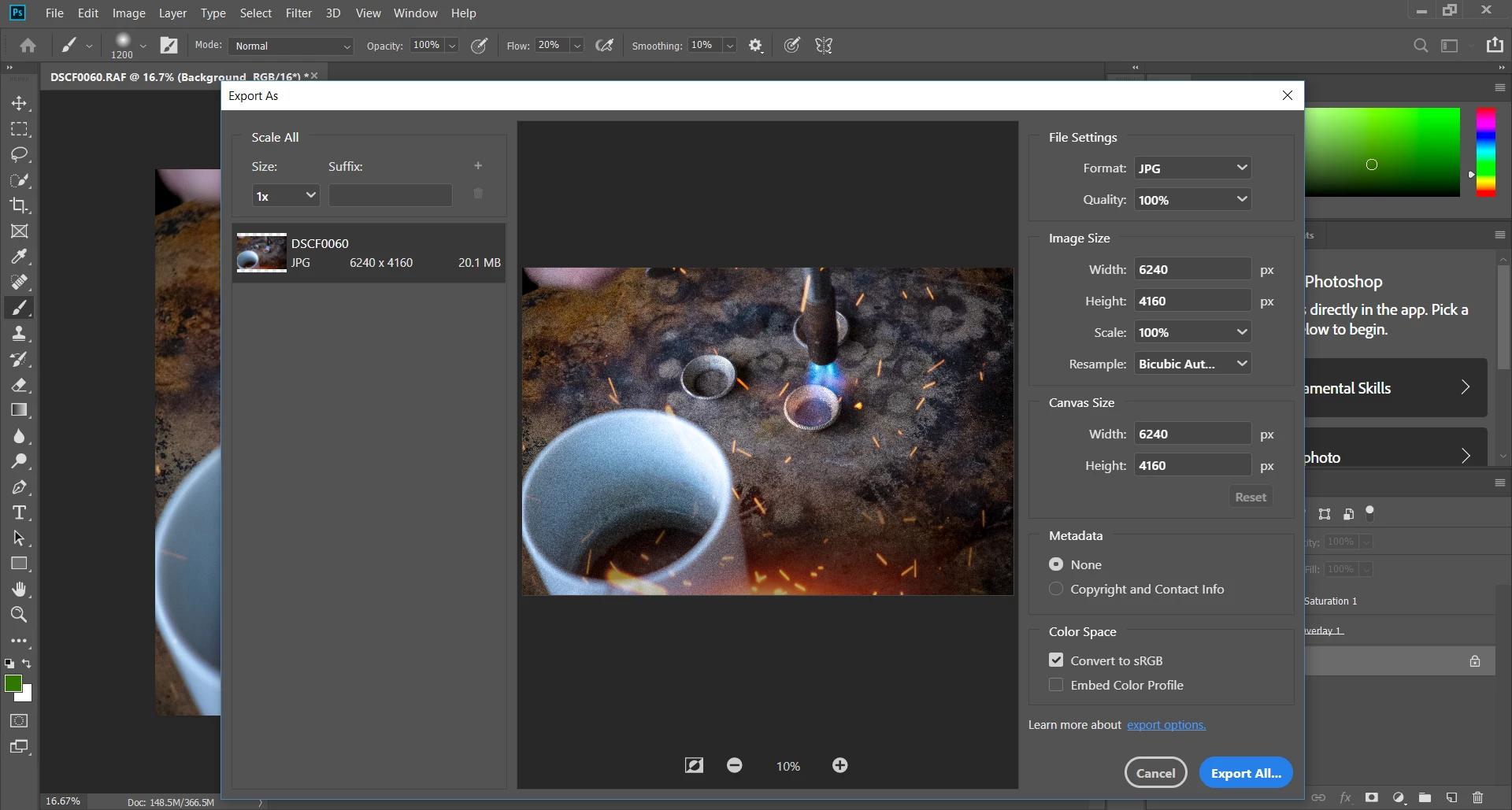
I hunted through the menu preferences and such, but can't seem to figure out a way to make this render more smoothly.

Anybody experienced this or have any suggestions?

This topic has been closed for replies.

3 replies

Per Berntsen
Community Expert
Community Expert
February 3, 2019

I think Trevor.Dennis is right, this is probably caused by the preview being scaled. If you want an accurate representation, you have to view at 100%. And that doesn't just apply to this particular situation – it applies to viewing any image in any application. At 100% view, one image pixel is represented by one screen pixel, and any other magnification will be inaccurate and misleading because the image has been scaled. To complicate matters, different applications use different algorithms for scaling, so viewing the same image at for instance 50% in two applications may produce different results.

If this image is for printing, I suggest that you do a Save As instead of Export, which will strip out the ppi value.

Export is intended for creating images for screen viewing, where ppi is irrelevant. (but if you open the exported image in Photoshop, it wil be 72 ppi, because Photoshop has to assign a ppi value)

If the image is for the web/screen viewing, I suggest that you reduce the pixel dimensions considerably.

Also check Embed color profile at the bottom of the dialog, this is unfortunately unchecked by default.

D Fosse
Community Expert
Community Expert
February 3, 2019

Well, first thing - don't use Export for a 6000+ pixel image, unless that's what you want on your website.

If it's not for web/mobile devices, use a regular Save As.

This is getting to be something of a problem. "Save For Web" spoke for itself, but "Export"...that is in fact the standard output method in a lot of software. So no wonder people reach for it as a first instinct.

Oh, what's actually causing this I have no idea. In fact I saw something similar in Bridge a couple of times, but I can't reproduce it now.

Trevor.Dennis
Community Expert
Community Expert
February 3, 2019

My first thought is the zoom ratio, which is only 10% in the preview window.  Set that to 100% and see if it matches the document window.

Is this a Save For Web export?  I don't do websites, and I am the last person to ask about colour.  We can see that the document is set to 16 bit, so I wonder if the reduced bit depth is loosing a lot of IQ.  I think you are saying that it looks OK when saved, so that's not going to be relevant.

I don't suppose the Resample algorithm is going to make a difference as it looks like you are not downsizing.  It does not look like the jaggies artefacts Nearest Neighbour can cause, but try setting it to Bicubic Smoother or Bilinear.

I am also not sure if cache levels would affect this screen, but check anyway.  I needs to be 2 or higher.  1 can cause noise and grain with screen renders.

So probably not a lot of help, but we've bumped your thread.  I'll put our Dag's name up to see if he has any insights. (he'll get an email notification of being mentioned in the thread).

Good luck