Participant
January 2, 2020
Answered

Photoshop CC 2020 is not automatically creating a new layer when I draw a basic shape

  • January 2, 2020
  • 2 replies
  • 7839 views

After updating ot the latest version of Photoshop I experienced some oncomfortable changes.

When I draw a basic shape (rectangle or ellipse) Photohop does not create a new layer for this object. It used to do that (the layer would then be called Rectangle 1/2/3).

How can I change the settings? Right now Photoshp just adds de shape to de underlaying layer.


Does anybody know the answer to this?

Thanks!
This topic has been closed for replies.
Correct answer

Hi

Are you holding down the Shift key before drawing the Shape, Photoshop will add the shape to the existing layer if you hold down the Shift key before drawing the Shape

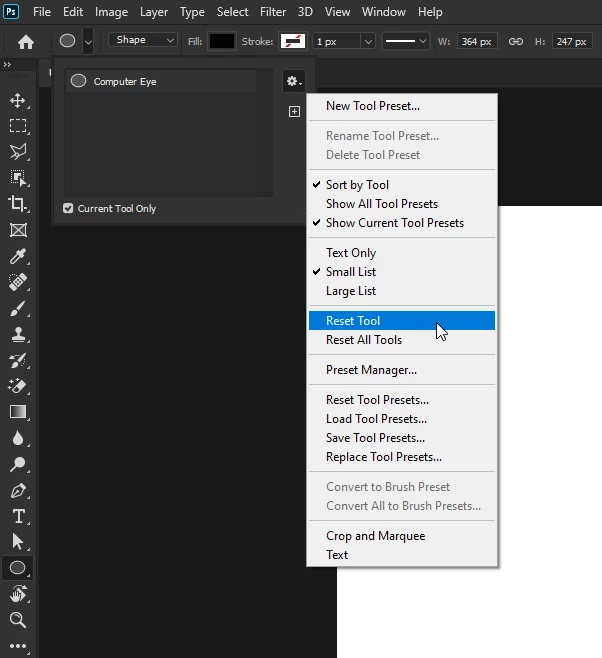
If it's not that then try resetting the Shape Tool

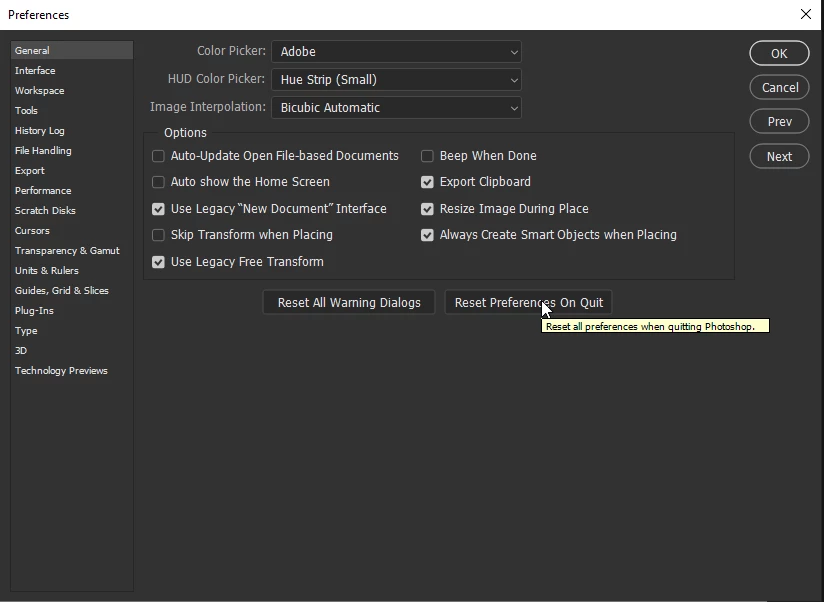
If that doesn't help try resetting Photoshop preferences


2 replies

jane-e
Community Expert
Community Expert
January 2, 2020

Hi

Two other things to check are:

  • Confirm you are in Shape mode
  • Confirm you have New Layer enabled

~ Jane


January 2, 2020

Jane, how did you manage to add a blank reply

Happy New Year 🙂


Edit: just refreshed and the blank reply disappeared

jane-e
Community Expert
Community Expert
January 2, 2020

Talent would be my first guess, Ged! I've moved it to the holding room.

Cheers, and best wishes for a Happy New Year! 😊


Correct answer
January 2, 2020

Hi

Are you holding down the Shift key before drawing the Shape, Photoshop will add the shape to the existing layer if you hold down the Shift key before drawing the Shape

If it's not that then try resetting the Shape Tool

If that doesn't help try resetting Photoshop preferences