
Participant
January 23, 2023
Answered

Photoshop CC 2023 - White is now a blueish tint

  • January 23, 2023
  • 6 replies
  • 9826 views

I am on Windows 11, up to date version and as of today any white in my images are now blue. I've tried messing with colorspace settings, HDR on and off, recalibrating display, etc. and it does not change at all. 

 

Randomly earlier I had my focus set to another program, and when clicking back in focus for Photoshop the white went back to normal. But after closing and opening Photoshop it went right back to the blue tint. Images export fine and the white shows as white but not in Photoshop itself. No clue what else to do to fix it permanently.
Correct answer Kevin Stohlmeyer

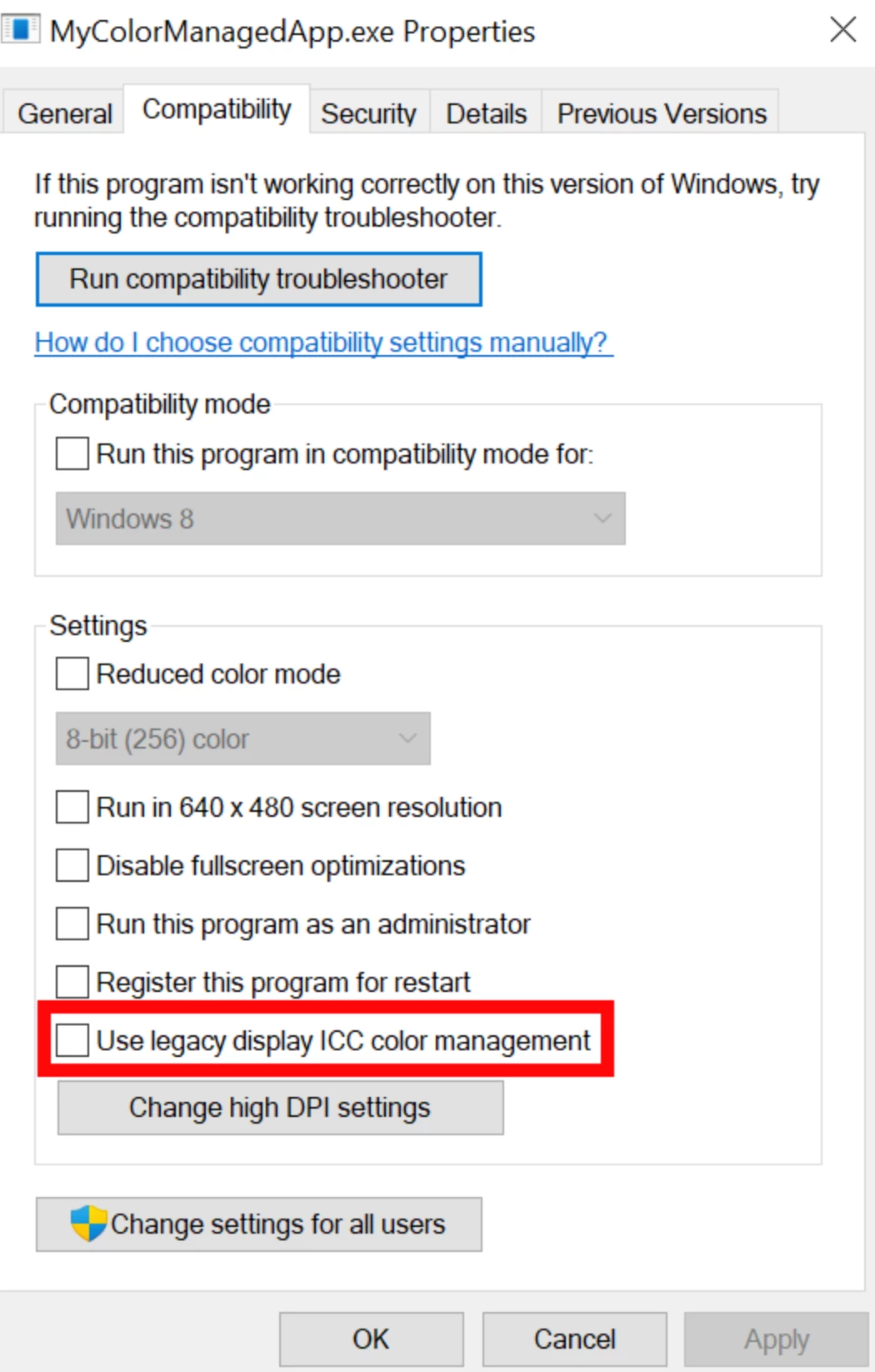
@Matttttttt I see you also have an HDR Calibrated profile. This has been noted by Adobe and Windows to be an issue with color shifts in Photoshop.

Go to Photoshop Properties and check/activate the box highlighted below.


6 replies

Participant
November 1, 2024

Right click an empty space on your desktop.

then click "Display Settings"

Select the monitor that is giving you this issue.

set the color profile to "native"

Kevin Stohlmeyer
Community Expert
Kevin StohlmeyerCommunity ExpertCorrect answer
Community Expert
January 24, 2023

@Matttttttt I see you also have an HDR Calibrated profile. This has been noted by Adobe and Windows to be an issue with color shifts in Photoshop.

Go to Photoshop Properties and check/activate the box highlighted below.


michaelwendrell
Participant
September 21, 2023

I had the same issue, worked here! Thanks a lot!

Participant
January 24, 2023

Hello everyone, thank you for your replies.


For @CShubert and @Kevin Stohlmeyer yes I double checked my color settings they are at default:


For @D Fosse I have chosen the sRGB IEC61966-2.1 ICC profile and clicked Set as Default however nothing changes on my end even after restarting Photoshop:


D Fosse
Community Expert
Community Expert
January 23, 2023

I think this sounds and looks like a broken monitor profile. Many monitor/laptop manufacturers distribute monitor profiles through Windows Update, and these profiles are surprisingly often defective in various ways.


A very quick test is to proof to Monitor RGB. This disables Photoshop's display color management and bypasses the monitor profile. In effect, it makes Photoshop behave like any other non-color managed application.


The monitor profile is set up in the operating system - it is not accessed in PS Color Settings. Reset everything here to defaults by picking one of the "general purpose" presets.


If proof to Monitor RGB clears the blue cast, the profile is bad and you need to replace it. The proper way is to use a calibrator, but if you don't have one, use sRGB IEC61966-2.1 for now. Relaunch Photoshop when done, the monitor profile is loaded at application startup.


CShubert
Community Manager
Community Manager
January 23, 2023

Hi @Matttttttt, as @Kevin Stohlmeyer said check your color settings and see if you are back to the default.  Share your settings if you are unsure.


Thank you,

Cory

Kevin Stohlmeyer
Community Expert
Community Expert
January 23, 2023

Check your color settings under Edit>Color Settings. It looks like you may have been set to a monitor profile instead of a standard profile.