
Participant
July 26, 2018
Answered

Photoshop CC and it doesn't recognise my camera raw images

  • July 26, 2018
  • 4 replies
  • 651 views

I've recently installed Photoshop CC and it doesn't recognise my camera raw images.  In the camera raw window I just get a series of coloured lines.  My camera is a Nikon 5500.

Mod Edit: changed title was "Derek"
    This topic is closed to new replies. Start a new post to keep the conversation going.
    Correct answer

    Hi

    This is normally an issue with a GPU driver

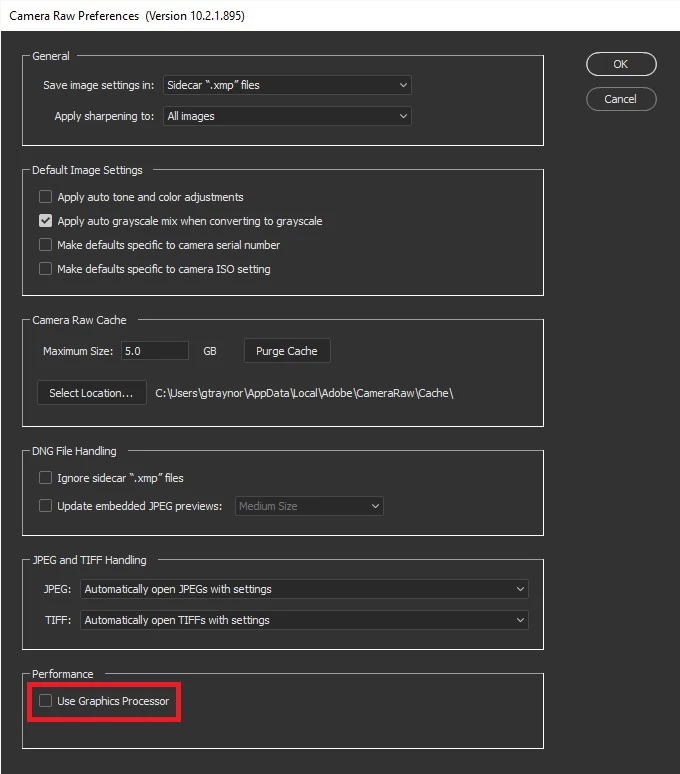
    Try disabling Use Graphics Processor in the Camera Raw settings, restart Photoshop to see if it helps

    If that doesn't help, in Photoshop go to Help > System Info and copy and paste that into this thread

    If it does fix the issue try updating your GPU driver from the manufactures website

    4 replies

    Correct answer
    July 26, 2018

    Hi

    This is normally an issue with a GPU driver

    Try disabling Use Graphics Processor in the Camera Raw settings, restart Photoshop to see if it helps

    If that doesn't help, in Photoshop go to Help > System Info and copy and paste that into this thread

    If it does fix the issue try updating your GPU driver from the manufactures website

    Participant
    July 26, 2018

    Hi Ged

    Thank you very much.  Disabling User Graphics Processor in the Camera

    Raw settings appears to have solved the problem.

    Derek

    July 26, 2018

    You're welcome