
danielquasar
Participating Frequently
Feb 6, 2017 7:26 AM UTC
Question

Photoshop CC Brush hardness acting weird. How to fix?

Hello everyone, I am having an issue with photoshop brushes in 0% hardness still showing edges. But first, here is my current system info:

CPU: i7-6700k @ 4ghz

RAM: 32gb DDR4 2300

GPU: nVidia 3gb 1060

OS: Win10 64bit latest

Adobe PS: CC latest (17.0.1)

System before I saw the issue:

CPU: i5 something from 6 years ago

RAM 16gb

GPU nVidia 550Ti

OS: Win10 64bit

I don't believe I saw the issue on my new setup before now.

Okay, back to the problem, which is a new issue. I can see the edges of brushes at 0% hardness. Even when opening up images made before the issue, it shows up. Here are some examples of what I am talking about:

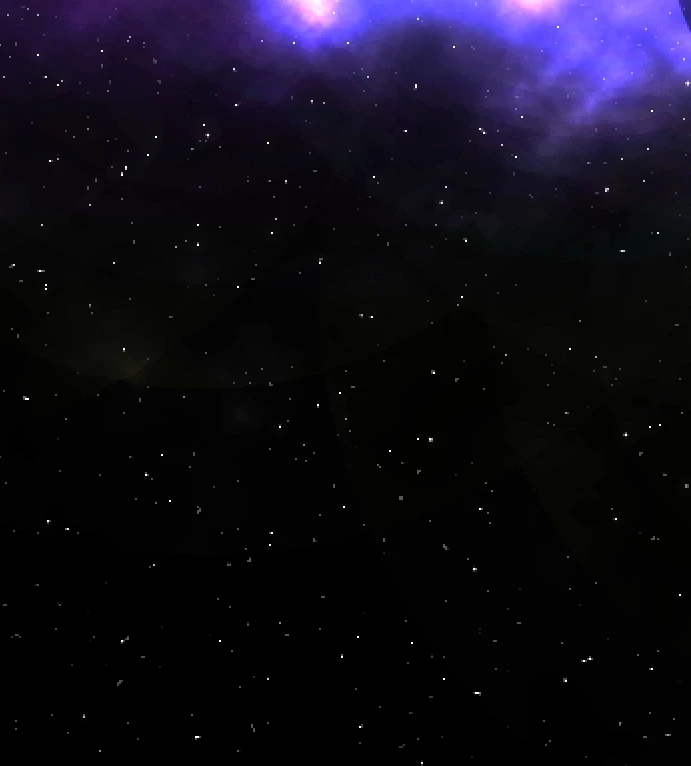
You can see the rings of where I clicked to add brush marks, and it never did this before. So, I went back to an old image and opened it up in an image viewer:
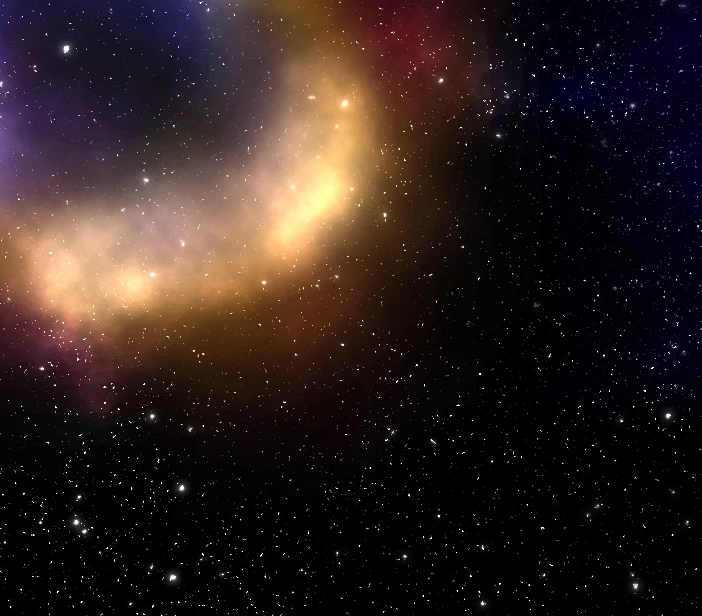
The issue doesn't appear, but when I opened it up in photoshop (like to edit), this is what I got:
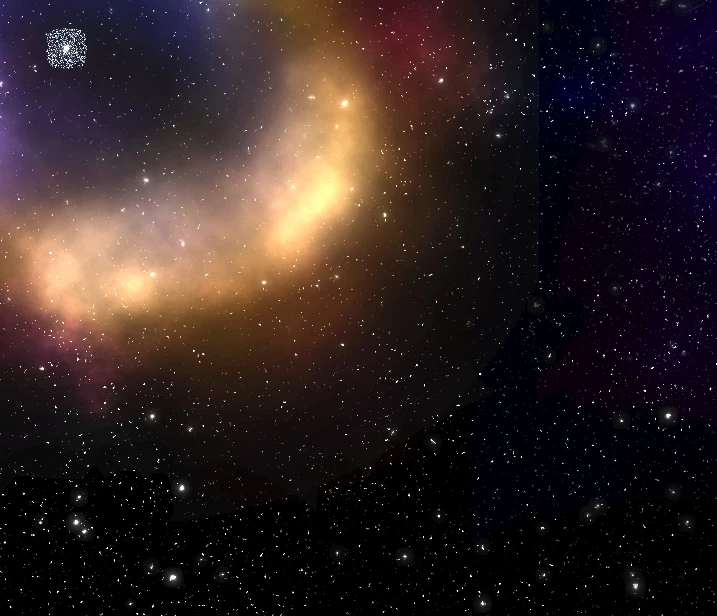
Now you can see the edges of where I brushed. Not to mention that now the glow around the center dot has turned into a pixelated mess.

Has anyone encountered this issue before? Do you know how to fix it? This is really killing me. Thanks in advance for the help!

This topic is closed to new replies. Start a new post to keep the conversation going.

15 replies

danielquasar
Participating Frequently
Feb 11, 2017 1:40 AM UTC

I guess the experts are as stumped as I am.

Translate
Trevor.Dennis
Community Expert
Community Expert
Feb 11, 2017 10:41 AM UTC

Just define a new brush preset.

Make a round selection and fill with black on a new layer.

Gaussian Blur using a high value to completely blur the circle.

With the brush tool and the layer with the blurred circle selected, define a new preset.  Call it

'Daniel's Incredibly Soft Brush that has no hard edges'   The name is crucial.  It won't work if you use another name.

You now have a soft brush you can stamp down with none of those 'edges'

Translate
danielquasar
Participating Frequently
Feb 12, 2017 3:33 AM UTC

Gave that a try. Still having issues, but at this point, I'm probably just going to have to switch up my technique. :-/ I'm also working with a much brighter monitor so maybe that is playing into it here. I appreciate the help, even the humorous tips. ;P

I'll keep working until I find a fix or a work around! ^_^

Translate
danielquasar
Participating Frequently
Feb 7, 2017 11:45 AM UTC

Just to update, this is still doing on and I have yet to figure out how to fix it.

Translate
Trevor.Dennis
Community Expert
Community Expert
Feb 6, 2017 11:01 AM UTC

I've been telling people that brushes are maybe not the best too for smooth gradients and to use Gaussian blur, but we have had so many people complain about this lately, that I've had a closer look, and there does seem to be an issue I don't remember being there before.  I wouldn't stake my life on it though.

The top stroke below is a full soft 125 pixel brush, and there is a definite edge against the white background.  I have set spacing all the way down to 1% btw.   The second stroke has Scatter set to 100% but not for both axes and control set to Off.  That has caused just enough jitter to soften the edge, but the brush size is obviously going to be bigger than the cursor.  The stroke is not perfectly parallel either, which is understandable with scatter jitter.  So I upped the Count to 2 for the last stroke to increase the stamp downs and hopefully straighten the line.  As you can see, it has not made a lot of difference.

That's as good as I can get it, but it is better than it was.

Translate
Trevor.Dennis
Community Expert
Community Expert
Feb 6, 2017 11:09 AM UTC

BTW I use the Flaming Pear Space Bundle for that sort of effect.  It's a bit dated now, but does an OK job and if you need to work quickly, it's useful.  You get the three plug-ins below for just $59, which I thought was OK.

Glitterato - Flaming Pear Software

LunarCell - Flaming Pear Software

SolarCell - Flaming Pear Software

It does this sort of thing between the three of them

Translate