
Participant
June 18, 2013
Answered

Photoshop CC Live Shapes Properties Bug (also in 2022)

  • June 18, 2013
  • 38 replies
  • 72477 views

Checking out the corner radii controls on vector shapes and it looked to be working, until I created a couple of other shapes. The Properties box inconsistently changes for the same kind of shapes.


Link to vid to show my problem: http://cl.ly/PheD


Looks like I can't go back to edit the shape for some reason. What would cause this? It's like the shape has suddenly stopped being a Live Shape.


Cheers!
This topic has been closed for replies.
Correct answer Jeff Arola

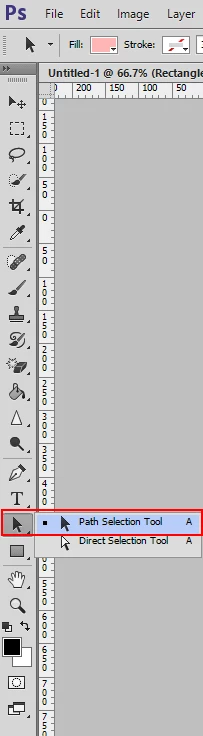
What happens if you use the Path Selection Tool to select the shapes instead of the Move Tool?

38 replies

Participant
September 10, 2013

Answer:

Hollow point selector (Direct Selector Tool) will allow smart object radius options in the "Properties" window once an actual point is selected in the shape.

Participant
September 10, 2013

They took the Live Shape Properties out completely !!  Put them back with or without bugs please.  The shape tool is usless without the Live Shape Properties!!! I'm at a stand still with my project now!!! 

Please put back Live Shape Properties!!!

Participant
September 10, 2013

@theHighestCliff :: They are still available for me after the recent update, though I haven't tested fto see if the bug is fixed yet (14.1)

Participating Frequently
September 9, 2013

Same issue. Not resolved in 14.1. Live shape properties CAN be accessed again with the right secret handshake: 1) create a new shape layer via copy (Cmd+J) and click on the layer thumbnail, OR select the shape using the Path Selection tool and click on the layer thumbnail. Very inefficient when you are dealing with anything more than just a few shapes.

Participant
August 30, 2013

Same issue.

Participant
August 30, 2013

Same issue,

Live shape properties get removed when re-selecting the "same tool" or when duplicating the layer.

please fix.

Participant
August 30, 2013

I also have this issue. Adobe please fix this asap!

Participant
August 29, 2013

Same problem here.

Still no fix?

August 29, 2013

Guess they don't consider it a priority.

Adobe Employee
August 14, 2013

Hello,

As a couple of people have mentioned in this thread, the Live Shapes Properties panel displays based on which subpaths are currently targeted. By targeted, I mean that the anchor points on the path are visible and at least one is filled. Clicking on the shape with the Path Selection tool is the easiest way to target a subpath. You can add to the targeted subpaths by Shift-clicking additional shapes with the Path Selection tool (or Shift-dragging around the shapes you want to select). Using the Move tool won't work for this, since it only selects the layer and not the path(s).

We implemented it this way because now that Photoshop has multiple path selection and there are so many combinations of ways to select different kinds of paths, it can get really buggy when Photoshop has to make assumptions about exactly what the user meant to select. This way, it's obvious which subpaths are targeted.

We are continuing to look into ways to improve the way the Properties panel works for live shapes. I see that a couple of bugs are mentioned here in addition to the issue with accessing the Live Shape Properties panel.

Not only does it forget that you have a live shape, you can not create a new live shape if the you have a shape layer selected.

This should be possible. Could you post the list of steps you're using when you run into this problem?

This bug goes a lot further than what you have stated, if you select the live shape from the tool menu on the left it removes the properties and the width becomes the width of the space.

I'm not sure what you mean by this -- could you also post a list of steps?

Thanks!

Participant
August 19, 2013

I made a little video of how this bug looks on my Mac:

Adobe Employee
August 21, 2013

Hi inteilla,

Are you using Photoshop CS6? The Live Shapes Properties panel was introduced in Photoshop CC.

Participant
July 17, 2013

Well, it's also the same for us. Please adobe fix this issue, it is quite annoying and affecting our workflow...

Participant
July 16, 2013

Is there an ETA on this issue?... Does anyone else have issues resizing the rounded rectangles after it switches from 'live shape'?