
Participant
December 17, 2014
Answered

Photoshop CC missing Magic Wand Tool

  • December 17, 2014
  • 5 replies
  • 98317 views

Hello! I've got the new Adobe Creative Suite for Student and am working with Photoshop CC at the minute but cannot find the Magic Wand Tool anywhere... is it not in this version, or is it hiding somewhere... can't locate it. Please help?
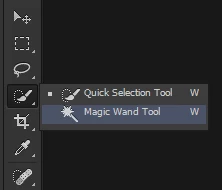
    Correct answer Wolf Eilers

    Look in your Tools:

    5 replies

    Sylvia72
    Participant
    October 5, 2020

    Hi, I cant find my maic wand or the quick selection tool.  Please help

    Known Participant
    March 8, 2022

    good luck


    Participant
    August 7, 2020

    How to find the magic wand when using MacOS Sierra, and Photoshop CS5? The advice above did not work.

    chanaart
    Community Expert
    Community Expert
    April 27, 2018

    Happy you had help looking for the tool!

    In general in the tool box you see the small arrow that indicates that there is another tool inside!

    mags89
    Participant
    March 27, 2020

    Hi, I do have the tool bar in place, and can select magic wand and use it. BUT the usual bar that comes up with the magic wand, the add, substract, contiguos options doesnt appair anymore.. Can someone tell me how to activate them again?. TNX 

    mistrn8
    Participant
    April 27, 2018

    Yep that worked!  Hold down the left mouse button while clicking on the Quick Selection Tool and you will see it.  Thank you!

    Wolf Eilers
    Wolf EilersCorrect answer
    Inspiring
    December 17, 2014

    Look in your Tools:

    Participant
    December 18, 2014

    Wolf, thank you so much... I am truly burning the midnight oil and can't think straight. I've found it now with your help.