Participant
December 3, 2017
Answered

Photoshop CC No text layers

  • December 3, 2017
  • 2 replies
  • 10213 views

This is a stupid question, but it's got me stumped.  I'm trying to type text onto a photo.  I select the Horizontal type tool, and type my text.  I try to move it around and get a warning that no layer has been selected.  Looking in the layers panel, I see that there is no text layer. Hard to do, but I managed it!  How can no layer be generated when you start to type?
    This topic has been closed for replies.
    Correct answer davescm

    Hi

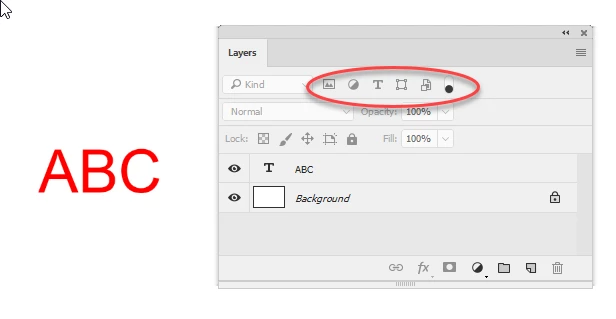
    Check your layers panel and ensure you don't have a filter on as in the example below

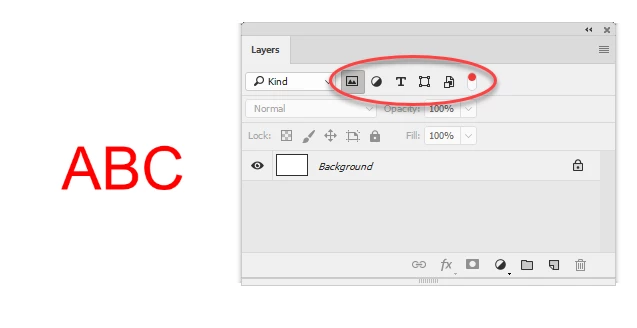
    removing the filter above reveals the text layer:

    Dave

    2 replies

    Chuck Uebele
    Community Expert
    Community Expert
    December 3, 2017

    Did you click on the canvas first to have an insertion point? Just clicking the text tool will not generate a text layer.

    seiurusAuthor
    Participant
    December 3, 2017

    Yes, I clicked on the canvas, and the type appeared, as it should.  Just no layer in the layers panel.

    davescm
    Community Expert
    davescmCommunity ExpertCorrect answer
    Community Expert
    December 3, 2017

    Hi

    Check your layers panel and ensure you don't have a filter on as in the example below

    removing the filter above reveals the text layer:

    Dave

    cmgap
    Community Expert
    Community Expert
    December 3, 2017

    You're right... as soon as you select the Text tool a new layer should be created. Not sure why that is happening but what type of file are you working with? Have you tried a different file? What are the settings on this file? Can you post a screen shot with the Text tool selected showing the whole screen?