geotso
Inspiring
December 3, 2024
Answered

photoshop changed some glyphs

  • December 3, 2024
  • 2 replies
  • 300 views

Hi,

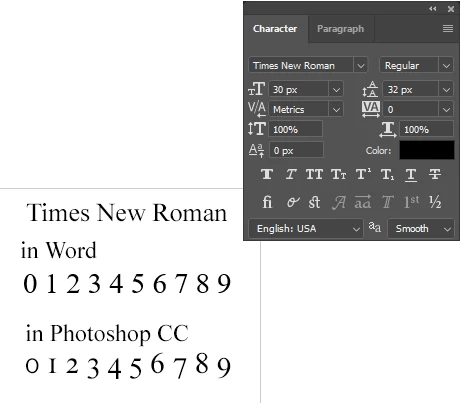
after some years of use, suddenly the last few days, Photoshop changed the appearance of some characters, especially the numbers, as you can see in the attached screenshot.

- The Character panel shows the settings at typing the numbers time.

- The image shows the Times New Roman font. Also affected: Arial, Calibri, to mention the most used.

Can some one help me fix it, please?


Thanks.
 

This topic has been closed for replies.
Correct answer Ged_Traynor

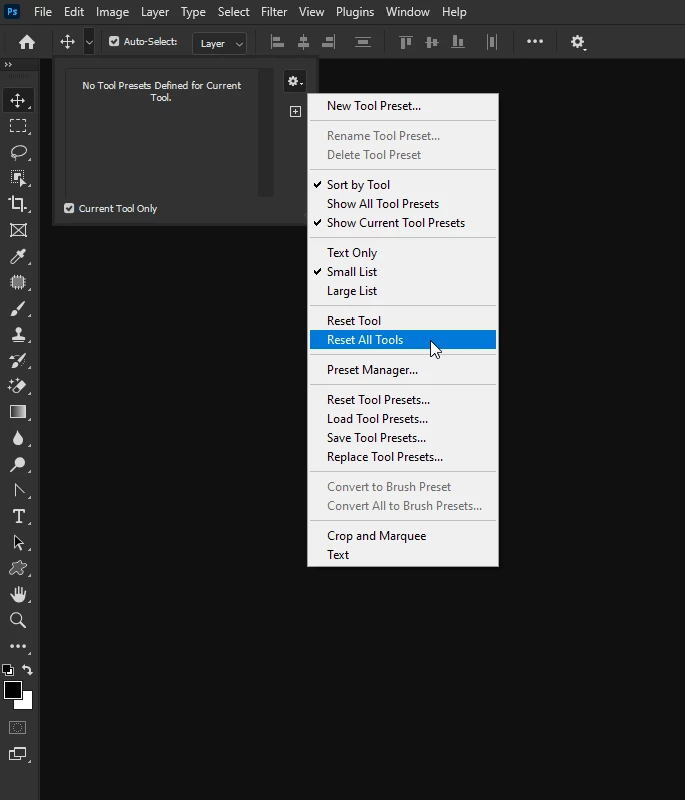
@geotso have you tried resetting the tools

2 replies

Per Berntsen
Community Expert
Community Expert
December 3, 2024

These are Oldstyle figures.

Click the menu in the top right corner of the Character panel, and uncheck Open Type > Oldstyle.


Ged_Traynor
Community Expert
Community Expert
December 3, 2024

@Per Berntsen well spotted, didn't even know that option was there

Ged_Traynor
Community Expert
Ged_TraynorCommunity ExpertCorrect answer
Community Expert
December 3, 2024

@geotso have you tried resetting the tools