Known Participant
July 1, 2026
解決済み

Photoshop Closes due to stack overflow Error (2026)

  • July 1, 2026
  • 返信数 7.
  • 364 ビュー

Issue Summary: Photoshop immediately closes with the following error reported within Windows Event Viewer:

Faulting application name: Photoshop.exe, version: 27.2.0.15, time stamp: 0x693dd4a4
Faulting module name: Photoshop.exe, version: 27.2.0.15, time stamp: 0x693dd4a4
Exception code: 0xc00000fd
Fault offset: 0x0000000000fcec4b
Faulting process id: 0x1E04
Faulting application start time: 0x1DD091413396C60
Faulting application path: C:\Program Files\Adobe\Adobe Photoshop 2026\Photoshop.exe
Faulting module path: C:\Program Files\Adobe\Adobe Photoshop 2026\Photoshop.exe
Report Id: 7dd72f9c-e3e2-4cf4-9d11-5bc32d485e92
Faulting package full name: 
Faulting package-relative application ID

Product And Version: (PHOTOSHOP 27.5.0 Desktop Release)

In Addition the screen turns white and the application freezes before it closes. 

Operating System: 

Edition    Windows 11 Home
Version    24H2
OS build    26100.8655
Experience    Windows Feature Experience Pack 1000.26100.315.0

Steps to Reproduce: Simply use the program as normal and it’ll eventually freeze up and crash no matter what you do. 

Expected Result: Photoshop should operate as normal.

Actual Result: Seconds to minutes before photoshop freezes up and closes, preventing me from doing any work.

Attachments:

pslog_20260701_125609

UXPLogs_2026-07-01_12-56-10_374494



    解決に役立った回答 Sameer K

    Hi ​@Bitbat, ​@Simon Gostling, ​@Murphy4ever, ​@emmahihey, & ​@danielkhc. I notice a pattern, and I appreciate the added details and logs.


    If this crash occurs on a personal machine, please try these two sets of steps and report back with your findings:

    1- In the Creative Cloud app, press CTRL + ALT + T (Win) to launch Creative Cloud Troubleshooter & select 'Close Creative Cloud and related processes' > click on Go.

    2- Windows - Press Windows + R to open the Run Window. Type in %temp% and delete files or folders with 'NGL' in their names. 

    3- Go to the following location on Windows 10/11: Users/[user name]/AppData/Roaming/Adobe/UXP/PluginsStorage/PHSP

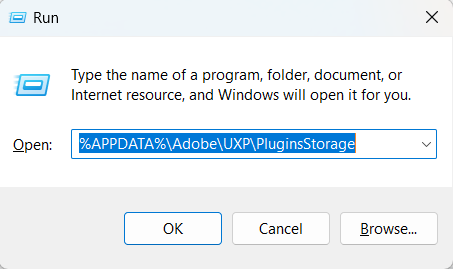
    4- Press Windows + R & type this is the Run Window - %APPDATA%\Adobe\UXP\PluginsStorage

    image.png

    5- In the PHSP Folder, rename the 27 folder by adding a .old at the end. ('27' > Rename > '27.old')

    6- You must restart your machine and use Creative Cloud to launch Photoshop next time. 


    These changes will help mitigate the activation error in Photoshop.

    Let me know how it goes.

    Thanks!

    Sameer K

    返信数 7

    Sameer K
    Community Manager
    Sameer KCommunity Manager解決!
    Community Manager
    July 7, 2026

    Hi ​@Bitbat, ​@Simon Gostling, ​@Murphy4ever, ​@emmahihey, & ​@danielkhc. I notice a pattern, and I appreciate the added details and logs.


    If this crash occurs on a personal machine, please try these two sets of steps and report back with your findings:

    1- In the Creative Cloud app, press CTRL + ALT + T (Win) to launch Creative Cloud Troubleshooter & select 'Close Creative Cloud and related processes' > click on Go.

    2- Windows - Press Windows + R to open the Run Window. Type in %temp% and delete files or folders with 'NGL' in their names. 

    3- Go to the following location on Windows 10/11: Users/[user name]/AppData/Roaming/Adobe/UXP/PluginsStorage/PHSP

    4- Press Windows + R & type this is the Run Window - %APPDATA%\Adobe\UXP\PluginsStorage

    image.png

    5- In the PHSP Folder, rename the 27 folder by adding a .old at the end. ('27' > Rename > '27.old')

    6- You must restart your machine and use Creative Cloud to launch Photoshop next time. 


    These changes will help mitigate the activation error in Photoshop.

    Let me know how it goes.

    Thanks!

    Sameer K

    Participant
    July 8, 2026

    Hi Sameer,

    Here is some feedback. I followed your guide, and the issue seems to be resolved now. At least this afternoon, it has not crashed again.

    Much appreciated.

    Regards.


    Ged_Traynor
    Community Expert
    Community Expert
    July 4, 2026

    @danielkhc there’s another thread here with similar issues


    Participant
    July 4, 2026

    I am using Photoshop 27.8

    When I open a jpg or png file, it crashed and give an error report.

    If I go offline and open the same jpeg/png, it does not crash.

    In the crash log file:

    <stackStatement index="0" symbolname="AuthenticateLicense"/> <stackStatement index="1" symbolname="AuthenticateLicense"/> <stackStatement index="2" symbolname="AuthenticateLicense"/>

    exception="EXCEPTION_ILLEGAL_INSTRUCTION" exceptionCode="0xc000001d"

    Looks like Photoshop is checking some licensing online and it fails, and crashes Photoshop.

    If I go offine, open Photoshop and open a jpeg/png file, it does not crash. Without exiting Photoshop, if I go onlne, and open another jprg/png file, it does not crash.

    Participant
    July 3, 2026

    I have found a possible work around, it's not ideal as you potentially lose some PS functionality, but it seems to make PS more stable.

    Stop PS from connecting to the internet through windows defender, or a VPN.  

    I tried it initially by disconnecting wi-fi and PS didn't crash.

    Participant
    July 3, 2026

    I am experiencing the same issue. It is quite strange, as I have both a desktop and a laptop.

    PS2026 works well on my desktop, but it keeps crashing on my laptop, even when I only open it and do nothing. It usually crashes after 5 to 10 minutes.

    PS2026 was working fine on the laptop previously, and this issue only started last week.

    Participant
    July 2, 2026

    I have exactly the same issue, a crash, without warning, after a few minutes of use.  It started 3 days ago.  I have tried all the fixes Google and AI can suggest.  I know that this doesn’t help you, sorry.

    Participant
    July 3, 2026

    Oh my god, me too. It started a few days ago. I tried EVERYTHING. I’m about to give up. Please tell me if you find the solution.

    Participant
    July 3, 2026

    Try stopping PS accessing the internet through Windows Defender.  It worked for me but obviously I lost AI functionality.

    Bitbat作成者
    Known Participant
    July 1, 2026

    LOGS (ADOBE IS FAILING TO UPLOAD)

    https://filebin.net/zxtvn2zdqxhz9efh

    Bitbat作成者
    Known Participant
    July 1, 2026

    SPECS OF MACHINE:

    PROCESSOR: INTEL CORE I9 14900F, 64 GB Ram, 16 GB Nvidia RTX 4080 Super, 2 TB SSD