I'm trying to automate part of my workflow in Photoshop and I'm wondering if there's a way to achieve this, either with an Action, a JSX/UXP script, or a plugin.
I have a PSD containing multiple Artboards. Each Artboard contains several layers (text, shapes, images, etc.).
For each Artboard, I'd like to:
Select all layers inside that Artboard only (excluding hidden and locked layers).
Convert those layers into a single Smart Object.
Rename the Smart Object using the Artboard's name.
Center the Smart Object horizontally and vertically within the Artboard.
Repeat this process automatically for every Artboard in the document.
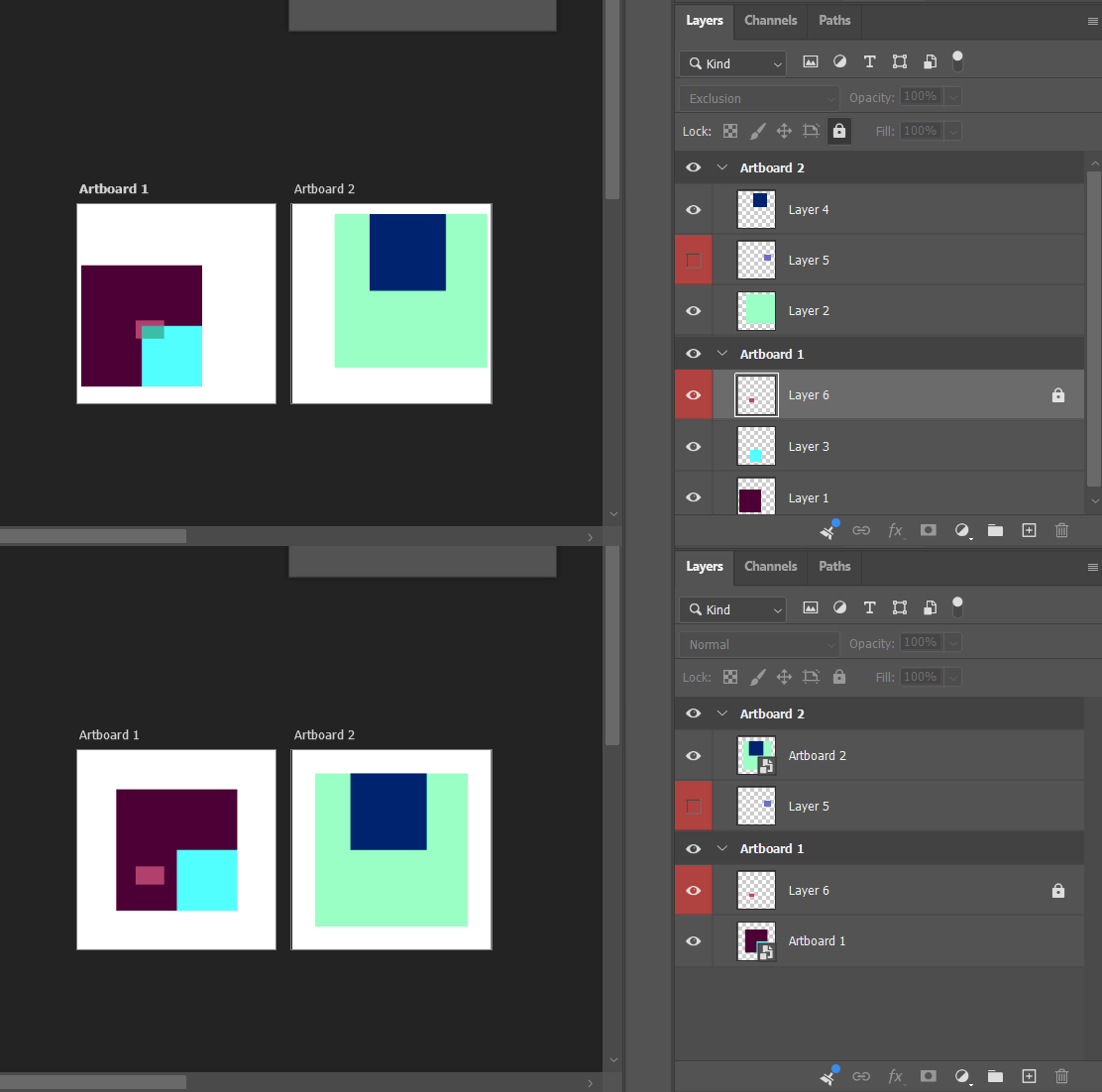
The final result would look like this:
Before:
Card 01 (Artboard)
    Background
    Title
    Description
After:
Card 01 (Artboard)
    Card 01 (Smart Object)
I'm using Photoshop 2025 on macOS.
I initially thought this could be done with an Action, but I couldn't find a way to select only the layers inside the current Artboard or loop through every Artboard automatically.
Has anyone achieved something similar, or knows of a script/plugin that can do this?
I'm also open to alternative workflows if there's a more efficient way to achieve the same result. My goal is to prepare hundreds of card designs as Smart Objects for use with batch mockup generation.
Any suggestions would be greatly appreciated. Thanks!
/* Artboard Content to Centered Smart Object https://community.adobe.com/questions-712/photoshop-convert-all-layers-in-each-artboard-to-a-smart-object-automatically-1633971 Stephen Marsh 27th July 2026 - v1.0: Initial release
For every artboard in the active document: 1. Collects the parent artboard's child layers, skipping any that are hidden or locked 2. Selects those layers and converts them into a single Smart Object 3. Renames the Smart Object to match the artboard's name 4. Centers the Smart Object horizontally and vertically within the artboard's bounds */
#target photoshop
(function () {
var interactiveDebug = false;
if (!app.documents.length) { alert("A document must be open to run this script!"); return; }
// Preserve user settings var originalRulerUnits = app.preferences.rulerUnits; var originalDisplayDialogs = app.displayDialogs; // Configure user settings app.preferences.rulerUnits = Units.PIXELS; app.displayDialogs = DialogModes.NO; var doc = app.activeDocument; var processedCount = 0; var skippedArtboards = [];
try { var artboards = collectArtboards(doc);
if (artboards.length === 0) { alert("No artboards were found in this document."); } else { for (var i = 0; i < artboards.length; i++) { var artboard = artboards[i]; var result = processArtboard(doc, artboard); if (result.success) { processedCount++; } else { skippedArtboards.push(artboard.name + " (" + result.reason + ")"); } }
// Main processing function function processArtboard(doc, artboard) { // Loop over artboards and collect the appropriate layers var candidates = []; for (var j = 0; j < artboard.layers.length; j++) { var child = artboard.layers[j]; if (child.visible && !isLayerLocked(child)) { candidates.push(child); } } if (candidates.length === 0) { return { success: false, reason: "no eligible visible/unlocked layers" }; } // Process the layers... // 1. Select all eligible layers inside this artboard selectLayersByID(getLayerIDs(candidates)); // 2. Convert the current selection into a Smart Object convertSelectedLayersToSmartObject(); var smartObject = doc.activeLayer; // 3. Rename it to match the artboard smartObject.name = artboard.name; // 4. Center it within the artboard bounds centerLayerInBounds(smartObject, getArtboardBounds(doc, artboard)); return { success: true }; }
///// Helper Functions /////
function collectArtboards(doc) { var result = []; for (var i = 0; i < doc.layers.length; i++) { var lyr = doc.layers[i]; if (lyr.typename === "LayerSet" && isArtboard(lyr)) { result.push(lyr); } } return result; }
function isArtboard(layerSet) { try { if (layerSet.artboardEnabled === true) return true; } catch (e) { // Ignore DOM call and use the AM check } try { var key = stringIDToTypeID("artboardEnabled"); var ref = new ActionReference(); ref.putProperty(charIDToTypeID("Prpr"), key); ref.putIdentifier(charIDToTypeID("Lyr "), layerSet.id); var desc = executeActionGet(ref); return desc.hasKey(key) && desc.getBoolean(key); } catch (e2) { return false; } }
function getLayerIDs(layers) { var ids = []; for (var i = 0; i < layers.length; i++) { ids.push(layers[i].id); } return ids; }
function selectLayersByID(ids) { var ref = new ActionReference(); for (var i = 0; i < ids.length; i++) { ref.putIdentifier(charIDToTypeID("Lyr "), ids[i]); } var desc = new ActionDescriptor(); desc.putReference(charIDToTypeID("null"), ref); executeAction(charIDToTypeID("slct"), desc, DialogModes.NO); }
function convertSelectedLayersToSmartObject() { executeAction(stringIDToTypeID("newPlacedLayer"), undefined, DialogModes.NO); }
function getArtboardBounds(doc, layerSet) { /* active artboard dimensions, by Rune L-H https://community.adobe.com/t5/photoshop-ecosystem-discussions/photoshop-2015-artboards-in-scripting/m-p/7276275 */ var previousActive = doc.activeLayer; try { doc.activeLayer = layerSet;
var ref = new ActionReference(); ref.putEnumerated(charIDToTypeID("Lyr "), charIDToTypeID("Ordn"), charIDToTypeID("Trgt")); var desc = executeActionGet(ref);
var artboardKey = stringIDToTypeID("artboard"); if (desc.hasKey(artboardKey)) { var artboardDesc = desc.getObjectValue(artboardKey); var rectKey = stringIDToTypeID("artboardRect"); if (artboardDesc.hasKey(rectKey)) { var rectDesc = artboardDesc.getObjectValue(rectKey);
function getDescNumber(desc, keyName) { var key = stringIDToTypeID(keyName); var type = desc.getType(key); switch (type) { case DescValueType.INTEGERTYPE: return desc.getInteger(key); case DescValueType.DOUBLETYPE: return desc.getDouble(key); case DescValueType.UNITDOUBLE: return desc.getUnitDoubleValue(key); default: return desc.getDouble(key); } }
function centerLayerInBounds(layer, rect) {
var artboardCenterX = (rect.left + rect.right) / 2; var artboardCenterY = (rect.top + rect.bottom) / 2; var b = layer.bounds; // pixel units (ruler set above) var layerCenterX = (b[0].value + b[2].value) / 2; var layerCenterY = (b[1].value + b[3].value) / 2; var deltaX = artboardCenterX - layerCenterX; var deltaY = artboardCenterY - layerCenterY;
/* Artboard Content to Centered Smart Object https://community.adobe.com/questions-712/photoshop-convert-all-layers-in-each-artboard-to-a-smart-object-automatically-1633971 Stephen Marsh 27th July 2026 - v1.0: Initial release
For every artboard in the active document: 1. Collects the parent artboard's child layers, skipping any that are hidden or locked 2. Selects those layers and converts them into a single Smart Object 3. Renames the Smart Object to match the artboard's name 4. Centers the Smart Object horizontally and vertically within the artboard's bounds */
#target photoshop
(function () {
var interactiveDebug = false;
if (!app.documents.length) { alert("A document must be open to run this script!"); return; }
// Preserve user settings var originalRulerUnits = app.preferences.rulerUnits; var originalDisplayDialogs = app.displayDialogs; // Configure user settings app.preferences.rulerUnits = Units.PIXELS; app.displayDialogs = DialogModes.NO; var doc = app.activeDocument; var processedCount = 0; var skippedArtboards = [];
try { var artboards = collectArtboards(doc);
if (artboards.length === 0) { alert("No artboards were found in this document."); } else { for (var i = 0; i < artboards.length; i++) { var artboard = artboards[i]; var result = processArtboard(doc, artboard); if (result.success) { processedCount++; } else { skippedArtboards.push(artboard.name + " (" + result.reason + ")"); } }
// Main processing function function processArtboard(doc, artboard) { // Loop over artboards and collect the appropriate layers var candidates = []; for (var j = 0; j < artboard.layers.length; j++) { var child = artboard.layers[j]; if (child.visible && !isLayerLocked(child)) { candidates.push(child); } } if (candidates.length === 0) { return { success: false, reason: "no eligible visible/unlocked layers" }; } // Process the layers... // 1. Select all eligible layers inside this artboard selectLayersByID(getLayerIDs(candidates)); // 2. Convert the current selection into a Smart Object convertSelectedLayersToSmartObject(); var smartObject = doc.activeLayer; // 3. Rename it to match the artboard smartObject.name = artboard.name; // 4. Center it within the artboard bounds centerLayerInBounds(smartObject, getArtboardBounds(doc, artboard)); return { success: true }; }
///// Helper Functions /////
function collectArtboards(doc) { var result = []; for (var i = 0; i < doc.layers.length; i++) { var lyr = doc.layers[i]; if (lyr.typename === "LayerSet" && isArtboard(lyr)) { result.push(lyr); } } return result; }
function isArtboard(layerSet) { try { if (layerSet.artboardEnabled === true) return true; } catch (e) { // Ignore DOM call and use the AM check } try { var key = stringIDToTypeID("artboardEnabled"); var ref = new ActionReference(); ref.putProperty(charIDToTypeID("Prpr"), key); ref.putIdentifier(charIDToTypeID("Lyr "), layerSet.id); var desc = executeActionGet(ref); return desc.hasKey(key) && desc.getBoolean(key); } catch (e2) { return false; } }
function getLayerIDs(layers) { var ids = []; for (var i = 0; i < layers.length; i++) { ids.push(layers[i].id); } return ids; }
function selectLayersByID(ids) { var ref = new ActionReference(); for (var i = 0; i < ids.length; i++) { ref.putIdentifier(charIDToTypeID("Lyr "), ids[i]); } var desc = new ActionDescriptor(); desc.putReference(charIDToTypeID("null"), ref); executeAction(charIDToTypeID("slct"), desc, DialogModes.NO); }
function convertSelectedLayersToSmartObject() { executeAction(stringIDToTypeID("newPlacedLayer"), undefined, DialogModes.NO); }
function getArtboardBounds(doc, layerSet) { /* active artboard dimensions, by Rune L-H https://community.adobe.com/t5/photoshop-ecosystem-discussions/photoshop-2015-artboards-in-scripting/m-p/7276275 */ var previousActive = doc.activeLayer; try { doc.activeLayer = layerSet;
var ref = new ActionReference(); ref.putEnumerated(charIDToTypeID("Lyr "), charIDToTypeID("Ordn"), charIDToTypeID("Trgt")); var desc = executeActionGet(ref);
var artboardKey = stringIDToTypeID("artboard"); if (desc.hasKey(artboardKey)) { var artboardDesc = desc.getObjectValue(artboardKey); var rectKey = stringIDToTypeID("artboardRect"); if (artboardDesc.hasKey(rectKey)) { var rectDesc = artboardDesc.getObjectValue(rectKey);
function getDescNumber(desc, keyName) { var key = stringIDToTypeID(keyName); var type = desc.getType(key); switch (type) { case DescValueType.INTEGERTYPE: return desc.getInteger(key); case DescValueType.DOUBLETYPE: return desc.getDouble(key); case DescValueType.UNITDOUBLE: return desc.getUnitDoubleValue(key); default: return desc.getDouble(key); } }
function centerLayerInBounds(layer, rect) {
var artboardCenterX = (rect.left + rect.right) / 2; var artboardCenterY = (rect.top + rect.bottom) / 2; var b = layer.bounds; // pixel units (ruler set above) var layerCenterX = (b[0].value + b[2].value) / 2; var layerCenterY = (b[1].value + b[3].value) / 2; var deltaX = artboardCenterX - layerCenterX; var deltaY = artboardCenterY - layerCenterY;
First of all, thank you so much for taking the time to help me. I really appreciate it!
In the meantime, I actually found one of your older scripts and, with the help of ChatGPT, I managed to modify it so that it now perfectly converts the contents of every artboard into a Smart Object. It keeps the Smart Object in exactly the same position, preserves the artboard name, and processes all artboards automatically.
The only part I haven't been able to add is centering the newly created Smart Object within its parent artboard.
I tried running the script you kindly posted, but unfortunately every artboard is skipped with the message:
"no eligible visible/unlocked layers"
So I suspect the layer collection logic doesn't match the structure of my document.
Since I already have a working script that handles the Smart Object conversion perfectly, would it be possible for you to help me by adding only the part that centers the newly created Smart Object inside each artboard? I believe that's the only missing piece.
I'd really appreciate any guidance you can provide. Thanks again for all your help and for sharing your scripts with the community!
Best regards, Angela
/* Convert All Artboards Content to Separate Linked Smart Objects.jsx Stephen Marsh v1.0 - 19th September 2025: Initial release v1.1 - 20th September 2025: Corrected the layer selection code to include groups v1.2 - 22nd September 2025: Added a progress bar for the artboard and .psb file processing loops https://community.adobe.com/t5/photoshop-ecosystem-discussions/converting-a-bunch-of-artboards-into-separate-linked-smart-objects/m-p/15510949 Partly based on: https://community.adobe.com/t5/photoshop-ecosystem-discussions/converting-to-linked-smart-object/m-p/13357539 Note: The linked smart object will have four guides indicating the original artboard bounds, which might be useful if you have content extending beyond the artboard edges. */
#target photoshop
app.activeDocument.suspendHistory("Convert All Artboard's Content to Separate Linked Smart Objects", "main()");
function main() { if (app.documents.length > 0) { var doc = app.activeDocument; var docName = doc.name.replace(/\.[^\.]+$/, ''); var layerSets = doc.layerSets;
// 1st Progress Bar: Artboards var win1 = new Window("palette", "Processing Artboards", undefined, { closeButton: false }); win1.orientation = "column"; win1.alignChildren = ["fill", "top"]; win1.margins = 15;
var txt1 = win1.add("statictext", undefined, "Processing artboards..."); txt1.alignment = "fill";
function layerLock(lockValue) { var idapplyLocking = stringIDToTypeID("applyLocking"); var desc1113 = new ActionDescriptor(); var idnull = charIDToTypeID("null"); var ref514 = new ActionReference(); var idLyr = charIDToTypeID("Lyr "); var idOrdn = charIDToTypeID("Ordn"); var idTrgt = charIDToTypeID("Trgt"); ref514.putEnumerated(idLyr, idOrdn, idTrgt); desc1113.putReference(idnull, ref514); var idlayerLocking = stringIDToTypeID("layerLocking"); var desc1114 = new ActionDescriptor(); var idprotectNone = stringIDToTypeID(lockValue); desc1114.putBoolean(idprotectNone, true); desc1113.putObject(idlayerLocking, idlayerLocking, desc1114); executeAction(idapplyLocking, desc1113, DialogModes.NO); }




 AdChoices