Participant
March 18, 2024
Question

Photoshop Corrupting Files

  • March 18, 2024
  • 8 replies
  • 573 views

Hello has anybody faced this issue, somehow during my work photoshop just hangs then corrupts the file im working on.

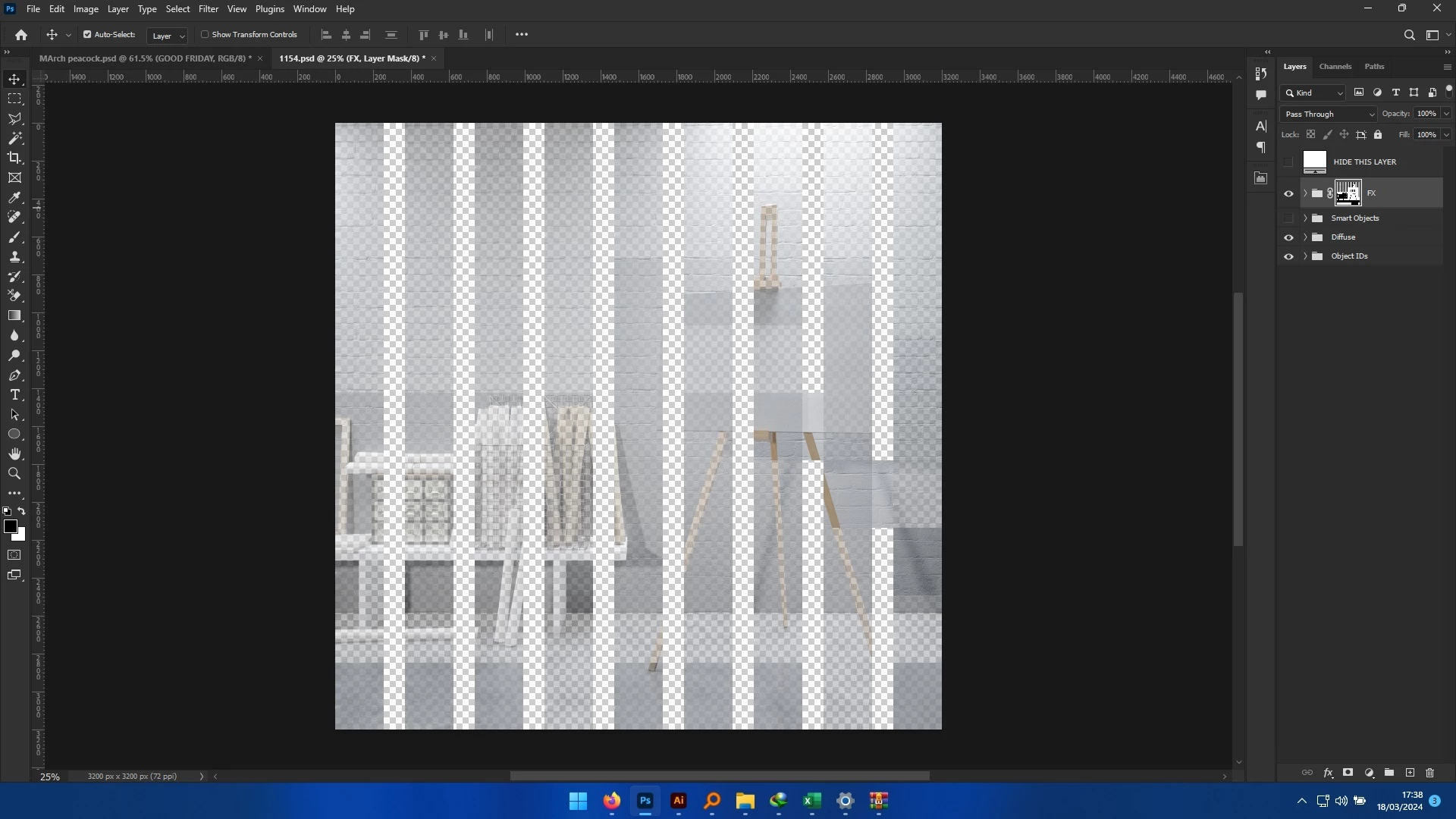
1. All layers get some funny pattern as shown in the screenshot

2. All the open files also get corrupted with the same pattern

3. none is recoverable


Its really annoying after doing a composition for 5 hours (first corrupted file), the current screenshot has like 6 peices on the same artboard, im really stressed.


Someone kindly help with a solution or fix. Thanks in advance


Current machine

Dell Vostro 14-5459

8GB RAM

Geforce 930MX


8 replies

Participant
February 20, 2025

This could be a GPU-related issue...try disabling "Use Graphics Processor" in Photoshop's Performance settings and see if that helps. Also, updating your graphics drivers or rolling back to a previous stable version might help

Participant
February 20, 2025

Hi, I've had this issue for many years and had many support chats with Adobe about it. At one point they suggested that my GPU is not supported as others have suggested here. I went out and bought a new 8.5k setup only for it to keep happening. I got no real joy fom Adobe other than disabling the GPU accelleration which is not a fix because a fix would have the issue be gone and still have GPU accelleration. I'm in the process of switching my workflow over to Affinity Photo.

Kevin Stohlmeyer
Community Expert
Community Expert
March 19, 2024

@Daniel_RNSD to be clear - this isn't a software issue per se or we'd have multiple reports of this happening. It's something specific with your setup. I would still upgrade your GPU to something compatible - not ruling out that it is causing the corruptions especially if saving local.

Participant
March 19, 2024

@Kevin Stohlmeyeri turned off the GPU and files stil look the same, shared the file with a friend with a 2021 mac m1 chip and file is still messed up. For the mean time i have rolled back to PS 2021, cause i have some crazy deadlines to meet.


Thanks for your response and im happy to discuss further incase of any inquiry into this issue and i hope Adobe sorts it out in the future.

Kevin Stohlmeyer
Community Expert
Community Expert
March 18, 2024

@Daniel_RNSD turning off the GPU is not a permanent fix - but it will tell us if your files are truly corrupted or just rendering errors due to the limited GPU.

Participant
March 18, 2024

Files im currently working on are saved on the desktop, let me try turning off the GPU though i did notice when i do, i cant use Camera Raw

Derek Cross
Community Expert
Community Expert
March 18, 2024

You need a more powerful computer with more RAM and plenty of spare hard disk capacity.

Kevin Stohlmeyer
Community Expert
Community Expert
March 18, 2024

@Daniel_RNSD First - where are you saving your files?

Second your 930MX does not meet current Photoshop Requirements. You may be seeing GPU render issues, not corruption. Try turining off the GPU in Preferences/performance - does it resolve the rendering?