Participant
March 3, 2025
Question

Photoshop Crahses when ever I try to save my work

  • March 3, 2025
  • 1 reply
  • 195 views

Hi all.

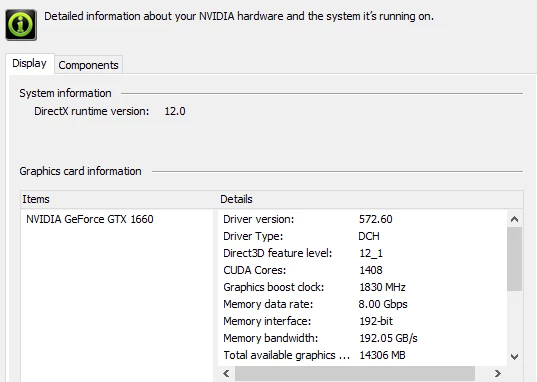
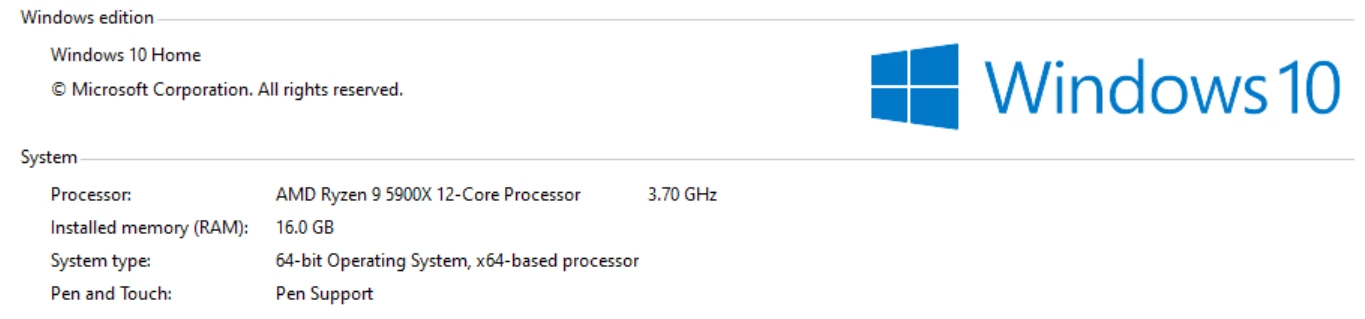
I recently got a Photoshop subscription, but I've been using it for the past four years through my college, which provided it to students. I never had any issues until my school subscription ended, and I had to start paying for it myself. Now, Photoshop crashes whenever I try to save my work—though not every time, it happens about one in three saves. My PC specs haven't changed, so I don't understand why this is. This issue is wasting so much of my time. Please help!


PC specs: 


1 reply

danny2000Author
Participant
March 3, 2025

I would like to add, that I have tried uninstalling photoshop and the creative cloud app and rinstalling it. I have tried using older versions of Photoshop. Nothing is working. 

nikunj.m
Legend
March 5, 2025

Hi, thanks for reaching out and we're sorry about the trouble! 

Please go to the Help menu in Photoshop, then System info and copy the text. You can either paste the text as a reply here or in a text file and share the file with us. Also, are you trying to save the file on your computer's local storage or an external drive? 

Meanwhile, you can try to reset the preferences of Photoshop using the steps mentioned here: https://adobe.ly/43l6JvF

Please backup your settings prior to resetting the preferences. You can check: https://adobe.ly/4brmmUi


Let us know how it goes!

Thanks,
Nikunj