
Participant
Sep 30, 2025 6:22 PM UTC
Question

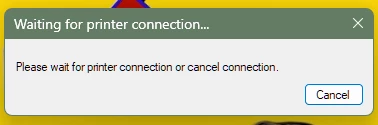
Photoshop crashing on opening any file, trying to open printer.

If I open any file, or create a new file I am immediately met with a "waiting for printer connection..." message, which it for some reason can not do. I am also not trying to print anything so not sure why it matters whether it can connect or not. I've unninstalled all printers, and reinstalled the one that I do use, and connected everything. I thought maybe it was the latest PS update, so I reverted to an older version and still the same problem. I'm running on windows 11.
 

4 replies

Anshul_Saini
Community Manager
Community Manager
Oct 20, 2025 5:49 PM UTC

Hi @spencers80265762 & @jdietz72,


Thanks for the follow-up and for confirming it’s still happening. The behavior you’re describing (apps stalling or crashing while “waiting for printer connection…”) usually comes from Photoshop or Illustrator trying to query a default printer that’s unavailable or not responding.


As a workaround, please try the steps in this Adobe help article: https://adobe.ly/4hh5h2o


This forces the apps to reference a stable virtual printer and often stops the crash/hang behavior.


Could you both try that and let us know if the issue stops after switching the default printer?


Best,

Anshul Saini

Translate
jdietz72
Participating Frequently
Oct 7, 2025 8:46 PM UTC

Just chiming in to say that not only is this happening to me as well, it's now started in Illustrator. I have not and will not ever print from either application and as someone who works very quickly, having to sit and wait several minutes for Adobe's applications to connect to a printer I don't ever want them to use is absurd. This seems like it should be a simple background task that shouldn't be holding up work...

Translate
Community Manager
Sep 30, 2025 6:40 PM UTC

Hi @spencers80265762, welcome to the community!
Sorry to hear you're running into trouble. As a first step, could you try resetting your Photoshop preferences? That’ll return things to the default setup in case something behind the scenes got a bit off.
Here’s how to do it: https://adobe.ly/42WIaEe
If you can't open Photoshop at all, you'll need to do the manual method.


Let me know how it goes!
Alek

Translate
*(If you mention me with an @, like @Aleke, I’ll get a notification and can respond faster.)*
Participant
Oct 1, 2025 6:42 PM UTC

Thank you for the suggestion Alek,

Unforunately it still asks me the same thing, and then crashes.

Translate