
Participating Frequently
January 31, 2022
Question

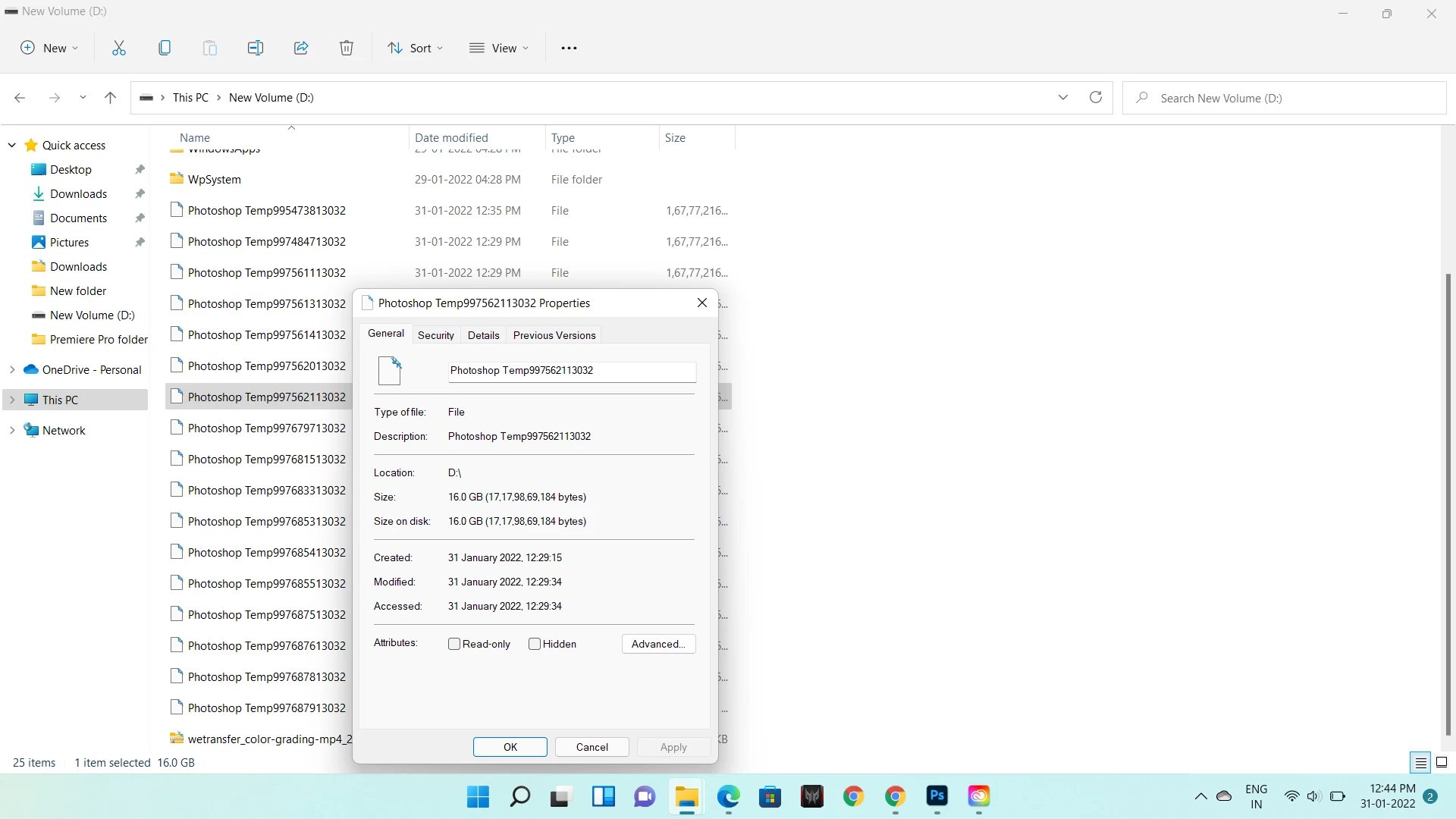
photoshop creating huge temp files

  • January 31, 2022
  • 7 replies
  • 17222 views

hi

I am using Photoshop version 23.11 and it creating huge temp files. one is around 16 gb. so i am not able to work on software as its takes 3-4 minutes for transforming. i am unable to solve this problem , i havent got this kind of problem in previous version. 

have a look at screenshot and help me out.
7 replies

Participant
March 1, 2025

Even I'm having the same problem now


Participant
January 18, 2025

Same issue man, but it's even worst i already gave it 64 gb still it's taking all that using 10gb ram for a single layer 4k project like wtf

D Fosse
Community Expert
Community Expert
January 18, 2025

@its_8261 


64 GB scratch disk is not enough if you're working with large files. The standard recommendation is 250 - 500 GB, in some cases up to a TB or more. It's not Photoshop, it's just a lot of data to manage.


Raster image editing requires huge amounts of memory, much more than any RAM you may have installed. There is no such thing as enough RAM, no matter how much you have installed.


Everything Photoshop does is always written to the scratch disk, right from the start. The scratch file is Photoshop's main memory. It contains all history states for all open documents (plus some overhead for things like smart objects). Every history state potentially adds the full uncompressed file size.


RAM contains current data. It's like a cache for the scratch disk's main memory.


If you absolutely have to work with limited scratch disk space, the first thing you need to do is go into Preferences and set history states to 1. That means you can't go back in history, but it will dramatically reduce the scratch size.

Participant
October 26, 2024

Same problem. Did you get any solution? Please help cant do anything in ps, cant even resize anything.

Participant
August 26, 2023

Ive had similar problems when working with large photo merge jobs. My recourse for now is to set up a link to my user name Appsdata.Local.Temp and delete any big files i have. I think Bridge needs an auto-purge myself. 

Participant
February 25, 2022

I have the same problem. Did you find a solution? If so, please post it here.

Conrad_C
Community Expert
Community Expert
February 25, 2022

The existing thread already solved the problem. The temp file was huge because they accidentally created a document that was huge (they read the unit of measure wrong).


The solution was to create a normal sized document, and that produces a normal sized temp file.

Participant
February 25, 2022

Not for me, unfortunately

@mj
Community Expert
Community Expert
January 31, 2022

Hi @Rohan5EE9 ,


Photoshop temp files depend on a number of factors, including how many files you have open, the number of history states and the size and resolution of your images.


16Gb for a cache is relatively small. The reason your Photoshop is running slow is probably because you are running out of HDD space. Can you share how much free space you have?


Here's a document from Adobe on how to boost your performance: https://helpx.adobe.com/in/photoshop/kb/optimize-photoshop-cc-performance.html


If you want to manually purge the cache files, check out this thread. https://www.howtogeek.com/302544/HOW-TO-MANUALLY-CLEAR-OUT-PHOTOSHOPS-MASSIVE-TEMP-FILES/


Let us know how you go.

mj


Mohammed Jogie |
Adobe Certified Associate |  Expert | Instructor |
Adobe Community Professional | Creative Ambassador | User Group Manager |
Member International Society of Typographic Designers | Lifetime Friend International Council of Design | Interaction Design Association Local Leader |
Member Pan Afrikan Design Institute | Ambassador Visual Arts Network South Africa | Central Executive Committee Member Printing SA |
Legend
January 31, 2022

I'm guessing the problem is this. You wanted an 808 x 632 pixel design. But you didn't notice that the unit was centimetres, rather than pixels. This makes your image 14000 times bigger than you expected! This will be slow for anyone, and will need huge amounts of disk space.

D Fosse
Community Expert
Community Expert
January 31, 2022

Go to Preferences > Scratch Disks, take a screenshot and post it here.


16 GB isn't particularly big. It can be many times that, and you need to have enough free disk space to accomodate it.

Rohan5EE9Author
Participating Frequently
January 31, 2022

as i start working on photoshop ..temp files keep creating and i am not able to work fast. it takes me 2-3 minutes to tranforming text as i want. its keeps loading. so my software is  working very slow as compare to previous version.

i have changed location "D" drive. have a look at this screenshot 

D Fosse
Community Expert
Community Expert
January 31, 2022

Well, 900 GB should be plenty, so that's not the problem.

Can you go to Help > System Info and paste the entire content here?