
Admired_epicness154A
Participating Frequently
February 7, 2017
Answered

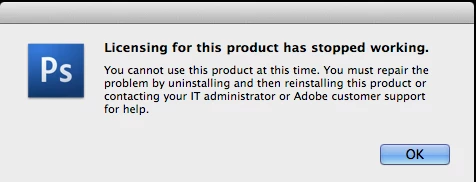
Photoshop CS3 licensing has stopped working
  • February 7, 2017
  • 5 replies
  • 2156 views

I no longer have my installers and need support personel to assist me. Being passed of on to a forum full of pages that don't apply to my situation is extremely frustrating. I have contacted customer support and am very dissatisfied with the support methods Adobe has engineered. Adobe products are great but I have been going around in circles with this issue for hours, trying to find some resolve with no hope in sight. Perhaps this error message could have provided a link to some useful customer service department. Instead, users like myself search for hours only to find this insanely cumbersome method of resolve. Even locating the community Im supposed to post this to is a nightmare.

I am on OSX 10.9.5

Correct answer Peru Bob

Update:

CS3 can no longer be activated. The activation servers have been shut down.

5 replies

Peru Bob
Community Expert
Peru BobCommunity ExpertCorrect answer
Community Expert
January 29, 2025

Update:

CS3 can no longer be activated. The activation servers have been shut down.

Legend
February 7, 2017

Ok I found this Adobe page which still (for now) has CS3 downloads including Mac Photoshop so that's a start:

Download CS3 products

Now, if you registered Adobe should have a record of your serial number - info on that page. Remember you need to use the Adobe ID in use AT THAT TIME.

If it's not there but you think you did register one more thing to try; ask Adobe again if they can look up your CS3 Photoshop serial number; just that. If you include any other request, comment or criticism you just give them an excuse to say it isn't supported.

Admired_epicness154A
Participating Frequently
February 7, 2017

They should be paying you for this... Many thanks for the solid solution, advice and patience.

Legend
February 7, 2017

I am not answering you as a professional. As you know, this is a community forum. We help if we can. "Helping" can include explaining when expectations are not supported by reality. Someone might be able to provide a link if you will say which of the many CS3 product suites you owned, or if it was just Photoshop CS3. Nobody can help you retrieve license info except Adobe. If you've lost your serial number you have probably lost the use of your product.

Admired_epicness154A
Participating Frequently
February 7, 2017

Please excuse my frustration as this experience has left me with much anger. I did not know that you were not employed with Adobe and apologize for my tone and demands. My drive with installers and license codes has been stolen along with many other items of equipment from my storage unit. I should not be taking out my grief on anyone but my experience in dealing with Adobe support on this matter is subpar service in my opinion. Getting to this answer has been entirely too cumbersome.

Makes sense now though. Why would they help me with a product I already own? I could just be forced to subscribe to their CC service for over $100 a year due to complete lack of support. No one else makes a comparable product so thats that. Just unrealistic expectations on my part.

Photoshop CS3 only.

Legend
February 7, 2017

There is no useful customer service department for you. Adobe support their products for 5 years from release. Cs3,4,5 and CS6 are all now out of support. And Never get rid of your installers!!! Many are still available for download but they probably won't be for long.

Legend
February 7, 2017

And you are also not on an OS that was ever supported for Cs3.

Mohit Goyal
Community Manager
Community Manager
February 7, 2017

Hi nicholass,

Please refer the below troubleshooting guide related to this issue.

Error: "Licensing has stopped working" | Mac OS

Let us know if that helps.

Regards,

Mohit

Admired_epicness154A
Participating Frequently
February 7, 2017

This does not help me. Can you provide the specific solution? I have read this whole page already. It does not address my OS or issue at all.