
Participant
November 24, 2019
Answered

Photoshop CS6 crashing on startup

  • November 24, 2019
  • 3 replies
  • 3161 views

I have Photoshop CS6 installed on my MacBook Pro 2015 running Mojave since I got my machine 2015. Each time I open Photoshop it loads and it tells me "The last time you opened Photoshop, it unexpectedly quit while reopening windows. Do you want to try to reopen its windows again?" to which I have tried both 'Reopen' and 'Don't reopen' and Photoshop crashes regardless of the choice. I've tried doing a reset on my computer as well. Any idea why this is not working?
This topic has been closed for replies.
Correct answer Jeff Arola

Another thing is you may have a third party plugin that is causing the issue.


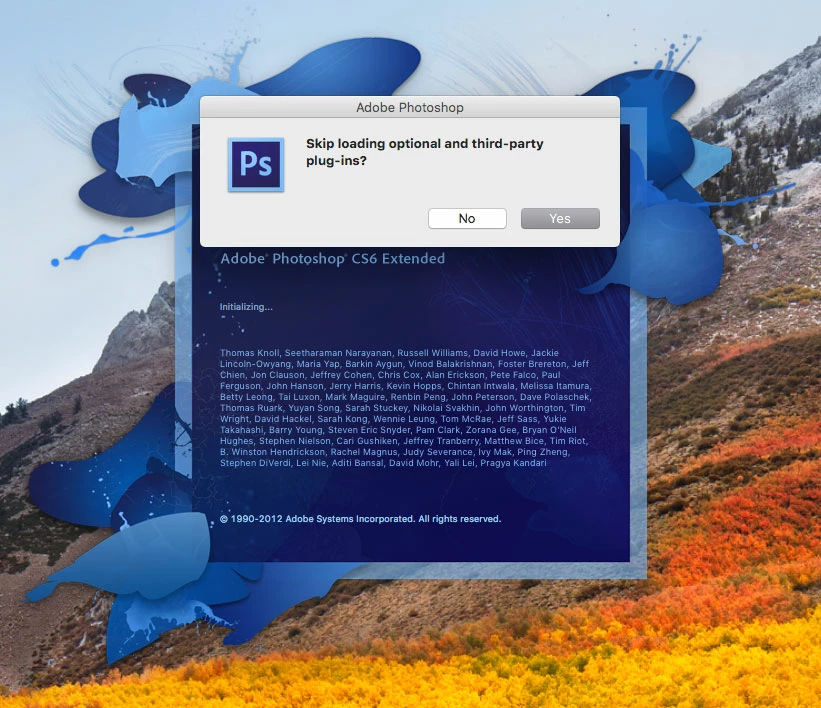
If you still get the message after trashing the com.adobe.Photoshop.savedState folder try starting photoshop cs6 with the third party plugins disabled by holding down the Shift key while starting photoshop cs6 and click Yes in the dialog that follows: Skip loading optional and third-party plug-ins?


3 replies

Jeff Arola
Community Expert
Jeff ArolaCommunity ExpertCorrect answer
Community Expert
November 24, 2019

Another thing is you may have a third party plugin that is causing the issue.


If you still get the message after trashing the com.adobe.Photoshop.savedState folder try starting photoshop cs6 with the third party plugins disabled by holding down the Shift key while starting photoshop cs6 and click Yes in the dialog that follows: Skip loading optional and third-party plug-ins?


ReeanneAuthor
Participant
November 24, 2019

Thanks Jeff! I did both of your suggestions, deleting the .savedState folder and opening Photoshop with the third party plugins disabled. It seems the latter worked and I can now open, use and close Photoshop CS6 freely.

Jeff Arola
Community Expert
Community Expert
November 24, 2019


Go to  /Users/User Name/Library/Saved Application State 

   and trash the com.adobe.Photoshop.savedState folder


Hopefully that'll fix the issue.


The User folder is hidden by default so an easy way to get to it is click on your desktop, click Go and hold down the Option key, then click Library, which is your User Library.


2.

Tacafy大尉
Legend
November 24, 2019

reeannea96227280, good evening.
Since CS6 is an old software and designed to operate up to OS10.9, it is necessary to take into consideration that the operation is not guaranteed with Mojave.
If the operating system is not guaranteed to operate, there is a risk that important data will be damaged due to unexpected operations such as this time or crashes during work.
Especially in the case of Mac, backward compatibility at the OS level is low, so compatibility with CS6 and Mojave drivers may also be involved.
If you consider CC products such as Photography Plan, you will have less trouble.
(CS6 data can be read and written by CC)