
Participant
February 24, 2023
Answered

Photoshop cylinder warp - changing direction (horizontal to vertical)

  • February 24, 2023
  • 2 replies
  • 3752 views

Hello,

is there any way of changing the direction of the Photoshop cylinder warp tool? I am making a mockup for this pen and I need the cylinder to be vertical, not horizontal. Any ideas??
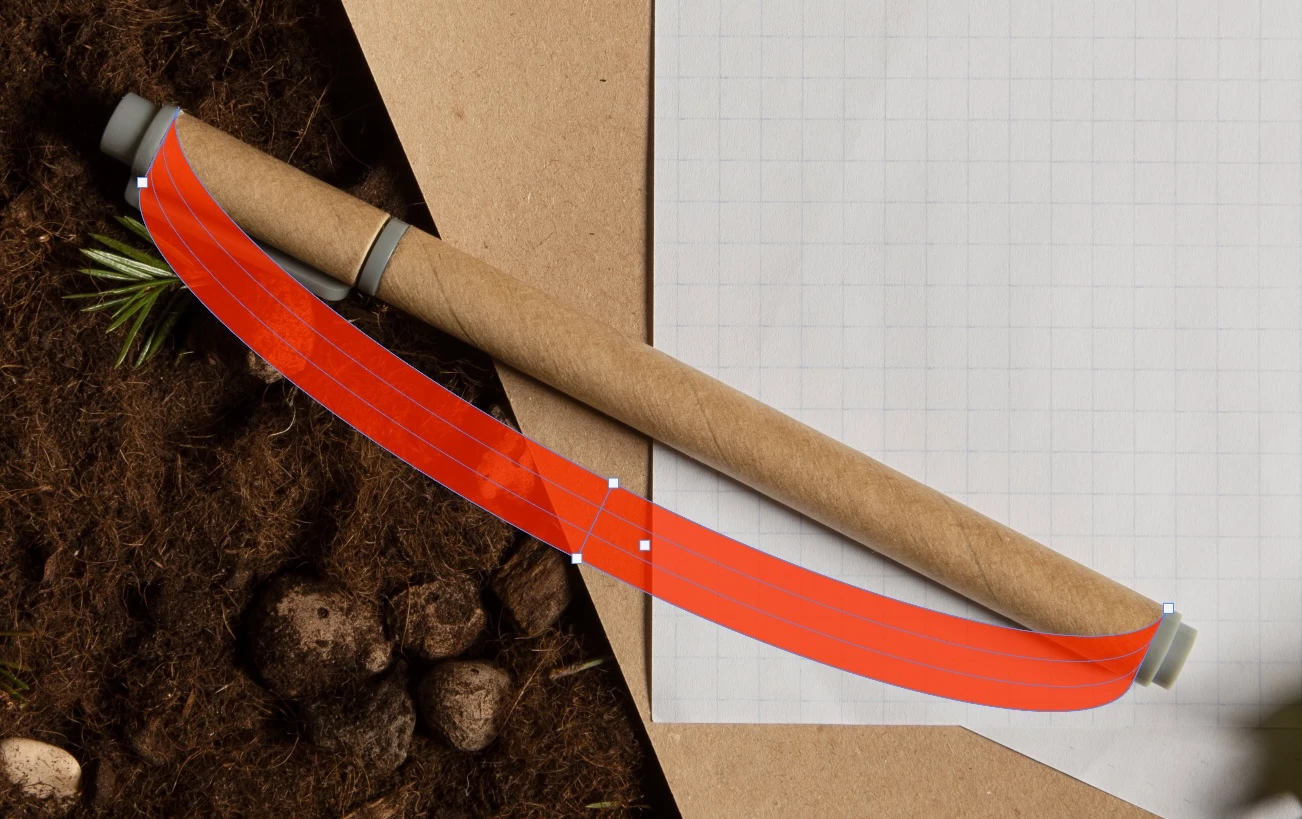
 

Thanks!

Sara

Correct answer Sara...

Ok, solved it. The rectangle must be created vertically and then converted to a smart object, in order to get the proper warp. Makes sense now 🙂

2 replies

Sara...AuthorCorrect answer
Participant
February 25, 2023

Ok, solved it. The rectangle must be created vertically and then converted to a smart object, in order to get the proper warp. Makes sense now 🙂

Participant
January 25, 2025

Sadly this did not work for me. Just did the same thing. 

Trevor.Dennis
Community Expert
Community Expert
January 25, 2025

Make the layer a Smart Object, so you can roptate it without losing image quality

Use the ruler tool to rotate the object to the vertical

Use Transform > Warp > Cylinder


I transformed text, so used a text box to shape it to the pen, and clipped the type layer to the pen.

When done, select the pen and type layers and make them a Smart Object, and rotate back to original angle.

melissapiccone
Community Expert
Community Expert
February 25, 2023

Can you rotate your image, do the warp and then rotate back?

Melissa Piccone | Adobe Trainer | Online Courses Author | Fine Artist
Sara...Author
Participant
February 25, 2023

No, unfortunately the rotation does not affect the direction of the warp...