
Answered
Photoshop doesn’t remember the Layers panel setting
Photoshop doesn’t remember the Layers panel setting—each launch hides it, requiring manual reactivation via Window > Layers. Tried multiple fixes but nothing works. Any solution?

Photoshop doesn’t remember the Layers panel setting—each launch hides it, requiring manual reactivation via Window > Layers. Tried multiple fixes but nothing works. Any solution?
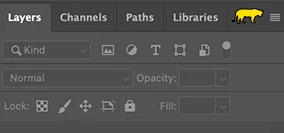
First double--click the Layers tab. It will expand the group as shown below:
Already have an account? Login
Enter your E-mail address. We'll send you an e-mail with instructions to reset your password.


 AdChoices