
Participating Frequently
January 12, 2024
Answered

Photoshop "Export as" quality problem

  • January 12, 2024
  • 18 replies
  • 885 views

Hello everyone, can someone help me with this export problem? I am trying export some mockup and there is very big quality difference between "Export as" and "Save for web (Legacy)".


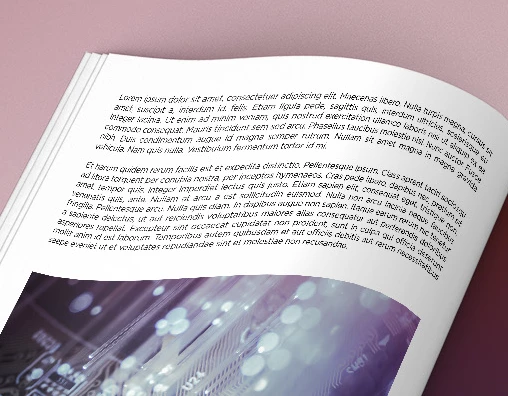
This is the view of the bad quality by Export as:
 

This is the view of the great quality by Save for web (Legacy):
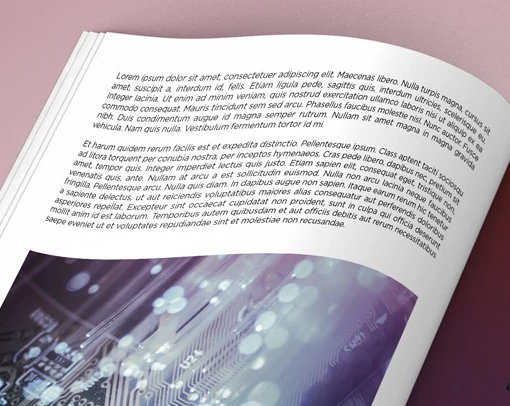


I belive you can see the difference in rendering font quality. Is there some way to force Export as make good quality? I already tried using Export as (legacy) in export setting but there is same problem. I can't always use Save for web (Legacy) because sometimes I need using artboards.


Things I tried but nothing helps:

  • Change export setting.
  • Change Export as to Export as legacy
  • Reset Photoshop preferences to default.
  • Different file formats.


I starting believe that this is some kind of bug.
Sorry for my English and thank you for your help.

This topic has been closed for replies.
Correct answer Stephen Marsh

Update, I am getting very different results when flattening/merge visible the image before Export As... This looks to be a bug with something in the layer structure, perhaps the smart object or transform applied to the smart object of the magazine page. Wrapping the entire layer structure into a new single smart object doesn't help.

18 replies

D Fosse
Community Expert
Community Expert
January 13, 2024

That's right. Damselflies are smaller, and fold their wings back when resting.


Er...where were we? 😉

jane-e
Community Expert
Community Expert
January 13, 2024

I love the detail @D Fosse, and it's a fantastic photo but I didn't notice how narrow the body was because of the crop. I was wrong to call it a dragonfly — it's a damselfly.

https://british-dragonflies.org.uk/species/large-red-damselfly/


Jane

D Fosse
Community Expert
Community Expert
January 13, 2024

No, you probably wouldn't, @jane-e . It's a European species known as Pyrrhosoma nymphula, no less. Not my area of expertise, but I always make it a point to know exactly what I have photographed. Most of our native species are bright blue, this is the only red one. It's actually a very tight crop, but shot on a Sony a7r-series camera, so there's lots of pixels to go around 😉

jane-e
Community Expert
Community Expert
January 13, 2024

Nice dragonfly close-ups, @D Fosse ! What kind of dragonfly is it? I don't think I've seen that one before.


Jane

D Fosse
Community Expert
Community Expert
January 13, 2024

I am absolutely unable to reproduce this.


Save For Web and Export produce identical results when all else is equal.


These are 100% crop screenshots from the 1920 x 1080 test jpegs:


When overlaid in Difference blend mode, and an extreme Curves layer to bring out every tiny bit of difference, all I get is general noise indicating that they are different jpeg encoding engines, but produce the same result:

Note that the "difference" pixels here are only two or three RGB values apart, not so much that you actually see that. And remember, this is jpeg, so values will be altered.


In short, I can't see any bug here. I never use Export because of its still broken color management, but quality-wise they're the same.

Stephen Marsh
Community Expert
Community Expert
January 13, 2024
quote

I can't always use Save for web (Legacy) because sometimes I need using artboards.


By @Payne66


Do you know of the File > Export > Artboards to Files script?


A custom script could also be created to use your preferred Save for Web (Legacy) settings and export the artboards.


Can you provide a sample for testing of the original 4400 x 2475 image of the book page?


I starting believe that this is some kind of bug.


The two methods use different underlying technology. Export As is meant as a replacement for Save for Web (Legacy), and despite offering some advancements, many find it to be a downgrade, not an upgrade.

Payne66Author
Participating Frequently
January 12, 2024

1920 x 1080 (downscale from 4400 x 2475 - 72 ppi). Bicubic Automatic resample. Jpeg maximum quality.

The problem is why Save for web (Legacy) can do it beutifully but newer Export as can't with the same export setting.

D Fosse
Community Expert
Community Expert
January 12, 2024

What are the pixel dimensions? Which resampling algorithm? What is the jpeg compression level?