henrywl
Known Participant
July 1, 2020
Answered

Photoshop "Export As" size limits?

  • July 1, 2020
  • 14 replies
  • 55697 views

Hello folks,


Got an issue that confused me and suprised me that I couldn't find an answer by googling...


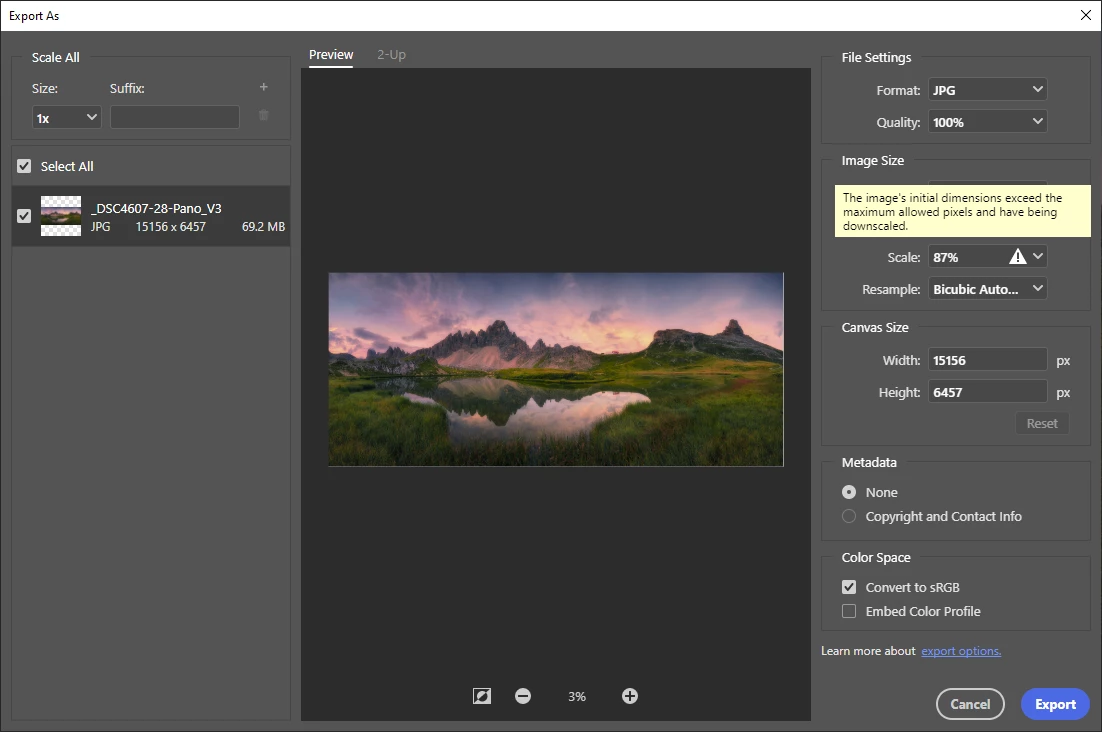
When I try to export one of  my panorama pictures using "Export as", Photoshop (V21.2) automatically scales down my pictures and gives following message: "The image's initial dimensions exceed the maximum allowed pixels and having be downscaled".


What caused this problem? Did I do anything wrong?

Correct answer Conrad_C

Ok, how can I check what are limitations?


The dimension limitations for Save for Web are 8192 × 8192 pixels. That is why a long dimension above 8192 is reduced to 8192. The limit exists because Save for Web is very old code, and that is why Adobe has named it Save for Web (Legacy). They want to remove this old command eventually.


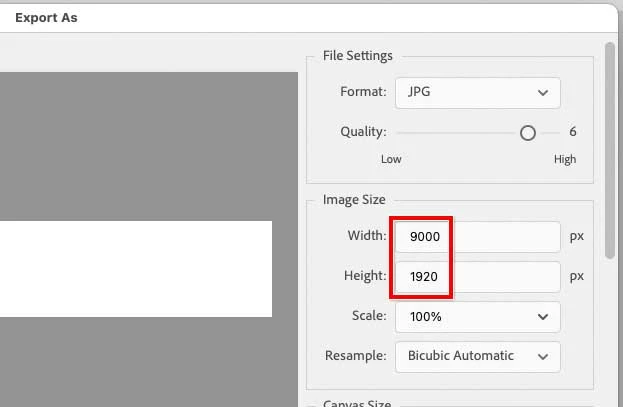
There is a much newer command for web graphics export, intended to eventually replace Save for Web (Legacy). The new command is File > Export > Export As. The Export As command has no problem allowing and exporting a 9000 × 1920 px image in JPEG format.


So:

  • For a very large JPEG graphic optimized for the web or mobile, use Export As. 
  • For a very large JPEG graphic to be printed, containing additional metadata such as ppi resolution and (if used) a clipping path, use File > Save a Copy.

14 replies

henrywl
henrywlAuthor
Known Participant
July 1, 2020

So, my friend just got back to me and she had exactly the warning and scaled down result when open the same file.  It is apparently PS "Export as" limitation issue, not my personal settings or  my PS configurations (at least by default).  Giving today's high end digital cameras and popularity of panorama photos, 17420 by 7421 isn't that big. So what is the maximum allowed pixels? What is the best option to export large JPG files while still have control on compression quality?

JJMack
Community Expert
Community Expert
July 1, 2020

Save as Jpeg has a quality settings 0 to 12 I believe.   I use 10 to produce smaller file sizes then quality 12?  I do not  believe you will see and different in Print quality between quality 10 an quality 12.   If you will be making changes in the future you also save a  layered  PSD so you still have you work and avoid jpeg generation degeneration.

The jpeg options pop-up happens during the save process the first time you save a  new jpeg. After that you can save over the file and the same quality setting will be used.

JJMack
Bojan Živković11378569
Community Expert
Community Expert
July 1, 2020

There is limitation when saving for web. Have you tried to use Generator for that task?

JohanElzenga
Community Expert
Community Expert
July 1, 2020

'Export as' does indeed have a size limit, but I have no idea how much that size is exactly.

-- Johan W. Elzenga
henrywl
henrywlAuthor
Known Participant
July 1, 2020

Thank you Barbara for the quick answer. Actually I did check that article before posting here. It says "Photoshop supports a maximum pixel dimension of 300,000 by 300,000 pixels per image", while my image, which is at 17420 by 7421, is way below this limit.

barbara_a7746676
Community Expert
Community Expert
July 1, 2020

Using those dimensions, I'm not able to replicate the issue.

All I can suggest is some general truobleshooting. Try closing and reopening Photoshop. If that doesn't help, try rebooting the computer. If that doesn't help try deleting preferences. If that doesn't help, uninstall and reinstall using Adobe CC Cleaner Tool.