

Sarah13242
Known Participant
February 24, 2026
Question

Photoshop freezes when trying to change the size or hardness of the brush.

  • February 24, 2026
  • 8 replies
  • 357 views

After the last update 27.4, Photoshop freezes when trying to change the size or hardness of the brush. It only helped to switch back to the previous version 27.3.1
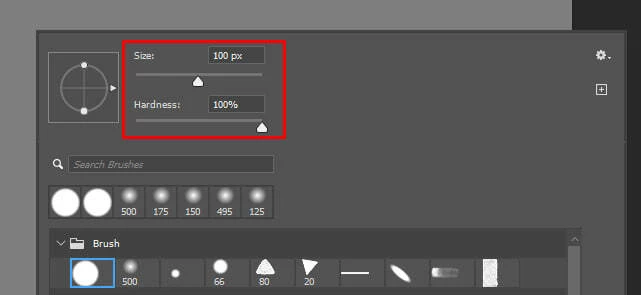
 

There are no errors when the program freezes, and if you minimize the application and expand it, it will restore. But the brush settings won't change, and if you try to change them again, Photoshop freezes again.

    8 replies

    Sarah13242
    Known Participant
    April 1, 2026

    I installed the 27.5 update, and the problem is still there. It's unfortunate. 😥

    Sameer K
    Community Manager
    Community Manager
    April 3, 2026

    Hey, ​@Sarah13242, ​@MAdrian & ​@kevin_8960. Thanks for the updates.

    Please make sure there are no stale preferences in your Photoshop. Go to the location of the preference folder below and rename it to backup.

    • Windows 10/11: Users/[user name]/AppData/Roaming/Adobe/Adobe Photoshop [version]/Adobe Photoshop [version] Settings

    • You can press Press the Windows key > Enter 'Run' > Enter %APPDATA%\Adobe

    • Rename the Adobe Photoshop folder by adding a .old at the end. (Adobe Photoshop 2026 > Rename > Adobe Photoshop 2026. old), You can restore these preferences later if needed.(https://adobe.ly/4860qM9)

    • Restart the computer.

    These changes will provide a fresh start to Photoshop, much like a new installation.

    Thanks!
    Sameer K

    Known Participant
    April 14, 2026

    Thank you for the reply Sameer. I followed your suggestion, the issues go away when i make a new PS Settings folder, and that solution actually helped me norrow down the possible conflicts that cause this issue. As far as i can see, it comes from the PSUserConfig.txt that most wacom tablet users use to be able to uncheck Windows Ink and still have pen pressure in Photoshop. That in relation with my Brushes. If i delete the brushes.psp, it works ok with PSUserConfig.txt, but not if i have the my old brushes.psp.


    Also the problem seems to happen only if i have the Brushes settings tab opened in PS with Brush tip settings highlighted. If i close the tab, hardness and brush size on right click behave normally.


    So there seems to be a conflight between actual brushes, the brush settings tab, and the psuserconfig.txt that helps us wacom users use pen pressure without using Windows Ink. 


    So as a temporary fix for the rest of us in this thread, i suggest closing the brush settings tab, and see if it works allright after that. I moved the brush settings tab in the collapsable tab group and it work fine like this, tho it’s a bit annoying for me.

    Known Participant
    April 1, 2026

    So version 27.5 just got realeased and the problem is still there, this is unbelivable, its there for 1 month and its workflow breaking, and no fixes in sight, what’s going on Adobe? We are paying money for the apps to work properly.

    Known Participant
    March 17, 2026

    Any updates, 2 weeks have passed and the issue is still there, it’s really annoying.

    Sarah13242
    Known Participant
    March 17, 2026

    There is no news. I just went back to version 27.3.1 via Creative Cloud - Photoshop - Three dots - Other versions

    Everything is working fine on it. I hope with the new update, this problem will be solved.


    Inspiring
    March 5, 2026

    27.4.0 freezes randomly for me. I don’t remember every situation, but it’s happened when applying grain with the Camera Raw Filter, and when using Revert.

    nataliaff
    Participant
    March 3, 2026

    I have exactly the same issue, freezes when you try to change brush hardness. 

    jane-e
    Community Expert
    Community Expert
    February 25, 2026

    @Sarah13242 

    This is a duplicate post. Please continue the discussion in your original thread. This one is now locked.


    EDIT: someone merged the locked duplicate thread into the original thread, which is unlocked.


    Jane


    Sarah13242
    Known Participant
    February 25, 2026

    After the last update 27.4, photoshop starts to freeze when I try to change the brush size or hardness. The problem occurs when I try to change the values in this window or in the "Brush settings"


    If i press "alt+tab" (I use windows 11), Photoshop unfreezes, but the brush values will not change.

    If i change the brush size using the "[" and "]" hotkeys, then freezes do not occur. Also, if you go back to the update 27.3.1, there are no freezes.


    Here is a video example of the problem:


    Yesterday, I was recommended to try resetting Photoshop preferences: https://helpx.adobe.com/ie/photoshop/desktop/get-started/settings-and-preferences/reset-preferences.html

    and I mistakenly thought that the problem had been solved, but unfortunately it remained. 😓

    Known Participant
    February 26, 2026

    After an hour of working in PS, the problem went away, but it’s there whenever i restart PS. Very strange and annoying.

    Ged_Traynor
    Community Expert
    Community Expert
    February 24, 2026

    @Sarah13242 I cannot replicate the issue with Photoshop version 27.4 on my system, have you tried resetting your Photoshop preferences

    https://helpx.adobe.com/ie/photoshop/desktop/get-started/settings-and-preferences/reset-preferences.html


    Sarah13242
    Known Participant
    February 24, 2026

    I tried, it helped! Thank you very much! 🙃