Participant
February 7, 2017
Answered

Photoshop gets stuck in Type Tool

  • February 7, 2017
  • 17 replies
  • 13019 views

This is the second time this has happened to me this week. Both time I had clicked on a text box with the type tool to edit the text, did Cmd A and Cmd C to copy the text, then hit Esc (I have it set to cancel the changes on Esc). But it doesn't cancel the changes and the text box is still live, I can still type inside the text box, I can't select any other tool in the toolbox (when I try, the entire toolbox goes blank), I can't select any other layer, clicking on the Check Mark or Cancel button at the top tool bar does nothing, and Cmd Return does nothing.

Both times this happened I had to Force Quit Photoshop but I'm hoping someone out there might have a fix for this for the future.

Here's what I'm running:

Photoshop CC 2017.0.1

MacBook Pro (13in Retina, early 2015)

macOS Sierra 10.12.3

2.7 Intel Core i5

8GB Ram
This topic has been closed for replies.
Correct answer gener7

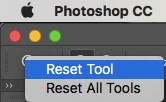
You can reset the Type Tool by right-clicking on its icon in the option bar at the top.

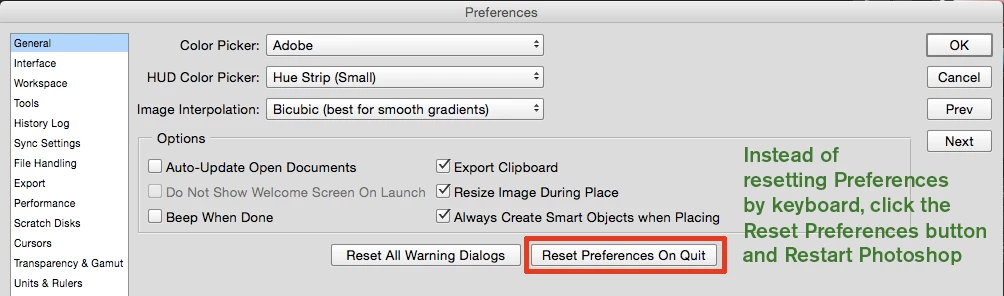
If that fails, reset preferences.

17 replies

Participant
July 6, 2017

This error occurs with me daily. Horrible bug. The "correct answer" above does not work.

gener7
Community Expert
Community Expert
July 7, 2017

Here's a more detailed troubleshooting guide: Troubleshoot fonts issues in Adobe Photoshop CC, 2015, 2014, CS6, CS5

Participating Frequently
July 10, 2017

I'll give the above a go gener7.

Regarding my comment above about not using the the font Fira Sans being a solution, I've realised this isn't the case anymore as it seems to happen more when using Device Preview.

If the above solution doesn't fix things I'm going to try and screen record the crash.

Participant
July 6, 2017

This just happened to me too. Fudge monkeys!!!!!!!!!!!!!!! The suggested fix above does NOT work.

Participating Frequently
May 22, 2017

For me the fix wasn't the type reset tool but starting a new project where I wasn't using the font Fira Sans. Since then it's not happened to me since... Hopefully it'll stay that way!

Participant
May 18, 2017

I'm also having this exact issue. The only way out is to force quit.

erickpf
Participant
April 19, 2017

I'm having this problem now also – it first happened a couple months ago, but now has happened 4 times in 3 days.  Incredibly frustrating.

Participating Frequently
April 5, 2017

I'm having this issue too. It seems completely random.

  • All of a sudden hitting 'CMD + Enter' doesn't commit type change.
  • I can still 'Select All' the type I just can't commit
  • Hitting 'ESC' seems to do nothing visually but it seems as though it has cancelled any text editing but the type box is still visible
  • I can even press 'CMD +A' to select all of the page and move one of the cursor keys and I get the usual dialogue box telling me that the type layer cannot be moved without rasterizing it
  • I get what the original poster is getting when after hitting 'ESC' and I interact with the toolbar buttons they disappear. I've found that I can get them to reappear when I hover over the tiny area that displays the zoom, save progress etc. in the bottom left.

I've tried using three different type managers (Suitcase, FontExplorer, FontBook) and still get the problem.

I've also tried the two solutions in the second post above.

And this has happened to me on multiple computers

Photoshop CC 2017.0.1

MacOS - 10.11.6

15" Macbook Pro (Mid 2012

2.7 GHZ Intel Core i7

16GB DDR3

gener7
Community Expert
gener7Community ExpertCorrect answer
Community Expert
February 8, 2017

You can reset the Type Tool by right-clicking on its icon in the option bar at the top.

If that fails, reset preferences.

Participant
April 19, 2017

Hi, thanks for the suggestion, but I'm having the same issue as the post author and the main problem is that I can't click on anything—no right click, no escape, I can't even click on the File/Edit menu bar.

The only way I've been able to "fix" the issue is by Force Quitting Photoshop. Force quitting is not ideal as I'm in the middle of working and despite hitting Save every two minutes (I've been burned too many times) it still doesn't recover all of my work.

Can someone at Adobe please file this as an actual application bug and notify us when this has been fixed?

Thank you!