


Known Participant
April 6, 2020
Answered

Photoshop has no icon in windows search

  • April 6, 2020
  • 3 replies
  • 4281 views

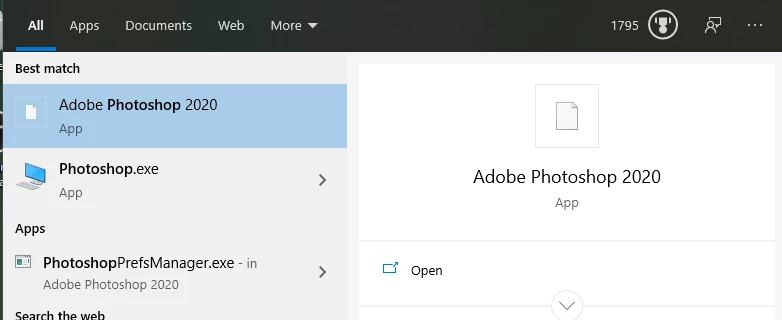
I mainly open photoshop (or most adobe products) through the windows search bar. But now when I try to look up photoshop on windows search, it has no icon. It's not just photoshop, but most adobe apps.

I've been confused by this multiple times thinking it wasn't photoshop (even though it was), and that delayed my work many times. How can I fix this? I've tried uninstalling photoshop and reinstalling it multiple times, but that didn't work.
Correct answer lloyd_9520

I know that this is a late reply. The issue still persists in 2025 and here is the only solution-

1. Go to Settings --> Apps --> Installed Apps

2. Find Adobe Creative Cloud --> Press three dots options --> Uninstall

3. It will launch Creative Cloud uninstall window with two options - Uninstall or Repair. Select Repair.

4. It will reinstall creative cloud and now the Windows search will show Creative Cloud icon. 

5. Enter Creative Cloud and find the apps you installed. Press three dots near them --> Other versions --> Choose last version

6. Wait till it rolls back to old version. Now the missing icon will come back in Windows search. Now update the app in Creative Cloud. Do this for all your apps


Cheers!

3 replies

lloyd_9520Correct answer
Participant
July 25, 2025

I know that this is a late reply. The issue still persists in 2025 and here is the only solution-

1. Go to Settings --> Apps --> Installed Apps

2. Find Adobe Creative Cloud --> Press three dots options --> Uninstall

3. It will launch Creative Cloud uninstall window with two options - Uninstall or Repair. Select Repair.

4. It will reinstall creative cloud and now the Windows search will show Creative Cloud icon. 

5. Enter Creative Cloud and find the apps you installed. Press three dots near them --> Other versions --> Choose last version

6. Wait till it rolls back to old version. Now the missing icon will come back in Windows search. Now update the app in Creative Cloud. Do this for all your apps


Cheers!

JJMack
Community Expert
Community Expert
April 6, 2020

Try re-booting or sign out of windows then sign back in to see if windows fixes itself.  That would be a windows thing.  On my windows system I see icons associated with the 7 Photoshop versions I have installed. CS3 and Photoshop 2020 have different icons than CS6, CS6 64bit, CC 2014, CC 2018 and CC 2019 thet seen to have the same icons.

JJMack
NelsonAAuthor
Known Participant
April 6, 2020

That didn't work either. It's also only the adobe products, which is weird, all 5 adobe products that I have installed, (except for illustrator) don't have icons. I do have my adobe programs installed on a secondary hard drive if that affects anything. Which I don't think it should since I always kept them there previously when the icon was there,

JJMack
Community Expert
Community Expert
April 7, 2020

In Windows File explored does Photoshop.exe in "C:\Program Files\Adobe\Adobe Photoshop 2020" have an Icon? When you Right Click on the exe then click Properties and also click on Create shortcut  does properties and the shortcut created on the desktop have icons?  Does Photoshop.exe work?

If you edit the properties of the shortcut created one the desktop can you change the icon? There should be many icons in] Photoshop.exe the first one the default icon

JJMack
Sahil.Chawla
Adobe Employee
Adobe Employee
April 6, 2020

Hi Alex,

That does not look like an issue with the Adobe apps but the operating system itself, could you check if there are any pending updates available for the OS? Also, which Windows version are you working on?

You may check this thread for troubleshooting steps and see if it helps: https://superuser.com/questions/996373/icon-adobe-reader-dc-on-taskbar-is-wrong

Regards,
Sahil


NelsonAAuthor
Known Participant
April 6, 2020

I checked for updates, no updates available.

I'm running windows 10 pro version 1909

I also tried the thread that you linked, and that didn't help.

Out of the 5 adobe apps that I have installed: Photoshop, Illustrator, Premiere Pro, After Effects, and Media Encoder, all of them, except illustrator, has no icon. And every other application that I have installed on my computer has an icon, except the adobe ones.