
Known Participant
March 15, 2025
Question

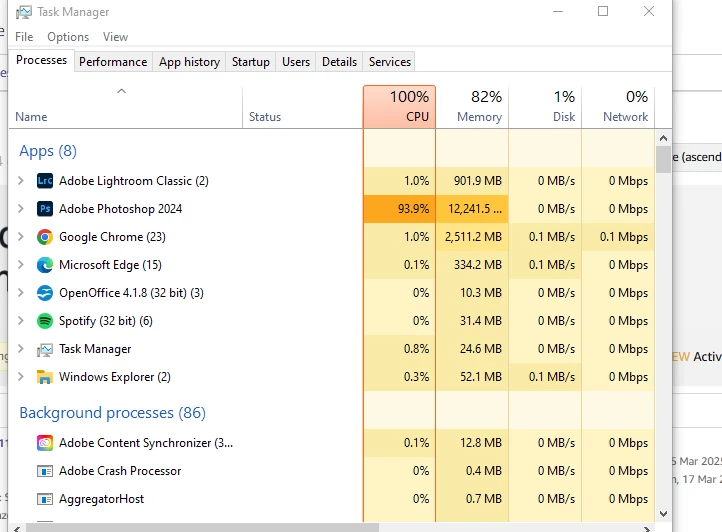
Photoshop hogging memory and now CPU useage as well.

  • March 15, 2025
  • 1 reply
  • 144 views

I've had enough of PS, in fact I had enough of it years ago but I have 12,000 PSD files that are work-related.

I know PS hogs memory for absolutely zero reason and has done for the 20 years I've used it - no other program does this, there is literally no excuse. But now it decides to hog CPU use as well, 94% to be exact while doing NOTHING, in fact the PC had been left for 12 hours idle but PS still manages to hog 12GB memory and 94% CPU with zero files even open. What an absolute dire piece of coding this is - I am desperately seeking an alternative that will work with PSD files. 20 years, many different systems, many different PS versions but still the same old ****
1 reply

D Fosse
Community Expert
Community Expert
March 15, 2025

We see this from time to time - and a lot of those users have come back and reported that a clean install and clean preferences fixed it. In other words, it seems to be a corrupt install and/or corrupt preferences. My money is on the preferences, which contains a lot more than your own user settings. It's the whole application configuration, including a lot of hidden parameters and system dependent parameters.


Also note that if this is a laptop with dual graphics, they are prone to conflict. The general advice is to disable the integrated GPU as per section 6 & 7 here: https://helpx.adobe.com/photoshop/kb/troubleshoot-gpu-graphics-card.html