
Participant
January 22, 2025
Question

Photoshop Hogging RAM Even With No Files Open?

  • January 22, 2025
  • 5 replies
  • 485 views

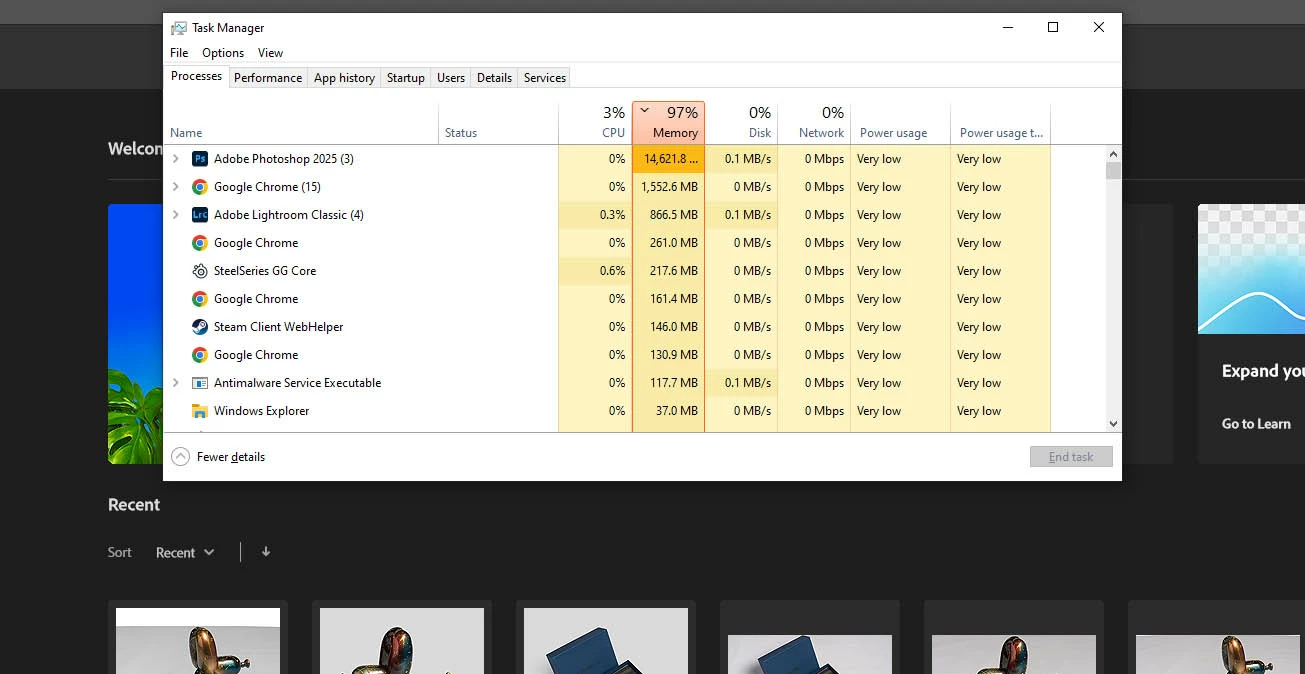
As can be seen by the screentshot Photoshop is using nearly 15 GBs of memory despite having no files open. If I close and reopen Photoshop it returns to just under 2 GBs. This happens on this PC but also 2 other Macs that I use.


This isn't a new bug by any means as I recall having the same issue over a year ago I just learnt to live with it. I have to remember to close and reopen Photoshop every so often.


It's that every file I work on in Photoshop holds onto a little bit of RAM even after I have closed the file and over time this eventually leads to my computer malfunctioning due to lack of memory if I forgot to close Photoshop.
 

5 replies

D Fosse
Community Expert
Community Expert
January 23, 2025

How much do you have it set at? Don't go over 70%.

Participant
January 23, 2025

Ok. The initial screenshot I took was after a browser tab crashed due to running out of memory. So yes it definitely causes problems. Looking at this there is something else odd going on. I actually have 32GB of memory which doesn't add up when you look at the processes tab. However the performance tab shows the amount of memory actually being used which is much larger but it doesn't show where it is being used.


For now I am going to limit the amount of RAM that Photoshop can use and see if that helps.

D Fosse
Community Expert
Community Expert
January 22, 2025

Photoshop does not release memory when you close a file. It is reused and recycled for the next file.


So if you've had files open, this is normal.


This is by design, and what makes things like batch processing possible. Requesting memory from the OS for every file is slow and impractical.


I don't see anything out of the ordinary in the screenshot you posted. Does it ever hit the ceiling and max out close to 100%? That's more of a concern.

Participant
January 22, 2025

14GB is normal if there are documents or a large document open in Photoshop but there aren't any. Currently Photoshop is using 12 GB and again has no documents open. I don't believe it is GPU memory and even if it was why would it still be used when there are not documents open?


D Fosse
Community Expert
Community Expert
January 22, 2025

Post screenshots of the memory graphs from task manager when this happens. Include both the system memory and the gpu memory.


14 GB isn't out of the ordinary - but 97% certainly is. That's not normal. I'm trying to figure out if this could be memory used by the GPU, executing Photoshop tasks.