


Inspiring
September 2, 2026
Question

Photoshop installation breaking up each update

  • September 2, 2026
  • 3 replies
  • 46 views

Sińce few months I’m seeing problem with Photoshop updates. If they started automatically and then I log out or shut down computer not knowing it because updated running in background whole installation crash and the only way is to uninstall and reinstall Photoshop.

On MacOS the message when starting program is that installation is incomplete or broken. I have never experienced such error before when doing so - closing computer during updates - it just started again after new session, and no other Adobe apps like Illustrator, Premiere etc. are suffering such as Photoshop.

But what is worst. Each time such event broke all preferences so I need to setup Photoshop once again!

    3 replies

    creative explorer
    Community Expert
    Community Expert
    September 2, 2026

    @piotr tomasz I agree with ​@D Fosse 100% 

    In Adobe.com, top right-hand corner is your avatar. Click on that - Preferences. Under General, Settings, slide the Settings of 'Automatically keep Creatve Cloud up to date’ - Click Done when done! 


    m
    D Fosse
    Community Expert
    Community Expert
    September 2, 2026

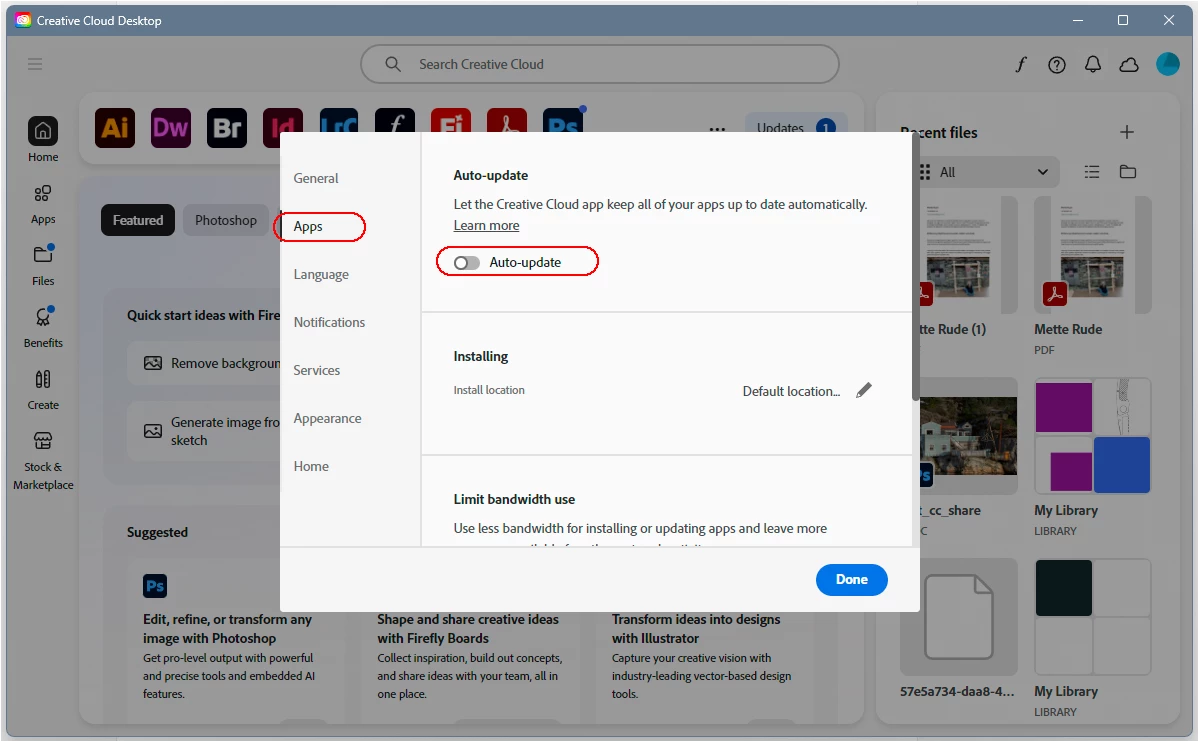
    Yes, but that only controls the CC desktop app itself.

    To disable auto update in the individual applications, go to the “Apps” tab:


    D Fosse
    Community Expert
    Community Expert
    September 2, 2026

    Turn off automatic updates. You do that in the CC desktop app preferences. You still get a notification when an update is available, so you can run it when you’re ready.


    Unfortunately auto update is on by default. That seems to be the industry standard everywhere, and it’s what I expect when installing any application for the first time. But there will always be an option to turn it off somewhere.


    In addition, with major Photoshop version updates, say, 26.x to 27.x, leave the previous version installed along with the new until you’re satisfied it works as expected. There’s a checkbox for that too in the installer.


    ‘Minor dot updates, say, 27.9 to 27.10, will overwrite, and to roll back you need to uninstall and then install the older version.